

Setting object permissions is helpful when you want to restrict the access rights on a particular object. By default, all objects inherit the permissions set for the object class.
Object permissions take precedence over the class and group permissions.
The object permissions are always present and managed by the security subsystem and cannot be disabled. If you do not want to take care of object permissions you may set the class-level permissions for all security classes to Full Control.
Authorization is based on the concept of an Access Control Entry (ACE). An ACE is any combination of the code letters shown in the following table, for example, VR. This ACE allows you to show and read objects; any other access is denied.
If the ACE is empty (contains no code letter), no access right is granted at all.
The following table defines object permissions:
|
Code letter |
Meaning |
Rights Granted |
|---|---|---|
|
V |
View |
Allows you to show objects |
|
C |
Create |
Allows you to create objects |
|
R |
Read |
Allows you to read sub-objects of an object |
|
W |
Write |
Allows you to change an object |
|
X |
Execute |
Allows execution, depends on object type |
|
D |
Delete |
Allows you to delete objects |
|
P |
Permission |
Allows you to change the ACE itself |
|
O |
Ownership |
Allows you to take ownership of an object |
A user may belong to one or more security profiles. A user can also be the owner of an object. A set of security classes is assigned to each security profile. The security class permission defines the default permission that is assigned to an object when an instance of the class is created.
The following illustration shows how security profiles, security classes and object permissions are related to each other and that an object inherits the rights from the security class where the object is an instance of:
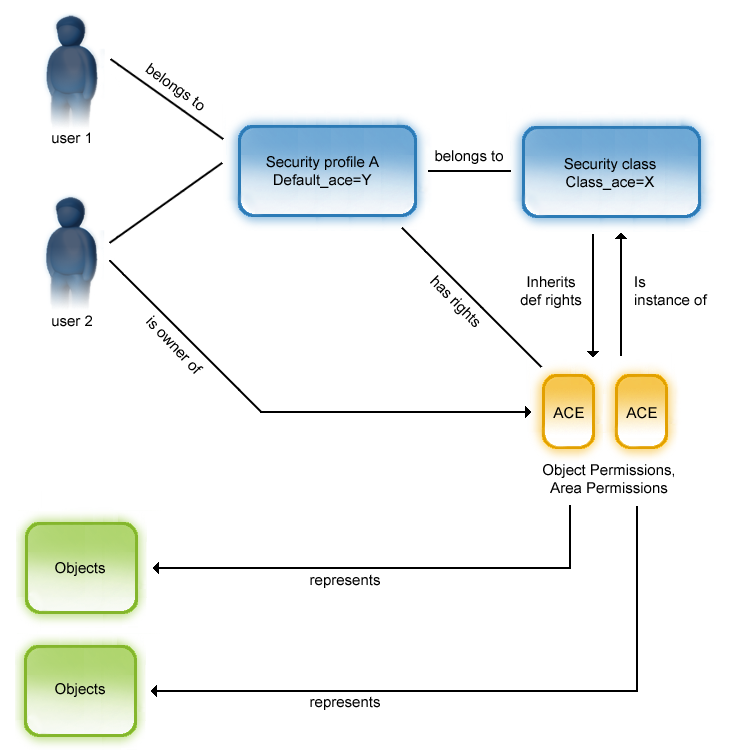
In the illustration, user 1 belongs to security profile A, user 2 belongs to security profile A and is also owner of objects, represented by an ACE. User 1 and user 2 have specific ACEs, for example, VR, through security profile A. User 2 has an additional ACE, for example, VCRWD, as owner of an object.
To check the access rights of user 1 and user 2 to an object, the security system makes a (logical) union of the user-specific ACE and the ACE associated to the specific secured object. In the example, both user 1 and user 2 have "view" and "read" rights to the object, but only user 2 has write or delete access.
|
Copyright © 2013 CA.
All rights reserved.
|
|