

These messages are generated by the Software Delivery manager and Agent, and placed in the Software Delivery Event Logs. Logged messages are then sent to the product Console. Some, but not all, of these messages are also displayed on the Software Delivery user's screen when the error or condition occurs.
Viewing Console Logs
You can view logged messages in the product Console. The product Console can be started as an enterprise Management component that enables you to monitor system events as they occur. It can also be started from within the Software Delivery Explorer by selecting Event Console.. on the file menu. This dialog displays time, node, user, and message data.
When a Software Delivery event message is sent to the Console Log, it gets an additional prefix and an additional suffix. The message structure changes to: prefix, message text, suffix.
Prefix
A prefix is added to each message, using the appropriate format:
%CASWD_C_xxxxxxxx for Windows NT or .CASWD_C_xxxxxxxx for Unix.
|
%CASWD or .CASWD |
This identifier is inserted to differentiate Software Delivery messages from other messages appearing in the Console. This information is extremely useful to the Console operator. |
|
C |
This one-character classifier categorizes each message. Valid values are: E - Error W - Warning I - Information |
Note: Messages that appear without a one-character classifier (those that appear with [_]) have been filtered out. For example, 222000=[_]Background process Task Manager Local started.
The following mapping applies to each category for a given message and its classifier:
|
Indeterminate |
E |
|
Critical |
E |
|
Major |
E |
|
Minor |
E |
|
Warning |
W |
|
Cleared |
I |
|
Supervisory |
I |
|
Record Keeping |
I |
|
xxxxxxxx |
This value denotes the number associated with each message listed here. The value can be up to eight characters in length. |
Important! If you receive a %CASWD_C_xxxxxxxx message and want to search this guide for additional information, you should search for the xxxxxxxx logged message. For example, to search for message %CASWD_I_227100, you should search for logged message 227100.
Message text
The message consists of the main message text underneath each message number. This one line message appears in the Event Logs discussed previously.
Suffix
The suffix is added to each message to identify where in the system the event took place. This information is also extremely useful to the Console operator.
For the domain manager: If the event originates in Computer COMP1 at an area and is then sent to the Console Log on that domain manager, the suffix COMP1 is added. COMP2 is added if the event originates in Computer COMP2, and so on. If you want to have messages from the domain managers presented at the enterprise Console Log, you must use Event Management.
*User Data
This entry in the Console log (an example of which is shown following) is coupled to an entry in the Software Delivery log of the originating domain manager.
|
Parameter ID |
Name |
|
1 |
Item name: TestObject |
|
2 |
Item version: 1.01 |
|
9999 |
User ID: TestUser |
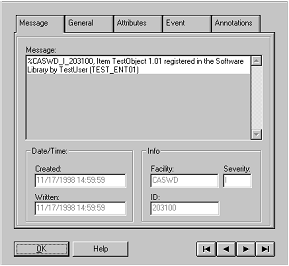
Following is another example of an entry in the Console log that is coupled to an entry in the Software Delivery log of the originating domain manager.
|
Parameter ID |
Name |
|
5 |
Computer name: MLI_NT 4PP |
|
6 |
Computer LAN ID: 172.16.185.124 |
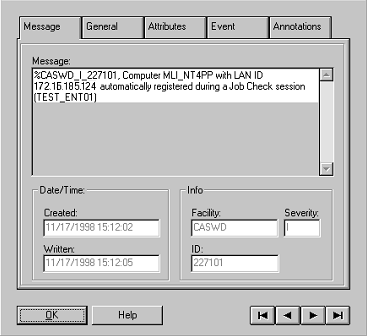
This section contains the following topics:
Logged Messages (1005 - 10000)
Logged Messages (200100 - 203175)
Logged Messages (204100 - 205103)
Logged Messages (220990 - 222093)
Logged Messages (222300 - 222484)
Logged Messages (222509 - 222716)
Logged Messages (224000 - 224025)
Logged Messages (224600 - 225102)
Logged Messages (227100 - 99001003)
|
Copyright © 2013 CA.
All rights reserved.
|
|