

The unregman method unregisters a DSM manager from an MDB. After you have unregistered a DSM manager, you can install a new DSM manager and point it to this MDB. On the first startup, the new DSM manager registers with the MDB you pointed it to. The DSM domain and enterprise managers allow registrations with the corresponding domain and enterprise MDBs only. For example, you can register a domain manager only with a domain MDB.
Note: Before executing the command, verify that target MDB does not have any open sessions.
This command has the following format:
mdbac.bat -unregman -target connection_name {-user User_Name -pwd password | -wallet wallet_file_name}
Example: Unregister a DSM Manager
This example command unregisters the DSM manager associated with the test MDB:
mdbac.bat -unregman -target mssql-test -user ca_itrm -pwd password123
The adjustmdbcfg method reconfigures a DSM manager to use a different MDB. You need to verify that the new MDB is not associated with any other DSM manager.
You must consider the following factors when you are using the adjustmdbcfg method:
The command for this method has the following format:
mdbac.bat -adjustmdbcfg -target connection_name -file rules_properties_file
Note: The connection string of the connection name that you are using for this method must explicitly state the database instance name even if you use the default instance. For more information, see Configure Database Connections.
Specifies the path to the rules properties file that contains the reconfiguration steps and actions. For more information, see Rules Properties File.
Upon execution, this command updates the following MDB connection parameters in the comstore of the DSM manager:
Note: If you have configured the rules properties file to create the ca_itrm user in the target MDB, you must verify that the password of the ca_itrm user in the comstore and in the rules properties file match. This is because the adjustmdbcfg method does not update the ca_itrm user and password parameters in comstore.
The rules properties file is a configuration file that lets you configure the steps that adjustmdbcfg method performs for an MDB move. An example file, mdbmove.properties, is available in the MDB_Install_Directory\cfg folder.
The following illustration displays the contents of the example file:
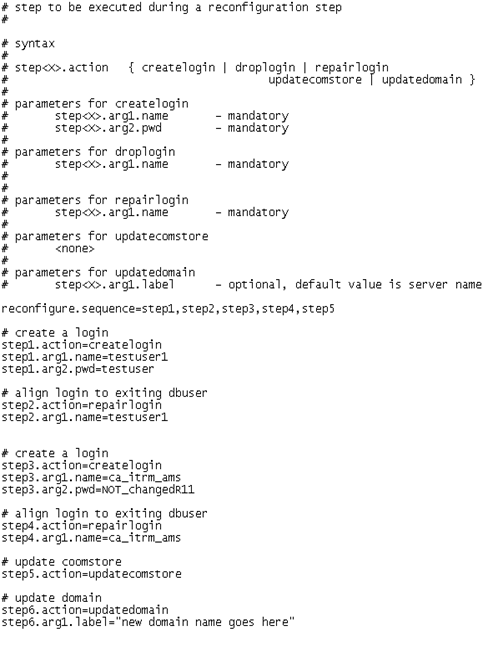
The following parameters and actions are available in the rules properties file:
Specifies the sequence of steps that the adjustmdbcfg method must follow. The sequence contains the step names in a comma separated list. Each step has an action name and parameters that are defined in the following format:
stepn.action
stepn.argm
Creates a database login with the given user name and password in the SQL Server MDB.
Drops the given database login from the SQL Server MDB.
Aligns the SID of the SQL Server login with the user of the MDB.
Update the comstore file of the local DSM manager with the database connection properties of the current SQL Server MDB (host name, instance name, port).
Updates the ca_n_tier table of the MDB according to the properties of the server hosting the SQL Server MDB. If you have specified a label, it is used as the label for the domain.
|
Copyright © 2013 CA.
All rights reserved.
|
|