

Customizing Asset Management › Asset Collector › How the Asset Collector Works
How the Asset Collector Works
The following steps are performed to collect inventory information from the inventory files:
- You place all of the inventory files in a particular folder and configure the relevant common configuration policy to specify the location of the folder.
If not specified using the configuration policy, the following folders are created:
- A collection folder is created at the DSM Install Path\AssetCollectorCollect
- An output folder is created at DSM Install Path\AssetCollectorOutput
- A Delta working folder will be created at DSM Install Path\AssetCollectorBAK
Note: We recommend that this folder is well protected using your operating system security, so that only authorized users can create, modify, or delete the inventory files.
- The Asset Collector monitors the folders that you configured in the configuration policy for new inventory files.
- When a new inventory file is detected, the file is parsed to extract the asset, and/or user inventory information.
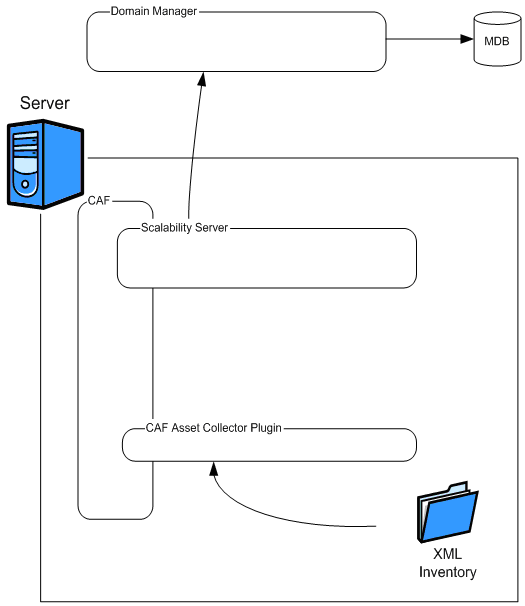
- If the inventory information is already processed, the Asset Collector compares the previous and the current versions and sends only the differential inventory to the scalability server; otherwise, full inventory is sent to the scalability server.
The scalability server processes the information and forwards it to its DSM manager for storage in the Management Database (MDB).
The following graphic illustrates how the Asset Collector works:
Copyright © 2013 CA.
All rights reserved.
|
|