

As a desktop support analyst, you can configure the power settings and power schemes in your organization to ensure optimal power consumption. Using CA ITCM to define and push a configuration policy to computers to automatically power down during a specified time (for example, after work hours, over the weekend, or on a holiday. Also, you can monitor the current power scheme and define a standard Windows power scheme implementation across your organization.
The following illustration shows the tasks that you complete to implement GreenIT remediation:
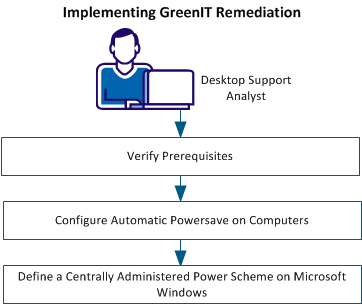
Perform the following tasks to implement GreenIT remediation:
Review the following prerequisites before you implement GreenIT remediation:
Important! To use the GreenIT Remediation features, you need a separate license for ecoDesktop, available at an additional cost.
|
Copyright © 2013 CA.
All rights reserved.
|
|
