

Configuring Asset Management › Custom Software Signatures › Creating Custom Intellisigs
Creating Custom Intellisigs
As a developer, you can create custom Intellisigs for any software that you use for which a CA-provided Intellisig is not available.
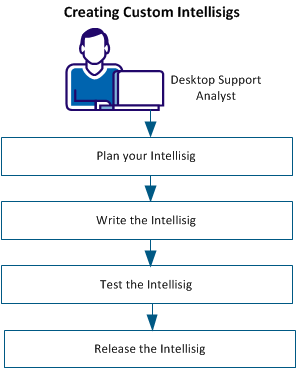
Plan your Intellisig
Intellisig Design Considerations
- Intellisigs provide a mechanism to detect current and future releases of products. As an author, focus on ways of inspecting the system in such a way that once written, the script is future proof.
- We recommend that you keep the number of Intellisig definitions low, each covering more than just a single product. A good practice is to create one Intellisig for each vendor and to create an Intellisig per vendor and per software category for large vendors. For example: IBM – Database Software, Microsoft - Database Software, Microsoft – Office Software, Apache – Office Software, and CA – Management Software. Verify that you keep the category names synchronized for all Intellisigs from a usability point of view.
- An Intellisig contains a main script and can contain a number of data files, which themselves can be scripts. You can keep the design clean and operating at the vendor or category level by using the data files as script-holders for product detection. The main script, which is vendor-specific, invokes all the other (data) scripts. These scripts, in turn, detect individual products. To extend the capability of an Intellisig, create a version of the vendor-specific Intellisig, adding new or updated existing scripts rather than adding a complete new Intellisig. Versions are embedded chains within a single Intellisig, hence, they do not clutter the user interface. Keep the list of the top-level Intellisigs as short as possible.
- Software that is detected heuristically or using traditional signatures uses a one-to-one relationship between software products and releases. With Intellisigs, you can control this behavior because you create both the detected products and releases. The best practice is to create a one-to-many relationship between detected products and releases for the following three reasons:
- A product can have multiple releases.
- The amount of data that is needed when using one-to-one relationships is high as compared to one-to-many.
- Most importantly, CA DSM feeds CA Software Compliance Manager (SCM) with detection information. SCM works around DSM products, not releases. Take this into consideration and create detected products that are based on how they are licensed. This way, you can help ensure that an SCM-licensable product can be matched to a single DSM-detected product. In addition, you can achieve a granular detection at the release (and patch) level and a meaningful detection at the product level.
- Intellisig-created products, releases, and patches (detected software definitions) are identified by name and version label as well as their location within the detection hierarchy of an Intellisig. An empty version label is allowed and treated as a separate version (the empty version). Intellisig-detected software definitions are distinct from CA-provided, custom, and heuristic software definitions even if they have the same name and version. In addition, different Intellisigs can create different definitions with the same name and version.
- Use the DMscript functions and provide software names and versions for each.
- A manufacturer can be provided when creating a detected definition. This information can be provided either by UUID or by name. The manufacturer UUID must be that of an existing manufacturer. If it does not exist, the detected definition has an empty manufacturer. The manufacturer name can be either that of an existing manufacturer or that of a new one. For the latter, the manufacturer is created and the detected definition is assigned to it. An existing manufacturer can be either CA-provided, custom-created, or created by heuristic software discovery.
- A detected definition can also be assigned to a category. This information can be provided either by UUID or by name. If provided by UUID, the category must exist. If provided by name, the category is created if it does not exist. An existing category can be either CA-provided or custom-created.
A best practice for Intellisig behavior is given below, using three different products: Microsoft Windows, Microsoft Office, and Microsoft SQL Server.
 Back to Top
Name a Product
Verify that the product reflects the licensable entity. The best practice for naming is as follows (optional in square brackets):
- Name: "<Manufacturer> <Product> [<Edition>] [<Architecture>] [<Language>]" – When applicable, add the edition. If the licensing depends on architecture or language, include it in the name. Verify to include this information only if necessary, to minimize the number of products created.
- Version Label: "<major>[.<minor>]" – Distinguishes a version from the other versions
Example:
- Name: "Microsoft Windows 7 Ultimate"
Version Label: "6.1"
Use both the major and minor versions to distinguish the version from Windows Vista (6.0) and Windows 8 (6.2). Remove 7 from the name if necessary.
- Name: "Microsoft Office 2010 Professional Plus"
Version Label: "14"
Use only the major version because it distinguishes two releases of Office from each other. Remove 2010 from the name if necessary.
- Name: "Microsoft SQL Server 2008 R2 Enterprise"
Version Label: "10.5"
Use both the major and minor version to distinguish the version from other versions. Remove 2008 R2 from the name if necessary.
Provide the following optional properties if available, to be inserted into dedicated columns in the database: VersionNumber, Language, Bitness, Architecture, Manufacturer, Category and Description.
Back to Top
Name a Release
Verify that the release captures as much information about the detected software as possible and that it is linked to a product. The best practice for naming is as follows (optional in square brackets):
- Name: "<Manufacturer> <Product>[ <Edition>] [<Architecture>] [<Language>]"
- Version Label: "<major>.<minor>.<minor’>.<minor’’> [<release/service pack>]" – Include as many details as possible. Each Architecture and Language has a separate release record but all are linked to the same product.
Example:
- Name: "Microsoft Windows 7 Ultimate x64 en-us"
Version Label: "6.1.7601 Service Pack 1 Build 7601"
- Name: 'Microsoft Office 2010 Professional Plus x64 en-us"
Version Label: "14.0.6112.5000 Service Pack 1"
- Name: "Microsoft SQL Server 2008 R2 Enterprise x64 en-us"
Version Label: "10.50.1617.0 Service Pack 1"
Provide the following optional properties if available, to be inserted into dedicated columns in the database: VersionNumber, Language, Bitness, Architecture, Manufacturer, Category and Description.
Back to Top
Name an Instance of a Release
The release instance is the actual detection record that links a release to a computer and forms part of the software inventory. A computer can have multiple instances of the same release installed. An installation can have additional properties which are specific to the instance.
Example:
- Microsoft Windows 7 Ultimate instance:
InstallPath: C:\Windows
Origin=Forward Inc
TrustLevel=5
- Microsoft Office 2010 Professional Plus instance:
InstallPath: C:\Program Files\Office
ProductGUID: FBD367D1-642F-47CF-B79B-9BE48FB34007
CustomData: Product-ID=02257-210-8656854-49625
Origin=Forward Inc
TrustLevel=5
- Microsoft SQL Server 2008 R2 Enterprise instance 1:
InstallPath: C:\Program Files\Microsoft SQL Server\MSSQL10_50.MSSQLSERVER
Label: MSSQLSERVER
CustomData: CPU=2/8/16;RAM=32GB;
Origin=Forward Inc
TrustLevel=5
- Microsoft SQL Server 2008 R2 Enterprise instance 2:
InstallPath: C:\Program Files\Microsoft SQL Server\MSSQL10_50.SQLEXPRESS
Label: EXPRESS
CustomData: CPU=2/8/16;RAM=32GB;
Origin=Forward Inc
TrustLevel=5
Provide the following optional properties if available, to be inserted into dedicated columns in the database: Label, InstallPath, SerialNumber, ProductGUID, LastAccessed, Origin, TrustLevel and CustomData.
The CustomData property is used to collect instance-specific information that affects licensing. Its size is limited to 255 characters. This property can hold information about the number of processors, cores or threads, and memory. CA ITCM does not use the collected custom data but it can be used in field-developed solutions.
Back to Top
Name a Patch
Verify that the patch captures as much information about the detected software as possible and that it is linked to a release. The patches that are detected by using Intellisigs are not used by the DSM Patch Manager.
Example:
Name: "KB971033 x64 en-us"
Version label: ""
Provide the following optional properties if available, to be inserted into dedicated columns in the database:
- VersionNumber Language
- Bitness
- Architecture
- Manufacturer
- Category and
- Description
Back to Top
Name an Instance of a Patch
The patch instance is the actual detection record that links a patch to a computer and forms part of the software inventory. A computer can have multiple instances of the same release installed. Each of those release instances can either have or not have the patch installed. Therefore, create one patch instance for each release instance. A patch can have additional properties that are specific to the instance.
Provide the following optional properties if available, to be inserted into dedicated columns in the database: Label, InstallPath, SerialNumber, ProductGUID, LastAccessed, Origin, TrustLevel and CustomData.
Example:
KB971033 x64 en-us instance:
Origin=Forward Inc
TrustLevel=5
Back to Top
Copyright © 2013 CA.
All rights reserved.
|
|