

When you create custom Intellisigs, call the DMScript functions within your Intellisig script for reporting software records that are detected on the agent computer. DMScript provides built-in functions that write detected software records to an output file.
Note: DMScript is a scripting language that provides a common means of executing commands on agents. For more information about DMScript, see the Desktop Management Scripting Language guide in the CA IT Client Manager bookshelf.
The Intellisig script must call the functions in the following order:
For more information about Intellisigs functions, see Desktop Management Scripting Language guide.
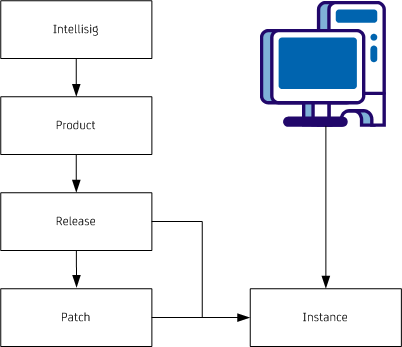
Understanding the hierarchy of Intellisig objects is important when you create custom Intellisigs. The objects must exist in a particular hierarchy. Each object has a parent, which must be created beforehand. The hierarchy is as follows:
The functions for creating detected software output files provide a way for future extensions by accepting fixed parameters and variable parameters. While fixed parameters are mandatory, variable parameters are optional. Variable parameters typically include the properties that are associated with the Intellisig and provide a means for adding additional properties. The functions can be expanded in future to add variable parameters without impacting existing scripts.
The following guidelines are applicable for specifying and using fixed and variable parameters:
property=value | property=value |…
Following is the list of architecture names that you can pass to the DMscript functions that write the detected records to the software detection output file:
The LogDetectedSoftwareError method accepts the error messages in a specific format. The error messages are localizable strings that are generated when there is an Intellisig execution error at the agent. The error messages are then sent to the domain manager and displayed as a status comment against the software inventory collect task in DSM Explorer.
Example: LogDetectedSoftwareError
LogDetectedSoftwareError("ISE:00400","PARAM5=Microsoft Windows 7 Ultimate x64 64 en-us|PARAM6=VersionNumber=6.1.7600 |VersionLabel=6.1.7600 |Language=en-us |Bitness=64 |Architecture=x64 |Manufacturer=Microsoft Corporation|Category=Operating Systems |Description=The Microsoft Windows 7 Product|PARAM7=SWDETECT_BADARGS");
The Intellisig scanner automatically raises the following error messages to report issues related to launching an Intellisig:
|
Error Code |
Error Text |
|---|---|
|
ISE:00302 |
The intellisig named %1$t, version %2$t, UUID %3$t, is missing the mandatory parameter %4$t. |
|
ISE:00303 |
Intellisig named %1$t, version %2$t, UUID %3$t, script file %4$t did not produce an output file. |
|
ISE:00304 |
The execution of Intellisig named %1$t, version %2$t, UUID %3$t, script file %4$t has exceeded the allowable timeout (%5$t seconds). |
|
ISE:00305 |
Intellisig named %1$t, version %2$t, UUID %3$t, script file %4$t could not be found. |
|
ISE:00306 |
Intellisig named %1$t, version %2$t, uuid %3$t, script file %4$t, caused an internal error while attempting to start an intellisig |
|
ISE:00307 |
The dmscript intepreter reported an error parsing the Intellisig named %1$t, version %2$t, uuid %3$t, script file %4$t |
|
ISE:00405 |
Intellisig %1$t version %2$t, UUID %3$t, script %4$t, %5$t was called to create "%6$t" with an unknown parent "%7$t". |
|
ISE:00406 |
Intellisig %1$t version %2$t, UUID %3$t, script %4$t, %5$t was called to create "%6$t" with a parent "%7$t" of the wrong type. |
|
ISE:00407 |
Intellisig %1$t version %2$t, UUID %3$t, script %4$t, %5$t was called to create an instance with a parent "%6$t"of the wrong type. |
|
ISE:00411 |
Intellisig %1$t version %2$t, UUID %3$t, script %4$t, %5$t was called with mandatory property "%6$t" set to blank. |
|
ISE:00412 |
Intellisig %1$t version %2$t, UUID %3$t, script %4$t, the lastaccessed property was specified with an invalid value: %5$t: should be in the format: yyyy-mm-dd:hh:mm. |
You can raise the following error messages to handle issues related to creating an Intellisig:
|
Error Code |
Error Text |
Function Syntax |
|---|---|---|
|
ISE:00400 |
Intellisig %1$t version %2$t, UUID %3$t, script %4$t, Failed to create software product. The parameters were ProductName:%5$t OptionalProperties : %6$t. Return Code : %7$t |
LogDetectedSoftwareError ("ISE:00400", "PARAM5=ProductName|PARAM6=OptionalProperties|PARAM7=ReturnCode") |
|
ISE:00401 |
Intellisig %1$t version %2$t, UUID %1$t, script %4$t, Failed to create Software Release. The parameters were ProducName:%5$t ReleaseNameProductRelease:%6$t OptionalProperties %7$t. Return Code : %8$t |
LogDetectedSoftwareError ("ISE:00401", "PARAM5=ProductName|PARAM6=ReleaseName|PARAM7=OptionalProperties|PARAM8=ReturnCode") |
|
ISE:00402 |
Intellisig %1$t version %2$t, UUID %3$t, script %4$t, Failed to create Software Patch. The parameters were ReleaseName:%5$t PatchName:%6$t OptionalProperties %7$t. Return Code: %8$t |
LogDetectedSoftwareError ("ISE:00402", "PARAM5= ReleaseName|PARAM6=PatchName|PARAM7=OptionalProperties|PARAM8=ReturnCode") |
|
ISE:00403 |
Intellisig %1$t version %2$t, UUID %3$t, script %4$t, Failed to create Software Instance. The parameters were PatchName:%5$t OptionalProperties: %6$t. Return Code : %7$t |
LogDetectedSoftwareError ("ISE:00403", "PARAM5= PatchName|PARAM6=OptionalProperties|PARAM7=ReturnCode") |
|
ISE:00404 |
Intellisig %1$t version %2$t, UUID %3$t, script %4$t, produced the following error : %5$t Note: You can specify any custom error text in PARAM5. |
LogDetectedSoftwareError ("ISE:00404", "PARAM5="An unexpected error has occured") |
|
Copyright © 2013 CA.
All rights reserved.
|
|