

The DSM Reporter tool extracts inventory information from the database. Using the Query Designer, the user is able to evaluate this data and specify which fields are provided on the reports. The information extracted can be filtered, sorted, summarized, and viewed immediately in the GUI, and can be utilized for report printouts or exporting to other applications (for example as CSV file or HTML file). Reports are displayed hierarchically in an Explorer-like tree view, and a number of predefined result sets can be kept for each report as auto history. In order to prevent a result set from getting deleted when obsolete, the user can choose to save it.
Report generation can be user initiated or scheduled. Scheduling of reports is done in the Reporter GUI. The Engine will then initiate the report generation itself, according to the scheduling properties.
Note: When you launch the DSM Reporter for the first time after installation, make sure that you give enough time to import all the report templates into the database. However, if anything goes wrong while importing the report templates, as a workaround, open the registry editor and delete the subkey in HKEY_LOCAL_MACHINE\SOFTWARE\ComputerAssociates\Unicenter ITRM\Reporter\Library. After deleting the subkey, launch the DSM Reporter again.
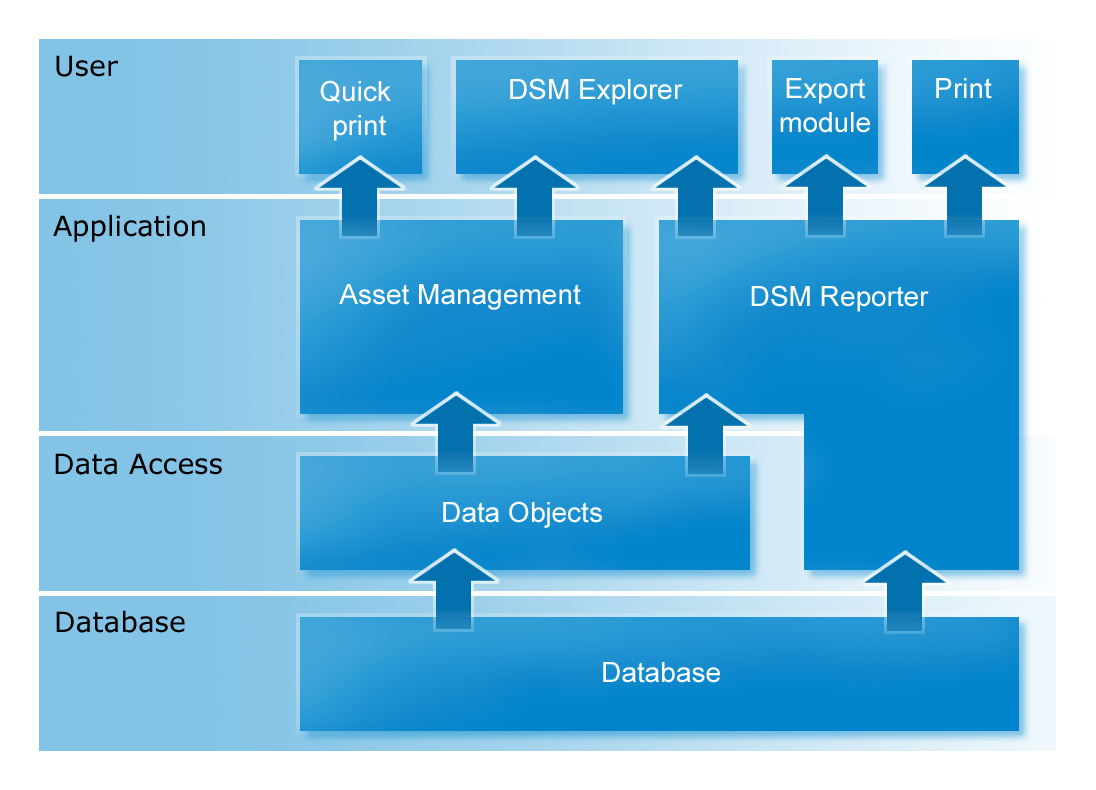
The following graphic shows how the DSM Reporter is embedded in the asset management environment:
Note: For more information about the predefined reports and DSM Reporter, see the DSM Reporter Help.
|
Copyright © 2013 CA.
All rights reserved.
|
|