

If you have configured your engine collect task to exclude content distribution, there may be times when you do want to distribute the current content from the engine to the scalability server. To make this distribution possible, you can use the CADSMCMD command line utility to request content distribution from the MDB to the scalability server.
To perform an on-demand distribution of content, use the following CADSMCMD command options:
cadsmcmd scalabilityServer action=collectSector name=<servername> CONTENTDISTRIBUTION
This command forces a content distribution to occur from the MDB to the specified scalability server, regardless of the default collect job configuration.
Note: For more information, see the CLI Reference Guide.
The AM remote agent collects the following RVI data from the virtual hosts:
This information is collected for a VM regardless of its state—powered on, suspended, powered off. However, certain information is only available when the VM is powered on and the virtualization tools have been installed.
Note: The RVI agent cannot collect certain BIOS inventory attributes from Linux virtual machines that are running on Microsoft Hyper-V and XenServer servers. Furthermore, there is no support for inventory collection from Microsoft System Center Virtual Machine Manager (SCVMM).
As a Desktop Support Analyst, you can collect the RVI (Remote Virtualization Inventory) data from multiple virtual hosts. A virtual host is a virtualization server that hosts numerous virtual machines. Collecting the inventory on virtual hosts identifies the relationship between the virtual host and the related virtual machines. When you register a virtual machine, the domain manager does not identify it as a virtual machine.
The inventory collection process identifies the virtual machines as virtual by adding additional properties to the computer. Additionally, the RVI data includes hardware and software patch information about the server. The data also includes the virtualization information and hardware information of each of the virtual machines.
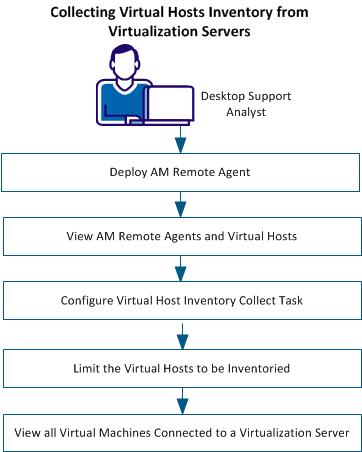
To collect RVI data from virtual hosts, deploy the AM remote agent on a physical or virtual computer. You can deploy the AM remote agent on multiple computers depending on the number of hosts and virtual machines you want to manage.
Follow these steps:
The deployment begins on the target computer.
The status of the deployment job is displayed.
To collect RVI inventory from the AM Remote agents for XenServer, you must download the inventory collection DLL manually from a third-party FTP download site.
Follow these steps:
Windows:
Copy \WindowsProductFiles_x86\libxenserver.dll to DSM_install_path\bin on the AM remote agent computer.
Linux:
Copy \LinuxProductFiles_x86\libxenserver.so to target/opt/CA/SharedComponents/lib on the AM remote agent computer.
The AM remote agent is configured to collect RVI inventory.
|
Copyright © 2013 CA.
All rights reserved.
|
|
