

|
|
|
You can use the Display options to customize the CA IDMS Visual DBA environment.
The Display options are found under File Preferences option.
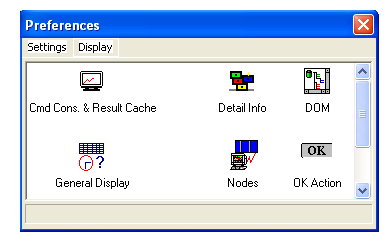
These include the following options:
|
Option |
Description |
|---|---|
|
|
Sets properties for the Command Console, such as the font, number of tabs for history, trace tab size, and the number of rows in cache. |
|
|
Sets the font used in most of the Detail Information Pane. |
|
|
Sets the font of the Database Object Manager window. |
|
|
Sets general display options, such as the time interval before animation dialogs are displayed, and whether the first document should be maximized at next startup. |
|
|
Sets the font of the Nodes window. |
|
|
Sets the action performed when you click OK for CA IDMS objects that you create or alter. You can choose to log, view, or execute syntax for each object compiler. |
|
|
Sets the printer and defines properties such as paper size and orientation. |
|
|
Sets the refresh frequency for specified object types. |
|
|
Sets the number of CA IDMS sessions allowed and the timeout period. |
| Copyright © 2011 CA. All rights reserved. | Tell Technical Publications how we can improve this information |


