

|
|
|
You can use the following steps to add a new datasource or node.
To add a new Datasource or node
 , or right-click in the nodes window to use the Node menu.
A dialog displays prompting you to determine if the new data source must be system or user. A system data source is available to all users of the PC, a user data source only to the defining user. Defining a system data source requires more operating system privileges than a user data source.
The CA IDMS ODBC Administrator is invoked.
The following example shows SYSDICT as the Dictionary and SYSTEM71 as the Server name:
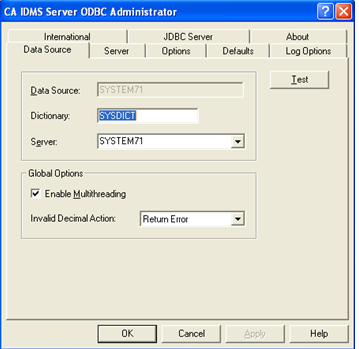
If the Server drop-down list box is empty or no usable server name is available a new Server must be defined. The name entered in the Server combo box is only an abstract name that corresponds to an IDMS CV with all the communication parameters required to connect to that IDMS CV. In the example we entered IDMSPROD NEW YORK in the Server combo box and then clicked the Server tab. This will show a new dialog that allows for specifying all the communication parameters of the abstract server IDMSPROD NEW YORK. Enter in the Node Name field the IDMS node name of the IDMS CV, this is the name specified in the SYSTEM ID clause of the IDMS CV system definition, that is IDMSPROD. The default values for Via Node, Task Code and MF Version are in general acceptable. In The CCI Options group box, the CCI Server Name can be entered. This is the TCPIP hostname where the IDMS CV is running, that is, NEWYORK. The CCI server port is usually 1202.
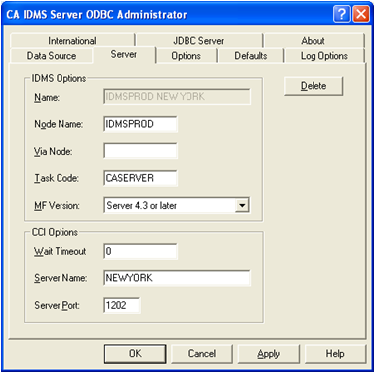
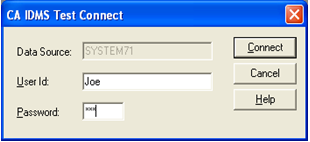
When all parameters are entered, click Apply, select the Data Source tab and click the Test button to execute an ODBC test connection. This will show the following dialog. Enter user id and password to signon to the IDMS CV and click the Connect button.
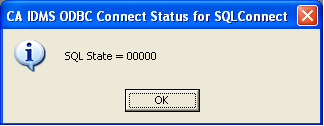
A successful connection is indicated as follows:
Note: For more information on defining ODBC data sources see the CA IDMS Server User Guide, which is also available in the CA IDMS Server product folder.
| Copyright © 2011 CA. All rights reserved. | Tell Technical Publications how we can improve this information |