

Database Conversion Programs
In the database conversion phase, you convert your Total database to a CA IDMS/DB database using the programs listed in the following table.
|
Program |
Input |
Ouput |
|---|---|---|
|
Generator (ETOTMAIN) |
|
|
|
CA IDMS/DB schema compiler (IDMSCHEM) |
Schema DDL produced by the transparency generator |
Compiled schema descriptions entered in the dictionary (IDD) |
|
CA IDMS Command Facility (IDMSBCF) |
Physical DDL statements that define segments, a database name table, and the DMCL Note: For more information about physical DDL syntax, see the CA IDMS Database Administration Guide. For more information about using IDMSBCF to submit physical DDL statements, see the CA IDMS Common Facilities Guide. |
|
|
CA IDMS/DB subschema compiler (IDMSUBSC) |
Subschema DDL produced by the generator |
|
|
CA IDMS Command Facility (IDMSBCF) |
FORMAT utility statement; use the names of the files included in the DMCL load module Note: For more information about the FORMAT syntax, see the CA IDMS Utilities Guide. For more information about using IDMSBCF to submit FORMAT, see the CA IDMS Common Facilities Guide. |
Formatted CA IDMS/DB database |
|
Total unload utility (CSITULOD) |
Parameters and data in the Total database |
Unloaded data |
|
Customized loader (ETOTLOAD) |
Unloaded data |
Data in the CA IDMS/DB database |
When you finish the conversion phase, the CA IDMS/DB database is available for processing. You are ready for the final transparency phase, runtime operations.
Illustration of the Database Conversion Phase
The following figure illustrates the database conversion phase.
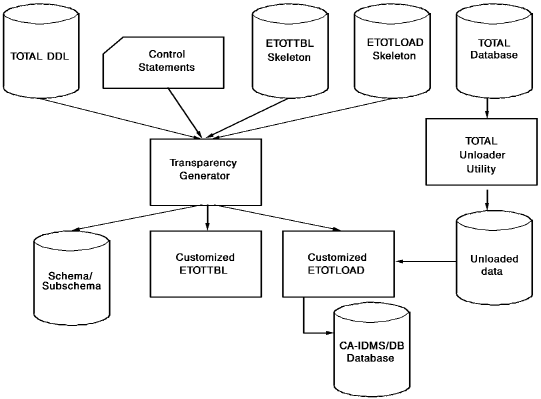
Note: For more information about the database conversion phase, see Chapter 4, Database Conversion Phase.
|
Copyright © 2013 CA.
All rights reserved.
|
|