

Command-initiated Batch Terminals
When a system starts up, the status of a command-initiated batch terminal is offline. To activate the terminal, the user must enter a DCMT VARY LTERM ONLINE command from another terminal. The command-initiated terminal is then marked online and the AUTOTASK task executes. When the task completes execution, the terminal is marked offline, awaiting the next DCMT VARY LTERM ONLINE request. The DCMT VARY LTERM ONLINE command allows the user to specify parameters to be passed to the AUTOTASK task and to override the AUTOTASK value specified in the LTERM statement.
Specifying a TERMINAL PRIORITY
For tasks associated with a logical terminal, the terminal-priority specified on the PRIORITY parameter is added to the values specified in the PRIORITY parameter of the TASK statement to determine the priority assigned to the task at runtime. If the sum of the above values is greater than 240, a dispatching priority of 240 is assigned at runtime.
A task initiated in one of the following ways is associated with a logical terminal:
Printer Classes
A logical terminal receives print output from a physical terminal if the physical terminal's printer class appears in the logical terminal's printer class list. For example, if PRINTER CLASS 5 is specified in the PTERM statement for physical terminal PT001 and in the LTERM statement for logical terminal LT064, print output from PT001 will be routed to LT064, as illustrated next.
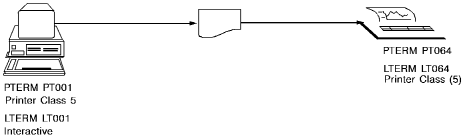
When multiple print classes are assigned to one logical terminal, reports are printed in order by class, starting with the lowest class and proceeding to the highest.
One printer class can be assigned to multiple logical terminals. For example, if class 2 is assigned to terminals A, B, C, and D, the system will route reports assigned to class 2 to the first printer that is not being used when the print request is issued. If all printers to which class 2 is assigned are in use, the system will queue the report and route it to the first available printer.
Printer classes assigned to no logical terminal can be used to hold reports for future printing. Users can use the DCMT VARY PRINTER or DCMT VARY REPORT command to route held reports to a printer.
|
Copyright © 2014 CA.
All rights reserved.
|
|