

Example 4 shows how the user positioned four record blocks--ACTIVITY, STUDENT, SCHEDULE, and DEPT--in the data structure diagram (see Exhibit 4.12).
Why record blocks were manually positioned in the diagram --The user was mainly concerned with the positions of four key record blocks in the data structure diagram. The user wanted to specify the locations of the four record blocks in the diagram and allow CA IDMS Schema Mapper to automatically LOCATE the rest of the record blocks.
Parameters Entered--The user could have edited the LOCATE statements in the Transfer File produced with the default diagram and then use the Transfer File as input. But in this case, the user would have to edit 16 LOCATE statements in the Transfer File.
Instead, the user simply added one LOCATE statement to the original Parameter Statements File to specify the position for each of the four record blocks (see Exhibit 4.11). This action LOCATEd the four record blocks in the desired positions and allowed CA IDMS Schema Mapper to position the rest of the record blocks automatically.
 PROCESS=SUBSCHEMA, SCHEMA=TSDSCHM1, SUBSCHEMA=TSDSUBS1,
     DICTNAME=SMAP

 LOCATE ACTIVITY
 LOCATE STUDENT                                    DOWN         1    FROM ACTIVITY
 LOCATE SCHEDULE                                   DOWN         1    FROM STUDENT
 LOCATE DEPT                    LEFT          1    DOWN         2    FROM STUDENT
Exhibit 4.11: Example 4--Parameters Entered
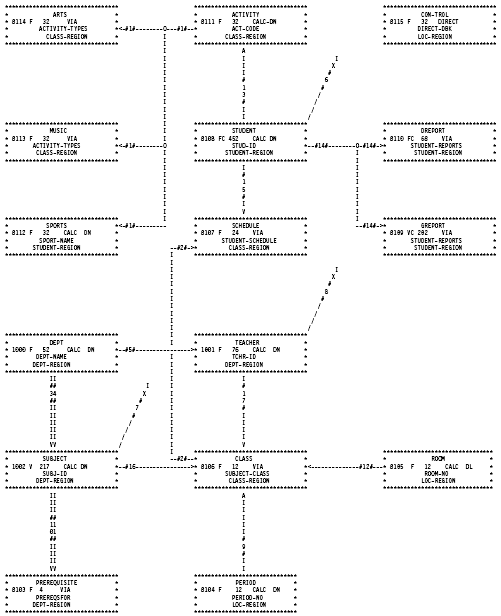
Exhibit 4.12: Tailored CA IDMS Schema Mapper Data Structure Diagram with Manually Positioned Record Blocks
|
Copyright © 2013 CA.
All rights reserved.
|
|