

Creating Table Procedure Specifications › Upload a Table Procedure to CA IDMS
Upload a Table Procedure to CA IDMS
After you generate a table procedure specification, you can upload the CREATE TABLE PROCEDURE syntax and the COBOL program to a CA IDMS dictionary.
To upload table procedure syntax, program syntax, and program code to a CA IDMS dictionary
- If a table procedure specification is open, select File Close to close it.
- If necessary, select File Connect to Database to connect to the data source that defines the CA IDMS system and dictionary in which you want to load the table procedure syntax and code.
- Select Upload SQL from the File menu to upload the CREATE TABLE PROCEDURE syntax to the CA IDMS system catalog. Select a file with file extension .SQ1.
Note: You can only use the Upload SQL menu item if CA IDMS Server is used for connectivity.
- Select Upload COBOL from the File menu to upload the table procedure COBOL program. Select a file with file extension .COB and click OK. CA IDMS stores the program in the dictionary as a module with language type COBOL.
- Select Upload COBOL from the File menu again to upload the system generation PROGRAM statement that defines the COBOL program. Select a file with file extension .SGN and click OK. CA IDMS stores the statement in the dictionary as a module with language type SYSGEN. To include the module in your system startup use the INCLUDE statement as described in CA IDMS System Generation.
Select a .COB file to upload the COBOL program.
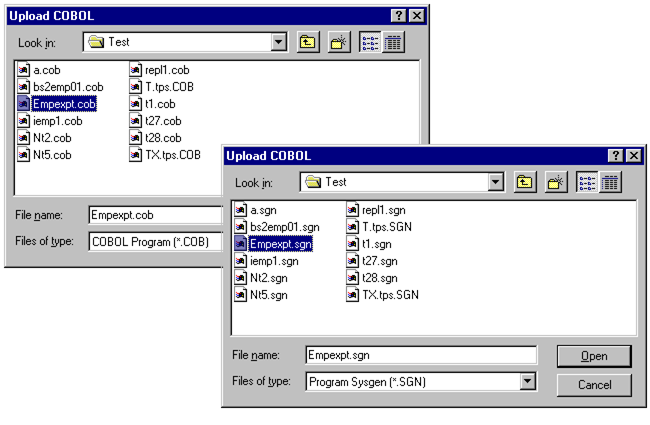
Select a .SGN file to upload the PROGRAM system generation statement.
For detailed information about defining and using table procedure programs, see the CA IDMS SQL Reference. For instructions to compile and link the COBOL program, see the CA IDMS DML Reference — COBOL and SQL Reference.
Copyright © 2013 CA.
All rights reserved.
|
|