

How CA OLQ interprets a set relationship
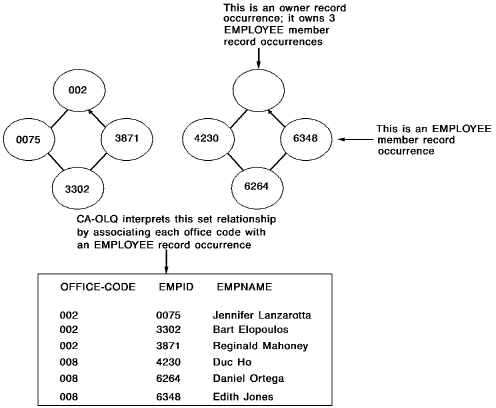
CA IDMS/DB database records relate to each other through set&$. RB. relationships or through data values. A CA IDMS/DB set links occurrences of one record type with associated occurrences of another record type. One record type is the owner of the set. The other record type is a member of the set. For example, the OFFICE-EMPLOYEE set associates each employee with a particular office. The OFFICE record is the owner and the EMPLOYEE record is the member.
When you retrieve data from two or more tables, you join the tables on a common value. For example, you join the DEPT and EMP tables by equating department IDs: where dept.deptid=emp.deptid. Similarly, when you retrieve data from two or more records, you join the records by using a set relationship. For example, you join the OFFICE and EMPLOYEE records with the OFFICE-EMPLOYEE set relationship: where office-employee. The figure below illustrates how CA OLQ interprets a set relationship between the OFFICE and EMPLOYEE database records:
Coding the SELECT statement
To retrieve data from two or more CA IDMS/DB records, code the SELECT statement like this:
Example 1— Retrieving data from 2 records
List all employees who work in the Boston office. The SELECT statement shown below selects EMPLOYEE and OFFICE records in the OFFICE-EMPLOYEE set having an office code of BOSTON:
select emp-last-name-0415 as &xq.employee name',
  office-city-0450 as &xq.office'
  from employee, office
  where office-employee and office-city-0450 = &xq.boston' ! display
                             OFFICE/EMPLOYEE REPORT
                                    mm/dd/yy

                  EMPLOYEE NAME                     OFFICE
                 ---------------                ---------------
                 ANGELO                         BOSTON
                 BANK                           BOSTON
                 BLOOMER                        BOSTON
                 FITZHUGH                       BOSTON
                 FONRAD                         BOSTON
                 GARDNER                        BOSTON
                 HENDON                         BOSTON
                 HUTTON                         BOSTON
                 JACKSON                        BOSTON
                 JENSON                         BOSTON
                 JOHNSON                        BOSTON
                 KAHALLY                        BOSTON
                 KIMBALL                        BOSTON
                 KING                           BOSTON

                                      - 1 -
Example 2— Retrieving data from 3 records
List the department and office location of each employee. The SELECT statement shown below:
select dept-id-0410 as department, emp-last-name-0415 as employee,
  office-city-0450 as office
  from department, employee, office
  where dept-employee and office-employee
  order by dept-id-0410, emp-last-name-0415 ! display
                        OFFICE/EMPLOYEE/DEPARTMENT REPORT
                                    mm/dd/yy

          DEPARTMENT            EMPLOYEE                 OFFICE
          ----------         ---------------         ---------------
                0100         HENDON                  BOSTON
                0100         PAPAZEUS                WESTON
                0100         RUPEE                   SPRINGFIELD
                0100         WILDER                  SPRINGFIELD
                1000         FITZHUGH                BOSTON
                1000         JOHNSON                 BOSTON
                1000         ORGRATZI                BOSTON
                1000         PEOPLES                 BOSTON
                2000         BLOOMER                 BOSTON
                2000         HUTTON                  BOSTON
                2000         JENSON                  BOSTON
                2000         KIMBALL                 BOSTON
                2000         KING                    BOSTON

                                      - 1 -
|
Copyright © 2013 CA.
All rights reserved.
|
|