

What is batch processing? Batch processing is a way to create a report without requiring any interaction from the user. Once you have set up the requirements of the batch job, you can start it running and it will run until it has completed, without needing any input from you.
When do you use batch? Batch processing is used to process large amounts of data, or to perform an operation in off hours.
If you are creating a report that contains a very large number of records, the amount of time that the system spends retrieving your report's data restricts with the system's availability to other users. Thus, if you are creating a very large report, you probably want to perform the data retrieval at off hours, when the system's resources aren't at high demand.
Example
Suppose you were put in charge of creating a personnel report for the phone company. Your report retrieves 30,000 records, one record for each employee. Since you are creating this report for the first time, you will probably want to change it once you see how it looks.
Because your report contains so many records, you don't want to retrieve all of them until you are sure that you have the report exactly the way you want it. You can create a report prototype to make sure that you are satisfied with the report before you retrieve the data.
Using batch processing
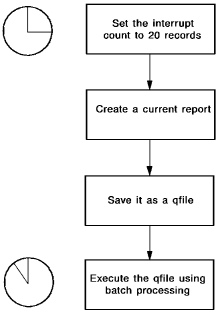
The step-by-step solution for the personnel report would be to:
Processing a Qfile in Batch:
This section contains the following topics:
|
Copyright © 2013 CA.
All rights reserved.
|
|