

In this chapter This section shows you how to save your current report as a data table. In this example, you will:
In this sample, you retrieve data from database records and store it in a table format. Each column of your table corresponds to an element in one of the records you retrieved. For example, the EMP-ID-0415 column corresponds to the EMP-ID-0415 element in the EMPLOYEE record.
Saving a Table from Your Current Report:
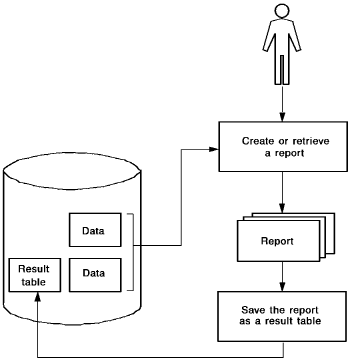
Each row in the table you create corresponds to a single occurrence of a record. For example, the table row that contains data for employee ANGELO corresponds to one occurrence each of the EMPLOYEE and OFFICE records.
     ┌───────────────────────────────────────────────────────────────────┐
     │ Record Type: EMPLOYEE                                             │
     │                                                                   │
┌────┴─────┬──────────────┬──────────────┐                               │
│          │              │              └┐                              │
│ EMP-ID-  │ EMP-FIRST-   │  EMP-LAST-    └┐                             │
│ 0145     │ NAME-0145    │  NAME-0145     └┐                            │
└──────────┴──────────────┴─────────────────┘                            │
                                                                         ▼
                                     ┌───────────────────────────────────────┐
Record Occurrences                   │            EMPLOYEE Table             │
                                     ├───────┬──────────────┬────────────────┤
┌───────┬──────────┬─────────┐       │ EMP-ID│ EMP-LAST-NAME│ EMP-FIRST-NAME │
│       │          │         └┐      ├───────┼──────────────┼────────────────┤
│ 0075  │ JENNIFER │LANZAROTTA└┐─►   │ 0075  │ Lanzarotta   │Jennifer        │
│       │          │           └┐    │ 3302  │ Elopoulos    │Bart            │
└───────┴──────────┴────────────┘    │ 3871  │ Mahoney      │Reginald        │
┌──────────┬──────────┬─────────┐    │ 4230  │ Ho           │Duc             │
│          │          │         └┐   │ 6264  │ Ortega       │Daniel          │
│ 3302     │ BART     │ ELOPOULOS└┐  │ 6348  │ Jones        │Edith           │
│          │          │           └┐ └───────┴──────────────┴────────────────┘
└──────────┴──────────┴────────────┘
┌──────────┬──────────┬──────────────┐
│          │          │              └┐
│ 3871     │ REGINALD │  MAHONEY      └┐
│          │          │                └┐
└──────────┴──────────┴─────────────────┘
This section contains the following topics:
Saving Your Report As an SQL Table
Saving Your Report As an ASF Table
|
Copyright © 2013 CA.
All rights reserved.
|
|