

Here are some of the terms used to discuss making a report from database records:
Database view
A more descriptive term for subschema. The two terms are used interchangeably.
Element
The smallest significant unit of data in a CA IDMS/DB database. Record elements correspond to columns in a table. For example, the record element DEPT-ID-0410 corresponds to the DEPARTMENT ID column in a table.
Record
A group of related elements. For example, the DEPT-NAME-0410, DEPT-ID-0410, and DEPT-HEAD-ID-0410 elements are all grouped into the DEPARTMENT record. Records correspond to rows in a table. For example, the record element DEPT-NAME-0410 corresponds to the DEPARTMENT NAME column in a table.
Selection criteria
A logical expression that you use to tell CA OLQ which rows of data to retrieve for your report.
Additional selection criteria
A logical expression that you use to tell CA OLQ which rows of data to retrieve for your report. Unlike selection criteria, you can also use:
Subschema
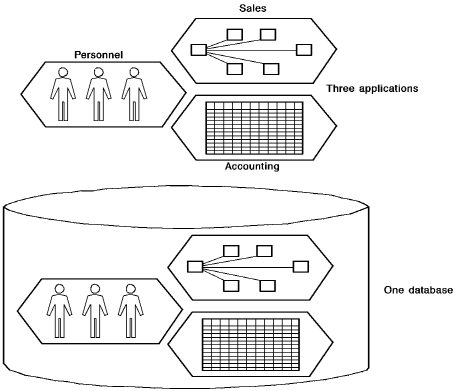
A view of the database that contains a subset of the records, elements, sets, and areas that make up the entire database. A subschema usually views functionally related data.
For example, the personnel department uses a subschema that views employee information such as salary, date of hire, and personal information. All of the information used by the corporation (sales, accounting, and personnel) are held in the same database, but the personnel department views only the information that it needs.
Using Subschemas:
|
Copyright © 2013 CA.
All rights reserved.
|
|