

Where are qfile definitions stored?
When you create a qfile, CA OLQ takes all the commands used in your current session and saves them as CA OLQ syntax statements in the data dictionary. Definitions stored in the data dictionary are accessed using a CA product called the Integrated Data Dictionary (IDD).
How to look at your qfile definition
Using the List option on the Qfile Processing screen, you can switch from CA OLQ to IDD to see how your qfile commands are stored in the data dictionary.
For more information on IDD refer to the CA IDMS IDD DDDL Reference Guide.
Note: Depending on the security level that has been assigned to you, you may or may not be able to access your qfile definition in IDD. If your specifying List or Edit on the Qfile Processing screen does not switch you out of CA OLQ, you probably do not have authority to access IDD.
Looking at Qfile Syntax:
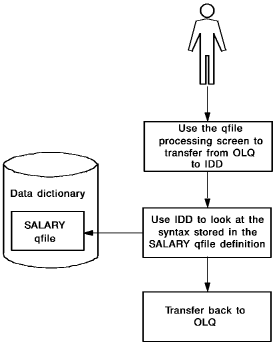
In this example, you see how the SALARY qfile is stored in the data dictionary by using the following steps:
|
Copyright © 2013 CA.
All rights reserved.
|
|