

FIND/GET WITHIN SET retrieves records based on their membership in a database set. Use this command to retrieve records only after currency is established within the object set. (Currency need not have been established previously for system-owned index sets.)
Access mode:The syntax below is invalid when the access switch is set to IDMS.
FIND locates database records but does not retrieve them into the report file. GET locates database records and does retrieve them into the report file.
Syntax:
►►─┬─ FINd ─┬─┬─────────────────────────────┬─────────────────────────────────►
   └─ GET ──┘ ├─ FIRst ─┬────────────────┬──┤
              │         └─ record-count ─┘  │
              ├─ LASt ─┬────────────────┬───┤
              │        └─ record-count ─┘   │
              ├─ NEXt ◄ ─┬────────────────┬─┤
              │          └─ record-count ─┘ │
              ├─ PRIor ─┬────────────────┬──┤
              │         └─ record-count ─┘  │
              └─ ALL ───────────────────────┘

 ►─┬────────────────────────────────────────────────────────┬─ records ───────►
   └─┬────────────┬─ member-record-name ─┬────────────────┬─┘
     └─ view-id. ─┘                      └─ (field-list) ─┘

 ►─┬───────────────────────────────────────────────────────────────┬──────────►
   └─ BELonging to this ─┬────────────┬─ owner-record-name record ─┘
                         └─ view-id. ─┘

 ►─┬───────────────────────┬──────────────────────────────────────────────────►
   └─ withIN set-name set ─┘

 ►─┬──────────────────┬───────────────────────────────────────────────────────►◄
   └─ WHEre criteria ─┘
►►─── REPeat with ─┬────────────────────────────┬─────────────────────────────►
                   ├─ FIRst ─┬────────────────┬─┤
                   │         └─ record-count ─┘ │
                   ├─ LASt ─┬────────────────┬──┤
                   │        └─ record-count ─┘  │
                   ├─ NEXt ─┬────────────────┬──┤
                   │        └─ record-count ─┘  │
                   ├─ PRIor ─┬────────────────┬─┤
                   │         └─ record-count ─┘ │
                   └─ ALL ──────────────────────┘

 ►─┬────────────────────────────────────────────────────────┬─ records ───────►
   └─┬────────────┬─ member-record-name ─┬────────────────┬─┘
     └─ view-id. ─┘                      └─ (field-list) ─┘

 ►─┬──────────────────┬───────────────────────────────────────────────────────►◄
   └─ WHEre criteria ─┘
Parameters:
Retrieves the first n (where n defaults to 1) records at the beginning of the current occurrence of the set type.
Retrieves the first n (where n defaults to 1) records at the end of the current occurrence of the set type.
Retrieves the next n (where n defaults to 1) records, starting with the record following the current record in the current occurrence of the set.
Retrieves the prior n (where n defaults to 1) records, starting with the record preceding the current record in the current occurrence of the set. If no PRIOR pointers have been defined for the record, CA OLQ displays an error message.
Retrieves all member records in the current occurrence of the set type.
The qualifying ID for the record or logical record name. Use view-id when you are signed on to multiple subschemas. View-id refers to the subschema where the record (or logical record) can be found.
Specifies a member record type in the set. If a member record type is named, the retrieval applies only to records of that type. If no member record type is specified, all member record types in the set are retrieved.
Specifies the owner record type in the set. If you don't specify set-name or member-record-name, then the specified owner record type must participate as owner in only one set in the subschema view.
Specifies the set where the participating record is retrieved. Set-name is required if the named or implied member record participates in more than one set. It is optional if the set name can be determined from the named member or owner record type.
Note: To retrieve all member record types in the set, specify either set-name or owner-record-name, but do not specify member-record-name.
Specifies criteria used to select record occurrences.
Duplicates an immediately preceding FIND/GET WITHIN SET (or REPEAT for FIND/GET WITHIN SET) command.
Retrieves the first n (where n defaults to 1) records at the beginning of the current set.
Retrieves the first n (where n defaults to 1) records at the end of the current set.
Retrieves the next n (where n defaults to 1) records, starting with the record that follows the current record in the current set.
Retrieves the prior n (where n defaults to 1) records, starting with the record that precedes the current record in the current set. If no PRIOR pointers have been defined for the record, CA OLQ displays an error message.
Retrieves all member records in the current set.
The qualifying ID for the record or logical record name. Use view-id when you are signed on to multiple subschemas. View-id refers to the subschema where the record (or logical record) can be found.
The member record type in the set. If a member record type is named, the retrieval applies only to records of that type. If no member record type is specified, all member record types in the set are retrieved.
Specifies criteria used in selecting record occurrences.
Considerations:
Use the member-record-name, owner-record-name, and set-name clauses to resolve ambiguity. At least one of these clauses must be specified.
If member-record-name is specified, but owner-record-name and set-name are not specified as listed in the syntax, be sure the named member record type participates as member in only one set in the subschema view of the database.
Examples:
The following examples illustrate the use of FIND/GET WITHIN SET and associated REPEAT commands based on the set occurrence diagram shown below:
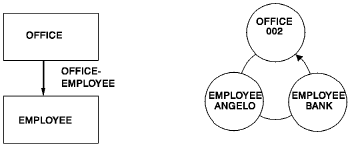
Get First
A GET command is used to enter the database and establish currency:
get first office (office-code-0450 office-phone-0450(1))
 where calckey = 002

 OFFICE
   OFFICE-CODE-0450 : '002'
   OFFICE-PHONE-0450(1)    9562377
 END OF RECORD
Get With Set
A GET WITHIN SET command is used to retrieve the first EMPLOYEE record in the OFFICE-EMPLOYEE set:
get first employee (emp-last-name-0415 emp-first-name-0415)
 in office-employee set

 EMPLOYEE
    EMP-FIRST-NAME-0415 : 'MICHAEL   '
    EMP-LAST-NAME-0415  : 'ANGELO         '
 END OF RECORD
Repeat Next
A REPEAT NEXT command duplicates the immediately preceding GET command for the next EMPLOYEE record:
repeat next

 EMPLOYEE
    EMP-FIRST-NAME-0415 : 'MONTE     '
    EMP-LAST-NAME-0415  : 'BANK           '
 END OF RECORD
|
Copyright © 2013 CA.
All rights reserved.
|
|