

FIND/GET using storage key retrieves records based on their CALC key or dbkey value.
Access mode: The syntax below is invalid when the access switch is set to IDMS.
FIND locates database records but does not retrieve them into the report file. GET locates database records and does retrieve them into the report file.
Syntax:
►►─┬─ FINd ─┬─┬──────────────────────────────┬────────────────────────────────►
   └─ GET ──┘ ├─ FIRst ◄ ─┬────────────────┬─┤
              │           └─ record-count ─┘ │
              ├─ NEXt ─┬────────────────┬────┤
              │        └─ record-count ─┘    │
              └─ ALL ────────────────────────┘

 ►─┬────────────┬─ record-name ─┬────────────────┬─ records ──────────────────►
   └─ view-id. ─┘               └─ (field-list) ─┘

 ►─── WHEre ─┬─┬─ CALckey ─────────┬─ = ─┬─┬───────────┬─ field-name ─┬─┬─────►
             │ └─ calc-field-name ─┘     │ └─ record. ─┘              │ │
             │                           │ ┌──────── , ───────┐       │ │
             │                           └─▼- calc-key-value ─┴───────┘ │
             │             ┌──────────── , ───────────┐                 │
             ├─ CALckey = -▼- concatenated-key-value ─┴─────────────────┤
             └─ DBKey = ─┬─┬───────────┬─ field-name ─┬─────────────────┘
                         │ └─ record. ─┘              │
                         │ ┌─────── , ──────┐         │
                         └─▼- db-key-value ─┴─────────┘

 ►─┬────────────────┬─────────────────────────────────────────────────────────►◄
   └─ AND criteria ─┘
►►─── REPeat with ─┬────────────────────────────┬─────────────────────────────►
                   ├─ FIRst ─┬────────────────┬─┤
                   │         └─ record-count ─┘ │
                   ├─ NEXt ─┬────────────────┬──┤
                   │        └─ record-count ─┘  │
                   └─ ALL ──────────────────────┘

 ►─┬────────────┬─ record-name ─┬────────────────┬─ records ──────────────────►
   └─ view-id. ─┘               └─ (field-list) ─┘

 ►─┬──────────────────────────────────────────────────────────────────────────►─
   └─ WHEre ─┬─┬─ CALckey ─────────┬─ = ─┬─┬───────────┬─ field-name ─┬─┬─────
             │ └─ calc-field-name ─┘     │ └─ record. ─┘              │ │
             │                           │ ┌──────── , ───────┐       │ │
             │                           └─▼- calc-key-value ─┴───────┘ │
             │             ┌──────────── , ───────────┐                 │
             ├─ CALckey = -▼- concatenated-key-value ─┴─────────────────┤
             └─ DBKey = ─┬─┬───────────┬─ field-name ─┬─────────────────┘
                         │ └─ record. ─┘              │
                         │ ┌─────── , ──────┐         │
                         └─▼- db-key-value ─┴─────────┘

─►────────────────────┬───────────────────────────────────────────────────────►◄
  ─┬────────────────┬─┘
   └─ AND criteria ─┘
Expansion of record
►►─┬────────────┬─ record-name ─┬────────────────┬────────────────────────────►◄
   └─ view-id. ─┘               └─ (occurrence) ─┘
Parameters:
Retrieves the first n (where n defaults to 1) records in the database that have the specified key value. Multiple records with the same CALC key are known as duplicates. Multiple records with the same dbkey value are not allowed.
Retrieves the next n (where n defaults to 1) records in the database that have the specified key value.
Retrieves all records in the database that have the specified key value.
The qualifying ID for the record or logical record name. Use view-id when you are signed on to multiple subschemas. View-id refers to the subschema where the record (or logical record) can be found.
The record type to be retrieved (required). If a database record name is the same as a CA OLQ keyword, the name should be enclosed in quotation marks.
Specifies the criteria for selecting records:
Note: If the CALC key defined for the named record type is a group item, all subordinate fields must be specified.
Separate multiple values with blanks or commas.
Note: The NEXT ordinal clauses cannot be specified for dbkey value retrieval.
Specifies selection criteria used for retrieving record occurrences.
Duplicates an immediately preceding FIND/GET using storage key (or REPEAT for FIND/GET using storage key) command.
Specifies the retrieval of the first n record occurrences.
Specifies the retrieval of the next n record occurrences.
Specifies the retrieval of all record occurrences.
The qualifying ID for the record or logical record name. Use view-id when you are signed on to multiple subschemas. View-id refers to the subschema where the record (or logical record) can be found.
Specifies the database record name.
Specifies criteria used in selecting records:
Note: If the CALC key defined for the named record type is a group item, all subordinate fields must be specified.
Separate multiple values with blanks or commas.
Note: The NEXT ordinal clauses cannot be specified for dbkey value retrieval.
Specifies criteria used in selecting record occurrences.
If no parameters are specified and the last retrieval was performed by database-key, the same record is retrieved. The CALC key or database key does not change unless a change is specified in the REPEAT command; any new key value replaces the previous value.
If the field-name occurs in more than one record, use record-name.
If the record occurs more than once in the same path, use occurrence. If a database record name is the same as a CA OLQ keyword, the name should be enclosed in quotation marks.
Examples:
The following examples illustrate the use of FIND/GET using storage key and associated REPEAT commands, based on the set occurrence diagram shown below:
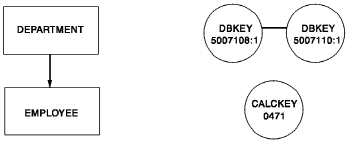
Get Using Storage Key
A GET using storage key command retrieves the first DEPARTMENT record with a dbkey value of 5007108:1:
get first department (dept-id-0410,dept-name-0410) where calckey=200

  DEPARTMENT
    DEPT-ID-0410     :   2000
    DEPT-NAME-0410   :  ACCOUNTING AND PAYROLL
  END OF RECORD
Repeat Get
A REPEAT command with a WHERE clause retrieves the same fields as the previous command for the new database-key value:
repeat with department where calckey=1000

  DEPARTMENT
    DEPT-ID-0410     :   1000
    DEPT-NAME-0410   :  PERSONNEL
  END OF RECORD
|
Copyright © 2013 CA.
All rights reserved.
|
|