

The COMMENTS option included in CA IDMS Log Analyzer is designed for your convenience and can be used at your discretion. When you place an asterisk (*) in the first column of a parameter statement, you can insert notes, observations, comments on reports and their uses, or any other information that will be helpful for future reference.
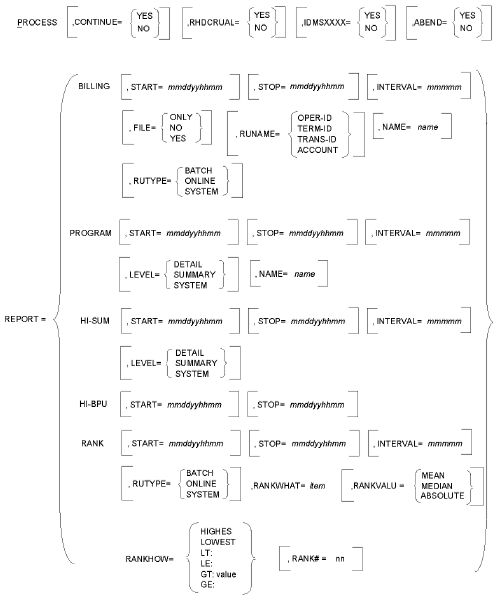
Note: CA IDMS Log Analyzer parameter syntax follows the notation conventions shown in Table 3-1 and syntax rules shown in Table 3-2. Please review these conventions and rules.
Notation Conventions for Parameter Statements:
|
Example |
Function |
|---|---|
|
PROCESS |
All keywords are written in UPPERCASE. Those portions of the keyword that must be entered are UNDERSCORED. When part of a keyword is not underscored, you may omit it without altering the meaning of the statement. |
|
CONTINUE= YES |
A keyword phrase is made up of a major keyword followed by an equal sign (=), followed by a minor keyword or a variable. A keyword phrase cannot be split between two parameter cards. |
|
INTERVAL=interval |
Variables appear in lowercase italic. Substitute an appropriate value for each variable if the keyword phrase is required. |
|
INTERVAL=60, RANK=45 |
Keyword phrases must be separated by a comma. All text between a keyword phrase and the next comma is ignored. |
|
[,NAME=name] |
Brackets indicate optional keyword phrases. If you omit the entire parameter, CA IDMS Log Analyzer will supply a default value. |
|
◄ |
Points to the default in a list of choices. |
|
FILE= {NO YES◄} |
Braces enclose two or more options in a column. You must choose one of them. |
Parameter Syntax Rules:
|
Item |
Rule |
|---|---|
|
Order of Parameter Statements |
Parameter statements are free-form. They can be entered in any order. |
|
Continuing a Parameter Statement |
To continue a parameter statement onto the next card, key in a trailing comma. |
|
Maximum Number of Reports Possible Per Execution |
A total of 20 reports can be requested during each execution of CA IDMS Log Analyzer. This means you can choose 20 Program Detail Reports, for example, or any combination of reports and options available through CA IDMS Log Analyzer. |
|
Entering Blanks on Parameter Statements |
You can enter blanks (character spaces) to separate keywords to improve readability in a parameter statement without affecting the parameter. Do not enter blanks within a keyword or value field. |
|
Positions of Keyword Phrases on Parameter Statements |
All keyword phrases must be entered between positions 1 and 72 on each parameter card. |
|
Copyright © 2014 CA.
All rights reserved.
|
|