

The Master Selection screen is the entry screen of the IDD menu facility. From this screen, you can:
The following figure illustrates the top of the menu facility's hierarchical structure.
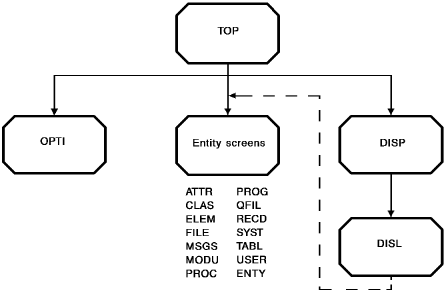
The names of the Entity screens that can be selected from the Master Selection screen are listed. Each Entity screen and its associated subordinate screens are described separately in this section.
Note: Using the Display All screen, you can select an entity occurrence to be displayed. The IDD menu facility transfers control to the appropriate Entity screen to display the occurrence. If you subsequently press CLEAR from the Entity screen, control returns to the Master Selection screen, not the Display All List screen.
Entry and Processing Screens
The following table describes the screens associated with the menu facility entry and processing options.
|
Screen name |
Screen title |
Description |
|---|---|---|
|
DISP |
Display All |
Defines the criteria to select entity occurrences for display |
|
DISL |
Display All List |
Lists entity occurrences specified on the Display All screen; allows selection of an entity occurrence for further display under the appropriate entity-type screens |
|
OPTI |
Session Options |
Defines session processing options |
|
TOP |
Master Selection |
Identifies the primary screen; furnishes signon information; provides access to subordinate screens |
|
Copyright © 2014 CA.
All rights reserved.
|
|