

CA Endevor/DB monitors change through the Dynamic Change Monitor which, in turn, logs those changes into the Change Control Database.
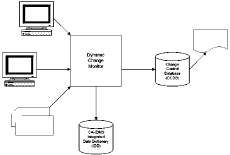
Upon initial installation, the Dynamic Change Monitor immediately begins keeping an audit trail in the Change Control Database of all updates performed against CA IDMS Integrated Data Dictionary (IDD). Entities and, optionally, userids are automatically established in the Change Control Database when they are first encountered.
As the Dynamic Change Monitor captures changes to data dictionary entities, it creates a Change Log Entry (CLE) in the Change Control Database. Each Change Log Entry contains the date and time of the change, the updating compiler, and the action. CLEs also draw an association among the user responsible for the change, the entity being changed and a user-defined change control identifier (CCID). Optionally, CLEs can contain other status and organizational information. Individual installations can determine whether the Dynamic Change Monitor is to intercept update requests for all or for only selected entity types.
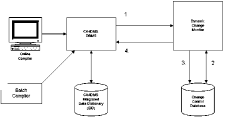
How it Works: 1. Update requests are intercepted by the Dynamic Change Monitor. 2. The request is validated against security information in the Change Control Database. 3. A Change Log Entry is stored in the Change Control Database. 4. The dictionary update is performed by CA IDMS.
The Dynamic Change Monitor is activated on a dictionary-by-dictionary basis, allowing a site to bring one dictionary at a time under CA Endevor/DB control.
|
Copyright © 2013 CA.
All rights reserved.
|
|