

The following command syntax, specified in the NDVRIPT file, is accepted by NDVRDSEL:
►►────── SIGnon ──┬─────────────────────────────────┬────────────────────────►
                  ├─ DBNAme ──────┬── is dictname ──┘
                  └─ DICtName ────┘

 ►────┬─────────────────────────┬───┬──────────────────────────┬─────────────►
      └─ USEr name is user-id ──┘   └─ PASsword is password ───┘

 ►───────────┬────────────────────────────────────────┬────────── . ─────────►◄
             └─ CCId name is ───┬─────── ccid ────────┤
                                │                     │
                                │     ┌─── , ───┐     │
                                └─ ( ─▼─ ccid ──┴─ ) ─┘
►►────── TARget ──┬──SYStem is target-system-name ────┬──────────────────────►
                  └─ NODename is target-node-name ────┘

 ►────────┬─────────────────────────────────┬────────────────────────────────►◄
          ├─ DBNAme ──────┬── is dictname ──┘
          └─ DICtName ────┘
►►────────┬────────────────────────────────────────┬─────────────────────────►◄
          └─ MODe is ───┬─── EXEcute ◄────┬── . ───┘
                        ├─── TRIal ───────┤
                        └─── BACkoff ─────┘
►►────────┬────────────────────────────────────────┬─────────────────────────►◄
          └─ INPut is ───┬─── DATabase ◄──┬── . ───┘
                         └─── FILe ───────┘
►►────────┬──────────────────────────────────────────────────────────┬───────►◄
          └─ SIGnout to ───┬─ USEr ──┬── name is signout name ── . ──┘
                           └─ CCId ──┘
►►─┬───────────────────────────────────────────────────────────────────────┬─►◄
   └─ INClude ──┬────────────────────────────────────────────────────┬─ . ─┘
                ├─ ALL ◄─────────────────────────────────────────────┤
                │                                                    │
                │ ┌───────────────────────────────────────────────┐  │
                ├─▼─ FROm date is mm/dd/yy ───────────────────────┼──┘
                ├─── THRu date is mm/dd/yy ───────────────────────┤
                ├─── where STATUS name is status ─────────────────┤
                ├─── USEr name is user-id ────────────────────────┤
                ├─── CCId name ccid ──────────────────────────────┤
                └─┬─ MANagement-group ┬ name is management-group ─┘
                  └─ MGRp ────────────┘
►►─┬──────────────────────────────────────────────────────────────────┬──────►◄
   │           ┌────────────────────────────────────────────┐         │
   └─ EXClude ─▼─┬── where STAtus name is status ──────┬────┴──── . ──┘
                 └── WIThin CCId name is ccid ─────────┘
►►────────┬──────────────────────────────────────────────────────────┬───────►◄
          └─ EXPand IDD ─┬─────────────────┬── relationships ── . ───┘
                         ├─── CHAnge ◄─────┤
                         ├─── HIErarchy ───┤
                         └─── MINimum ─────┘
►►────────┬──────────────────────────────────────────────────────────┬───────►◄
          └─ WARn where ─┬────────────────────────┬──────────── . ───┘
                         ├─── CCId is MULtiple ───┤
                         ├─── CCId is NULl ───────┤
                         ├─── USEr is MULtiple ───┤
                         └─── USEr is NULl ───────┘
The SIGNON command identifies the user responsible for the migration and optional password and CCID list. If no CCID list is specified, the default CCIDs for the user are assigned from the CCDB.
The TARGET command identifies the target system and base dictionary name to be migrated to. This identifier is used to drive the verification process. All activity against an entity since it last migrated will be used for integrity checking for WARN conditions and for INCLUDE conditions (See below).
Note: The target system name and dictname specified in this statement must match the values in the Dictionary record in the CCDB for the target dictionary. If an erroneous target dictionary and system name are given, NDVRDSEL will select many more entities than are necessary to achieve source and target synchronization. This is because the software bases its selection on change activity and last migration date.
The last migration date is determined from the Migrate out CLEs created by NDVRDCF2 when the migration is confirmed on the source system. The Migrate out CLEs contain the date of migration and the target system name and dictname. Since there will be no Migrate out CLEs on the source system for a non-existent target, giving the wrong target name will erroneously trigger the selection of all entities modified on the source system.
The Verification and Selection program can be run in three modes. They are:
|
Mode |
Description |
|---|---|
|
TRIAL |
This mode produces the NDVRENO file but does not perform the bulk sign-out of entities, even if specified in the input command syntax. All other edits are performed. This mode can be used by individual project leaders or development teams independently of the person responsible for migration, to check the integrity of work performed on the target and source dictionaries without affecting the state of the CCDB. Note: Users executing NDVRDSEL in TRIAL mode do not require security authorization. |
|
EXECUTE |
This mode performs all edits and selection and will sign-out the entities upon selection if SIGNOUT is specified in the input command file. Note: Any user operating in this mode must be authorized for MIGRATE = Y in his/her Security Class. |
|
BACKOFF |
This mode signs-in all elements that were signed-out during a NDVRDSEL run. Note: Any user operating in this mode must be authorized for MIGRATE = Y in his/her Security Class. |
Entities may be selected for migration based on CCID, user, Status, Date, or Management Group (MGRP). MGRP, CCID, and user are mutually exclusive. Only one of these conditions should be specified in a single INCLUDE statement, and may be combined with Date and Status conditions.Conditions within an INCLUDE statement are logically ANDed with other conditions within that statement. Each INCLUDE statement is logically ORed with other INCLUDE statements. Specify one INCLUDE for each set of modifications to be migrated.
To perform this function, NDVRDSEL reads Change Log Entries after the last Migrate-out CLE (action code = C) to the target system. If no Migrate-out CLE exists, it assumes the last migration to the target took place at the beginning of the recorded history for that entity.
When MGRP is specified, all IDD work performed under the CCIDs in that Management Group is selected.
When STATUS is given as the only selector within an INCLUDE statement, or when STATUS is given in combination with USER, only the base status (status set without a CCID context in the CCDB) is examined.
When STATUS is given as a selector in combination with MGRP or CCID, the base status or the status within the context of the included CCIDs is considered.
When ALL is specified, all updated entities since the last migration to the target are included. If the last activity against an entity is a migrate out (CLE action = C) to the target dictionary, it will not be included. All other entities in the CCDB are included.
Multiple EXCLUDE statements may be specified. Excluded from migration are those items which have been selected by an INCLUDE or through IDD expansion, but have a particular Status. This mechanism is employed as a way of excluding individual entities, even though all other criteria would have resulted in selection. For example, it can be used to accommodate last minute project decisions to migrate only part of the work performed under a CCID, or to exclude untested work.
Note: The IDD selection logic will not expand through (or validity edit) an entity that has been excluded. To prevent wholesale selection when a global record has changed in a compatible manner, EXCLUDE the global record from migration.
When the WITHIN clause is specified, the status under the context of the CCID specified is examined. When no WITHIN clause is present, only the base status is considered (status set without a CCID context in the CCDB).
Note: This is intentionally made more restrictive than the INCLUDE STATUS clause which will select a base or CCID status when specified.
All entities selected for migration will be signed out. Existing Signouts are overridden by NDVRDSEL. It is therefore possible to allow individual programmers the ability to Signout entities via Auto-Sign or explicit Signout to preserve the integrity of entities during development. When selected for migration, the user responsible for migration gains control of the entity regardless of prior signout status.
When the migration is completed, the signout is restored to the developer. Signout prevents modification by individuals other than the person responsible for the migration once an entity is selected. All entities will be signed out to the user or the CCID specified in the command.
Signouts remain in effect until the entities are received on the target system (through NDVRDCF2) or until MODE=BACKOFF is executed. After migration, Signouts are automatically signed back in.
NDVRDSEL determines the entities to be migrated through two passes:
When the EXPAND option is not in effect (default setting), the CCDB (or input Entity List File) is the sole source for entities which satisfy the selection criteria. No Pass 2 is performed. No consistency validation on the source dictionary is performed. In this case, the selection list will consist only of the entities modified in the source system without regard to affected entities in the source IDD.
When the EXPAND IDD RELATIONSHIPS clause is in effect, the Pass 2 selection and verification process will consistency-edit the IDD to determine if any potentially dangerous conditions exist in the source dictionary (e.g., Element changes with no corresponding Record modification). Entities, which violate validation conditions, are reported in the NDVRDSEL Exception Report. See the "Source System Validation and Integrity Checking Rules" section in this manual for a complete description of the validation and selection rules.
Note: If the CA Endevor/DB migrator is being used, always specify the EXPAND clause.
When EXPAND is in effect, NDVRDSEL will place additional entities (beyond those contained in the CCDB) into the NDVRENO file. The strategy used to select additional entities will depend upon the EXPAND option. CHANGE is the default strategy when the EXPAND clause is specified.
|
Option |
Meaning |
|---|---|
|
CHANGE |
CHANGE examines all relevant IDD relationships during Pass 2 in the dictionary according to the relationships described earlier in this chapter under Strategy 1. It will then select for migration all dictionary entities related to the entities logged to the CCDB if they have changed since they last migrated to the target system and dictionary. Any new item selected will start a new selection path. Selection paths stop when an entity is reached along a path, which has not been modified in the source system. Note: The object of this technique is to migrate only the minimum set of entities required to bring the source and target into synchronization. |
|
HIERARCHY |
HIERARCHY examines only hierarchical IDD relationships during Pass 2 in the dictionary according to the relationships described earlier in this chapter under Strategy 2. It will then select for migration all dictionary entities that are subordinate to any one already chosen. Any new item selected for migration will later be used to search for other entities. Note: When HIERARCHY is specified, related entity types are unconditionally migrated regardless of change activity. Also note that the object of this technique is to migrate complete application systems, especially in situations where CA Endevor/DB is being used to migrate an application system for the first time. |
|
MINIMUM |
MINIMUM examines only hierarchical IDD relationships, and then select only those subordinate entities that have changed since they last migrated to the target system and dictionary. Any new item selected for migration will later be used to search for other entities. Note: The object of this technique is to allow the separate migration of application systems that share components. It should be used with great caution, because such application systems may be so thoroughly inter-dependent that they cannot be migrated independently. |
All entities selected from the CCDB for migration can be optionally edited to produce warnings for each of the following exception conditions. Warnings appear on the NDVRDSEL Exception Report.
|
Warning |
Description |
|---|---|
|
CCID IS MULTIPLE |
A modification under more than one CCID has occurred to this entity since it last migrated to the target system. To perform this function, NDVRDSEL reads Change Log Entries after the last Migrate-out CLE (action code = C) to the target system. If no Migrate-out CLE exists, it assumes the beginning of the recorded history for that entity. By examining the detail change history associated with entities flagged with this warning, it is possible to identify the users involved for follow-up questioning, if necessary. Multiple updates can be prevented at modification time by the use of the CA Endevor/DB Signout facility. |
|
CCID IS NULL |
A modification with no CCID has occurred against this entity since it last migrated to the target system. This warning will flag unclassified work. This condition can be prevented at modification time through the use of the NO-CCID Security Class Option on the dictionary Security Class. |
|
USER IS MULTIPLE |
More than one user has modified this entity since it last migrated to the target system. To perform this function, NDVRDSEL reads Change Log Entries after the last Migrate-out CLE (action code = C) to the target system. If no Migrate-out CLE exists, it assumes the beginning of the recorded history for that entity. This edit is intended as an aid to insure that multiple users were aware of and tested each other's updates. By examining the detail change history associated with entities flagged with this warning, it is possible to identify the users involved for follow-up questioning, if necessary. Multiple updates can be prevented at modification time by the use of the CA Endevor/DB Signout facility. |
|
USER IS NULL |
A modification with no userid has occurred against this entity since it last migrated to the target system. This warning will flag unclassified work after the fact. This condition can be prevented at modification time through the use of the NO-USER Security Class Option on the dictionary Security Class. |
Two primary input sources can be used for entity editing:
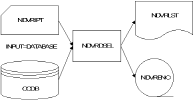
DATABASE: The CCDB is used with any INCLUDE/EXCLUDE statements to produce the NDVRENO file. The NDVRENO file contains a user-editable entity list and control information. From this point forward, the NDVRENO data set is used as input to other promotion support programs. DATABASE is used for the initial run of NDVRDSEL when change history is used to select entities for migration. After externally editing the entity list in the NDVRENO file (if necessary), subsequent runs for integrity edits would be done with INPUT=FILE and an NDVRENI file.
Figure 8.6 depicts a run with INPUT=DATABASE.
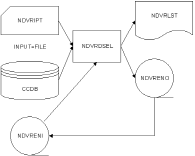
FILE: A previously created NDVRENO file can be read in through the NDVRENI DD statement. When this occurs, all entities in the list are re-edited for WARN conditions, selection criteria, and validation rules. A new NDVRENO file is always produced reflecting the most recent execution time. Entities manually added to the list are signed out if SIGNOUT is specified in the syntax. INPUT=FILE is used when iterating the Verification and Correlation process to obtain a "safe" or "improved" entity list based on validation edits and impact analysis.
Another use of INPUT=FILE is when a known entity list is migrating. Manually coding ENT statements eliminates the overhead of scanning the CCDB (Pass 1) for all change activity. In this case, the advantages of cross entity validation and selection (Pass 2) is still obtained even though the CCDB was not used for initial list creation.
Note: When doing this, make sure that a LIST FOLLOWS statement immediately precedes your ENT statement.
INPUT=FILE can also be used in BACKOFF processing. If you have run NDVRDSEL in EXECUTE mode and had it perform SIGNOUT processing, the most expedient way to undo the SIGNOUT processing is to submit a job that specifies MODE=BACKOFF and INPUT=FILE, and use the previous job's NDVRENO file as NDVRENI.
When INPUT=FILE is specified, the following additional edits are performed:
Figure 8.7 depicts a run with INPUT=FILE. The NDVRENI statement is required when INPUT=FILE is coded.
|
Copyright © 2013 CA.
All rights reserved.
|
|