

As part of the initial installation procedure (STEP 3), a null configuration table (load module NDVRCNFG) was placed in the CA Endevor/DB load library with other executable components of the system. The NDVRCNFG table can be optionally modified to:
When running with the null NDVRCNFG table supplied at installation, all CCDBs defined to a CV run with default base names, and run under one driver task as depicted in Figure 1.2. This is more than adequate for the majority of installations and need not be modified. It must be kept in mind that CCDB activity is extremely minor in comparison to the work performed in the IDD.
The configuration table is a simple two-entry table with a Driver Number in column one and a DBNAME in column two. The DBNAME in the table is used as the base name (DICTNAME) for the CCDB/IDD pair to which it belongs. The Driver Number is a digit from 1 to 9 that specifies the driver task assigned to handle the CCDB for that DBNAME. If a Driver Number is not specified, it defaults to 0.
When the driver task detects a newly initialized CCDB, it automatically primes the database with the records required for execution. One of the records stored in the CCDB (the Dictionary Record) contains the DICTNAME of its associated IDD. However, if the DICTNAME is changed (by a new DBNAME table) after initial install, the CCDB is automatically updated by the driver to reflect the new name. These are normally straightforward operations, except where two or more DICTNAMEs point to the same IDMS dictionary at initial startup or when renaming (by a new DBNAME table).
Note: If a site does not use multiple DBNAMES to point to the same IDMS dictionary, base name set up can be ignored.
The base name is stored internally in the CCDB Dictionary Record by the driver at startup. Only one base name can exist per dictionary. The base name displays at the top of all CA Endevor/DB Online screens (in the header area) regardless of the DICTNAME used to gain access to that dictionary (for example, through DCUF SET DICTNAME or CA Endevor/DB Signon). The default base name for a CCDB will be the lowest in collating sequence unless the system is instructed otherwise (as explained below). It is important to note that the primary dictionary is always known as ' ' under these rules regardless of coding in the DBNAME table. Base names become important when using the Promotion Support Facilities (see Chapter 8, "Promotion Support Facilities") to create migration audit trail records in the CCDB.
Figure 1.3 depicts a system running with a NDVRCNFG table.
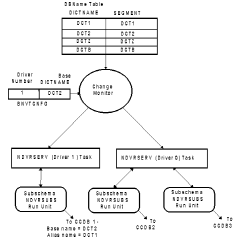
Notice that DBNAMEs (DCT1 and DCT2) both point to the same CCDB. Since DCT2 is coded in the NDVRCNFG table, DCT2 is the base name. DCT1 becomes an alias name. All non-base names become alias names. DCT1 will function normally (in DCUF commands and CA Endevor/DB search criteria) in all respects. When an alias name is used to sign-on, or in DCUF commands prior to using CA Endevor/DB online screens, the base name will be echoed in the screen header DICTNAME field.
Also notice in Figure 1.3 that a driver number other than 0 was specified with DCT2. This will cause the Change Monitor to establish another task, and assign it DCT2's CCDB run unit. Although the example shows a separate task assigned to DCT2, this is not necessary. If the Driver Number for DCT2 was specified as 0 or omitted, DCT2 would have its CCDB run unit managed by driver 0.
The following rules apply to this table:
At system startup, the NDVRCNFG Table is loaded and analyzed along with the DBNAME table. The following actions take place:
Note: Under local mode, one driver subtask is started for the CCDB being accessed. Be sure to supply the correct NDVRCNFG table and IDMSDBTB in the job step.
|
Copyright © 2013 CA.
All rights reserved.
|
|