

The Change Monitor runs as a task named NDVRSERV under CV, or as a subtask of the operating system in local mode operation. The task definition and programs for the Change Monitor are provided on the CA Endevor/DB installation media. Once the installation procedure (shipped with the media) is executed, the Change Monitor is available to any dictionary for which the IDMSNWKA -to- NDVRNWKA subschema mapping has been specified (for the applicable database name in the table). It is only necessary to install the Change Monitor once per CV. Any number of dictionary/CCDB pairs can be run through the monitor.
Note: Disabling CA Endevor/DB is only recommended when unloading and reloading the dictionary for expansion purposes.
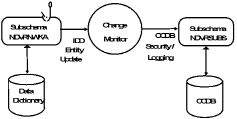
Figure 1.1 below depicts the flow of operation surrounding installation of CA Endevor/DB change monitoring on a dictionary.
|
Copyright © 2013 CA.
All rights reserved.
|
|