

Extract Paths
Extract Paths
This appendix contains the following topics:
This section contains the following topics:
Introduction
Extract Path for DIALOG
Extract Path for RECORD
Extract Path for RECORD when LEVEL = ENTITY
Extract Path for ATTRIBUTE when LEVEL = DIALOG
EXTRACT Path for ATTRIBUTE when LEVEL = ENTITY
Extract Path for ATTRIBUTE when LEVEL = ONLY
Extract Path for SUBSCHEMA when LEVEL = DIALOG
Extract Path for SUBSCHEMA when LEVEL = ENTITY
Extract Path for APPLICATION when LEVEL = DIALOG
Introduction
This appendix describes and illustrates the paths CA IDMS Dictionary Migrator takes when extracting entities from the source dictionary.
CA IDMS Dictionary Migrator extracts entities from the source dictionary based on the entity type and the name specified in an EXTRACT statement. The entity-namemask can be the name of any occurrence of the entity type, or mask using wild card characters for the entity type. Do not, however, use more than the maximum IDD characters.
This appendix provides descriptions and diagrams of the paths that CA IDMS Dictionary Migrator follows for these entities:
EXTRACT, DIALOG=dialog, LEVEL=DIALOG
EXTRACT, RECORD=record-name, LEVEL=DIALOG
EXTRACT, RECORD=record-name, LEVEL=ENTITY
EXTRACT, ATTRIBUTE=attribute-name, LEVEL=DIALOG
EXTRACT, ATTRIBUTE=attribute-name, LEVEL=ENTITY
EXTRACT, ATTRIBUTE=attribute-name, LEVEL=ONLY
EXTRACT, SUBSCHEMA=subschema-name, LEVEL=DIALOG
EXTRACT, SUBSCHEMA=subschema-name, LEVEL=ENTITY
EXTRACT, APPLICATION=application-name, LEVEL=DIALOG
|
Symbol
|
Definition
|
|
--(dotted line)
|
Path from Entry Point to Starting Point of Extraction.
|
|
_ (solid line)
|
Path from Starting Point to all extracted components.
|
|
*
|
Points to where the Extract Statement goes.
|
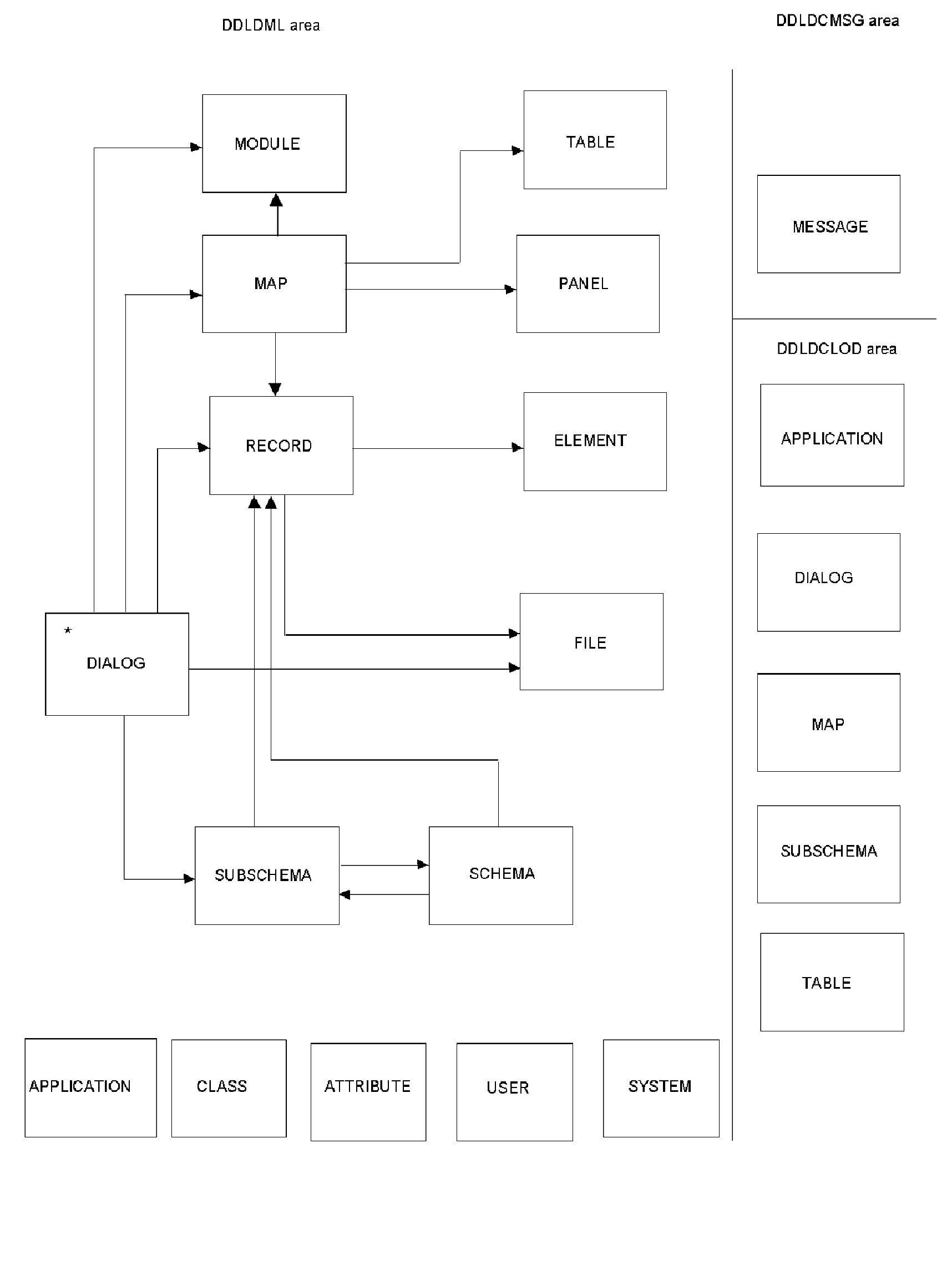
Extract Path for DIALOG
This section describes the EXTRACT path for DIALOG.
EXTRACT, LEVEL = DIALOG, DIALOG = dialog-name
The following is extracted:
For each dialog named in the EXTRACT statement:
- Extract the dialog
Extract the corresponding dialog load module from DDLDCLOD (load) area
- For each process module connected to the dialog and for each included process module within the process module
- Extract the process module source
- For each message code in the process module source
- Extract the message from DDLDCMSG (message) area
- For each referenced dialog within the process module source
- Extract the dialog and its components (start at step 1. above)
- For each record connected to the dialog
- Extract the record
- For each element connected to the dialog record
- Extract the dialog record element and all of its subordinate elements
- For each IDD defined file connected to the record
- For each file used by the dialog
- For the subschema connected to the dialog
- Extract the schema connected to the subschema
- For each record connected to the schema
- Extract the schema record
- For each element connected to the schema record
- Extract the schema record element and all of its subordinate elements
- For each subschema connected to the schema
- Extract the subschema
- Extract the corresponding subschema load module from DDLDCLOD (load) area
- Extract each Logical Record Facility work record used by the subschema
- For each record connected to the subschema
- Extract the Record
- Extract the subschema record element and all of its subordinate elements.
- Extract the map connected to the dialog
Extract the corresponding load module map from DDLDCLOD (load) area
For each message code in the map
- Extract message from DDLDCMSG (message) area
For each edit and/or code table used in the map
- Extract the table
- Extract the corresponding table load module from DDDLCLOD (load) area
For each work record used in the map
- Extract the map record
- For each element connected to the map record
- Extract the map record element and all of its subordinate elements
For the panel connected to the map
For each help module connected to the map
- Extract the module source
- Extract the map help load module
All attributes, systems and users associated with every entity are also extracted.
Extract Path for RECORD
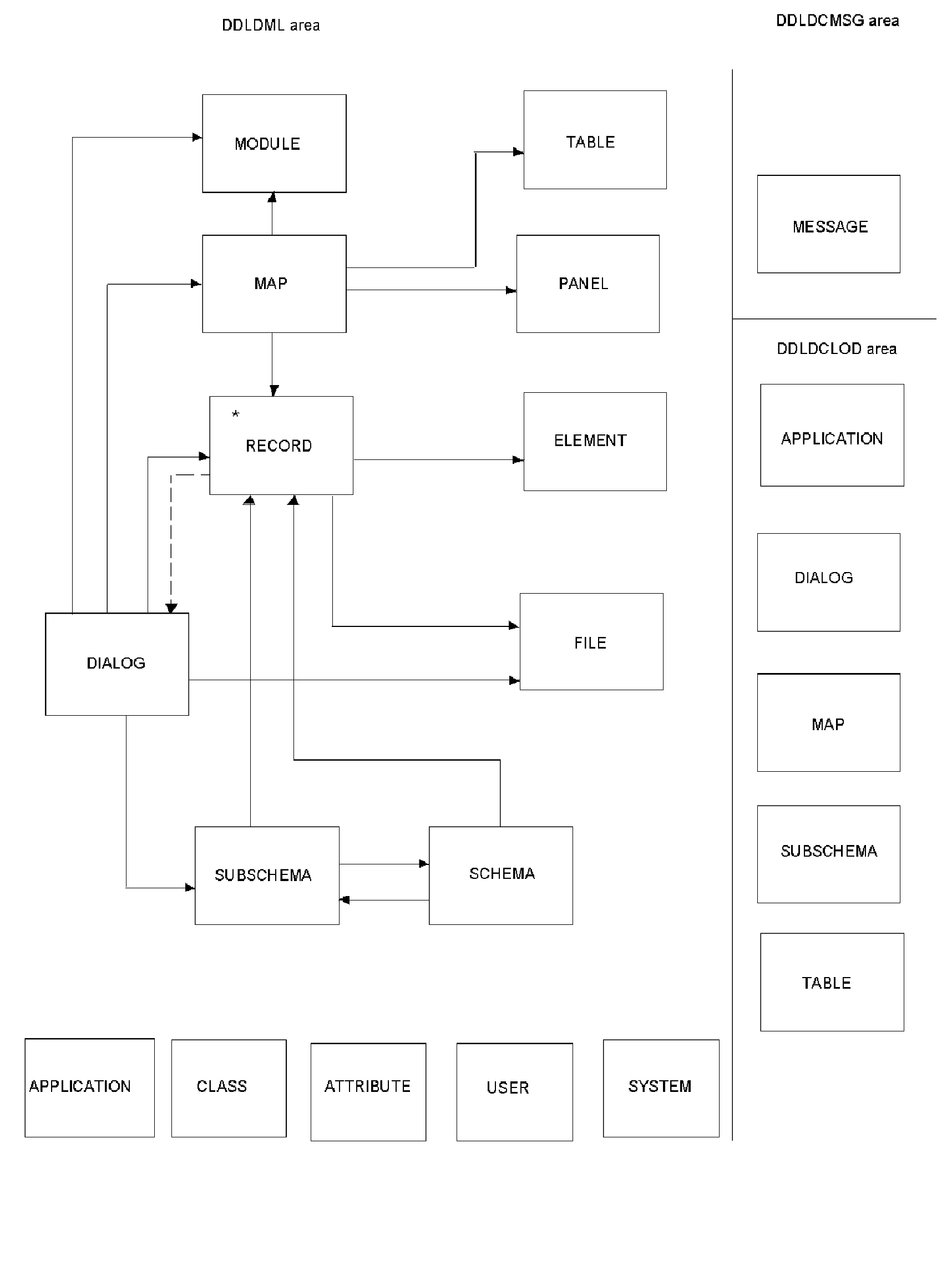
This section describes the EXTRACT path for RECORD.
EXTRACT, LEVEL = DIALOG, RECORD = record-name
The following is extracted:
For each dialog that uses the specified record:
- Extract the dialog
Extract the corresponding dialog load module from DDLDCLOD (load) area
- For each module connected to the dialog and for each included process module within the process module
- Extract the process module source
- For each message code in the process module source
- Extract the message from DDLDCMSG (message) area
For each referenced dialog within the process module source
- Extract the dialog and its components (start at step 1. above)
- For each record connected to the dialog
- Extract the record
- For each element connected to the dialog record
- Extract the dialog record element and all of its subordinate elements
For each IDD defined file connected to the record
- For each file used by the dialog
- For the subschema connected to the dialog
- Extract the schema connected to the subschema
- For each record connected to the schema
For each subschema connected to the schema
- Extract the subschema
- Extract the corresponding subschema load module from DDLDCLOD (load) area
- Extract each Logical Record Facility work record used by the subschema
- For each record connected to the subschema
- Extract the Record
- Extract the subschema record element and all of its subordinate elements.
- Extract the map connected to the dialog
Extract the corresponding load module map from DDLDCLOD (load) area
For each message code in the map
- Extract message from DDLDCMSG (message) area
For each edit and/or code table used in the map
- Extract the table
- Extract the corresponding table load module from DDDLCLOD (load) area
For each work record used in the map
- Extract the map record
- For each element connected to the map record
- Extract the map record element and all of its subordinate elements
For the panel connected to the map
For each help module connected to the map
- Extract the module source
- Extract the map help load module
All attributes, systems and users associated with every entity are also extracted.
Extract Path for RECORD when LEVEL = ENTITY
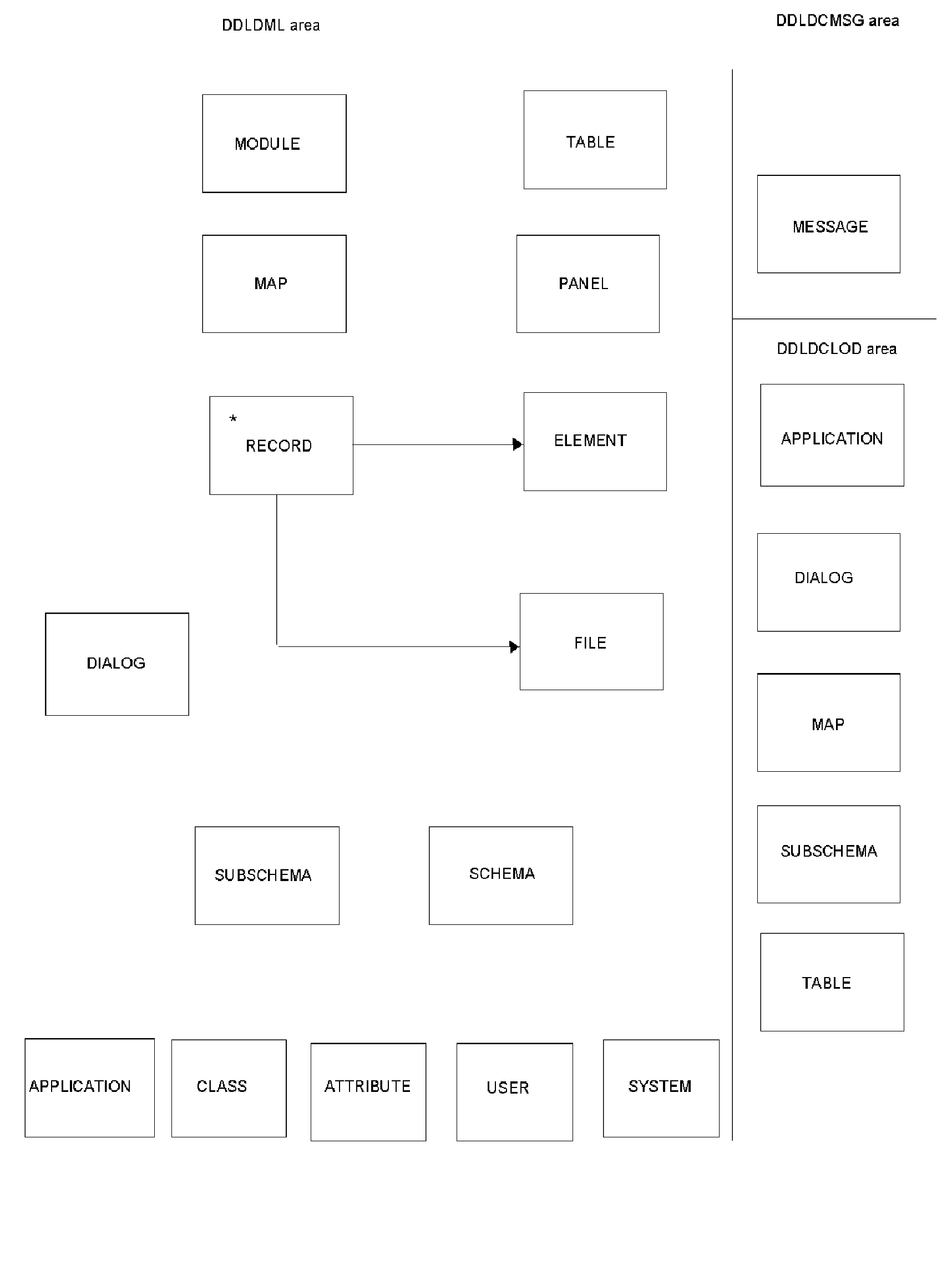
This section describes the EXTRACT path for RECORD, when LEVEL = ENTITY..
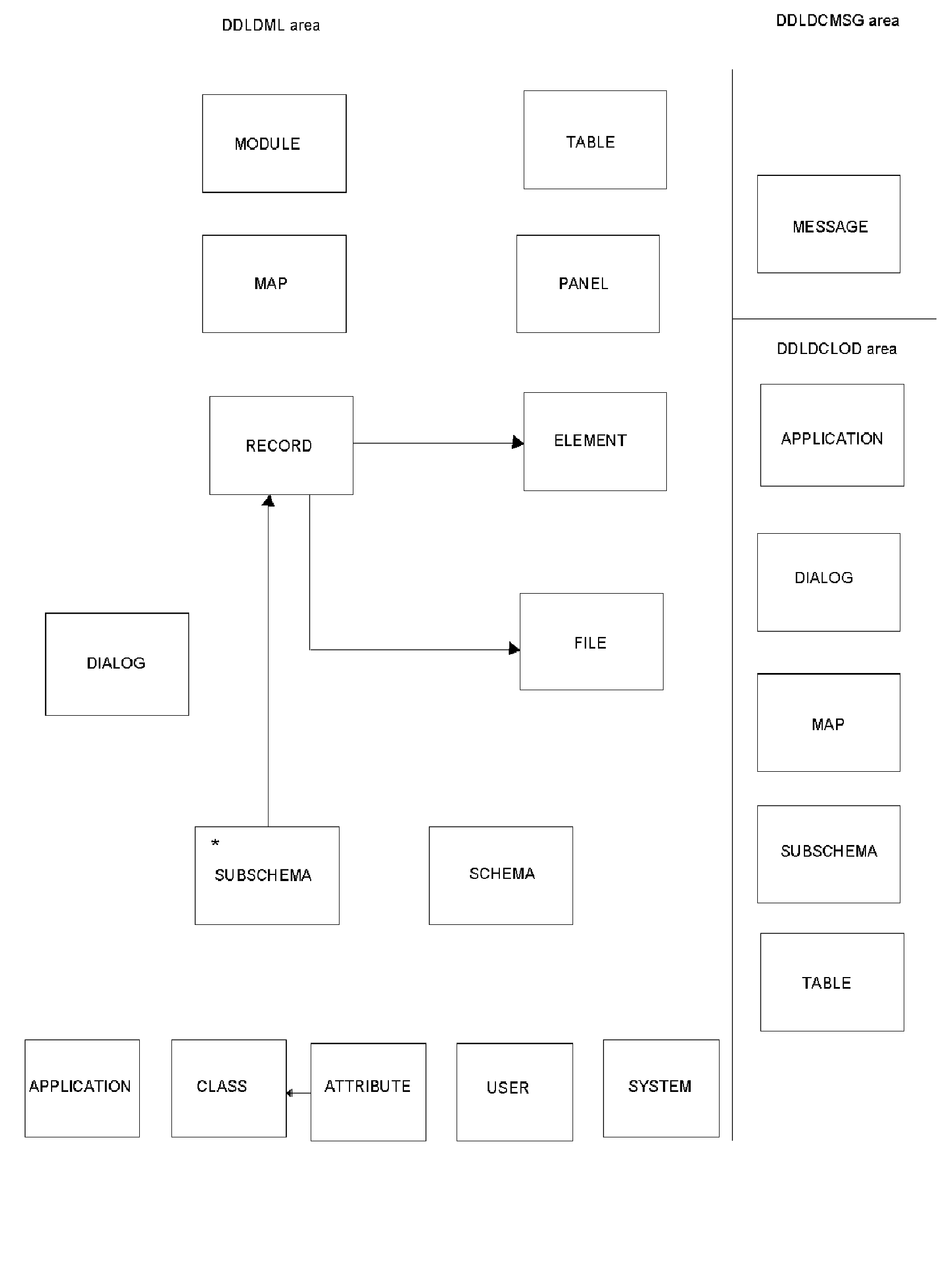
EXTRACT, RECORD = record-name, LEVEL = ENTITY
For the record specified in the EXTRACT statement:
- Extract the record
For each element connected to the record
- Extract the record element and all of its subordinate elements
For each IDD defined file connected to the record
All attributes, systems and users associated with the record are also extracted.
Extract Path for ATTRIBUTE when LEVEL = DIALOG
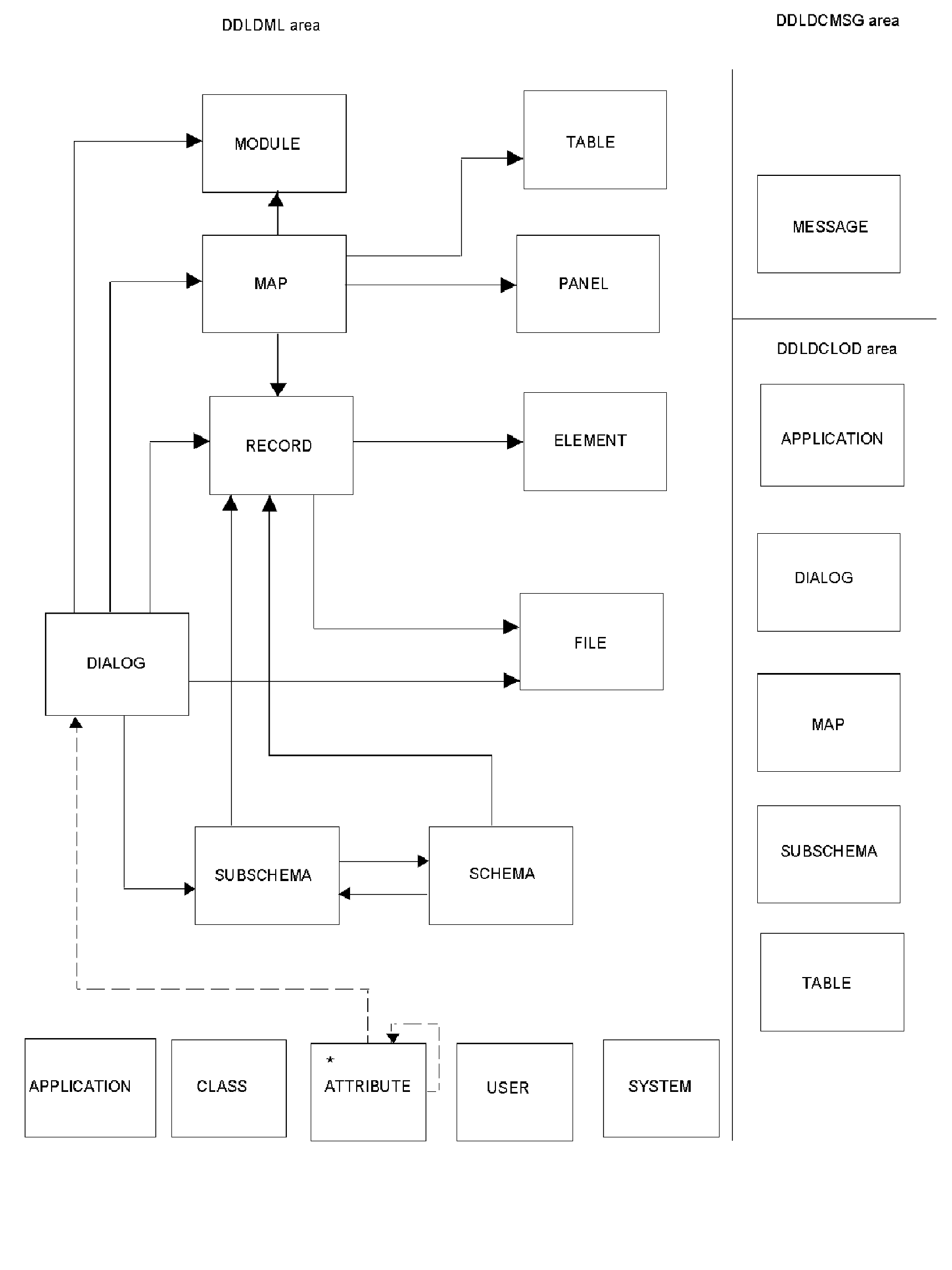
This section describes the EXTRACT path for ATTRIBUTE when LEVEL = DIALOG.
EXTRACT, ATTRIBUTE = attribute-name, LEVEL = DIALOG
The following are extracted:
For each dialog connected to the attribute specified in the EXTRACT statement, and for each dialog connected to an attribute of the attribute specified in the extract statement:
- Extract the dialog
Extract the corresponding dialog load module from DDLDCLOD (load) area
- For each module connected to the dialog and for each included process module within the process module
- Extract the process module source
- For each message code in the process module source
- Extract the message from DDLDCMSG (message) area
- For each referenced dialog within the process module source
- Extract the dialog and its components (start at step 1. above)
- For each record connected to the dialog
- Extract the record
- For each element connected to the dialog record
- Extract the dialog record element and all of its subordinate elements
For each IDD defined file connected to the record
- For each file used by the dialog
- For the subschema connected to the dialog
- Extract the schema connected to the subschema
- For each record connected to the schema
- Extract the schema record
- For each element connected to the schema record
-Extract the schema record element and all of its subordinate elements
- For each subschema connected to the schema
-Extract the subschema
-Extract the corresponding subschema load module from DDLDCLOD (load) area
- Extract each Logical Record Facility work record used by the subschema
- For each record connected to the subschema
-Extract the Record
-Extract the subschema record element and all of its subordinate elements
- Extract the map connected to the dialog
Extract the corresponding load module map from DDLDCLOD (load) area
For each message code in the map
- Extract message from DDLDCMSG (message) area
For each edit and/or code table used in the map
- Extract the table
- Extract the corresponding table load module from DDDLCLOD (load) area
For each work record used in the map
- Extract the map record
- For each element connected to the map record
- Extract the map record element and all of its subordinate elements
For each panel connected to the map
For the help module connected to the map
- Extract the module source
- Extract the map help load module
All attributes, systems and users associated with every entity are also extracted.
EXTRACT Path for ATTRIBUTE when LEVEL = ENTITY
This section describes the EXTRACT path for ATTRIBUTE when LEVEL = ENTITY.
EXTRACT, ATTRIBUTE=attribute-name, LEVEL=ENTITY
For the attribute specified in the EXTRACT statement:
Find each entity connected to the named attribute, extract these entities and extract components of all these entities:
- Extract all schemas connected to the attribute
- For each record connected to the schema
- Extract all subschemas connected to the attribute
- Extract the subschema
- Extract the corresponding subschema from DDLDCLOD (load) area
- For each record connected to the subschema
- Extract the subschema record
- For each element connected to the subschema record
- Extract the subschema record element and all of its subordinate elements
- Extract all records connected to the attribute
- Extract the record
- For each element connected to the record
- Extract the record element and all of its subordinate elements
- For each IDD defined file connected to the record
- Extract all elements connected to the attribute
- For each element
- Extract all of its subordinate elements
- Extract all modules connected to the attribute
- Extract the module source
- Extract all programs connected to the attribute
- For each program connected to the attribute
- Extract the programs PROG-051 record
- Extract the programs load module from DDLDCLOD (load) area
- Extract all maps connected to the attribute
- Extract the corresponding map from DDLDCLOD (load) area
- For each message code in the map
- Extract message from DDLDCMSG (message) area
- For each edit and/or code table used in the map
- Extract the edit and/or code table used in the map
- Extract the edit and/or code table from DDLDCLOD (load) area
- For each record connected to the map
- Extract the map record
- For each element connected to the map record
-Extract the map record element and all of its subordinate elements
- For the panel connected to the map
-Extract the panel
- For each help module connected to the map
-Extract the module source
-Extract the map help load module
- Extract all the panels connected to the attribute
- Extract the class connected to the attribute
Extract the attribute
All attributes, systems and users associated with every entity are also extracted.
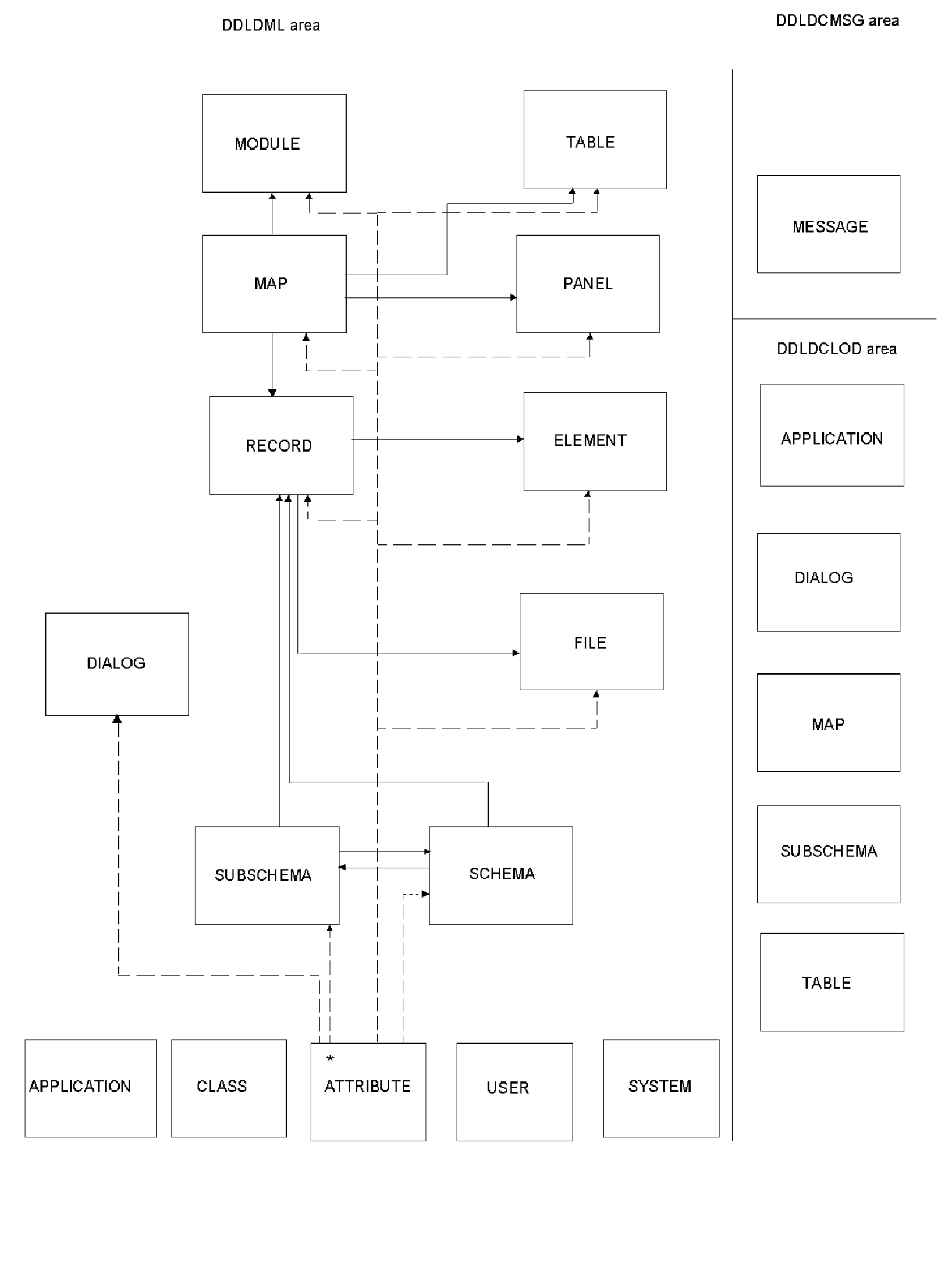
Extract Path for ATTRIBUTE when LEVEL = ONLY
This section describes the EXTRACT path for ATTRIBUTE, when LEVEL = ONLY.
EXTRACT, ATTRIBUTE = attribute-name, LEVEL = ONLY
For the attribute specified in the EXTRACT Statement
- Extract the class connected to the attribute
Extract the attribute
All users associated with the attribute are also extracted.
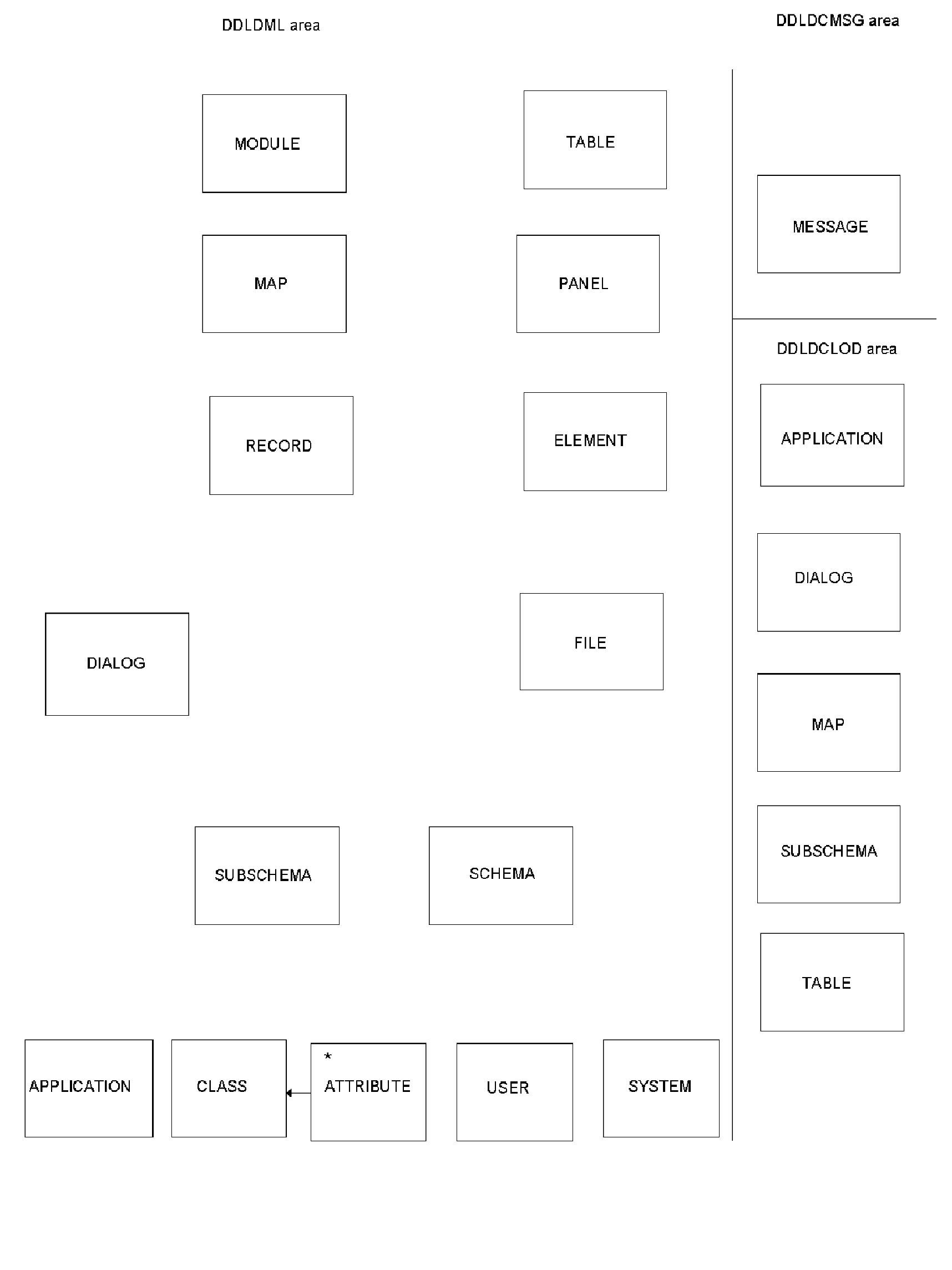
Extract Path for SUBSCHEMA when LEVEL = DIALOG
This section describes the EXTRACT path for SUBSCHEMA when LEVEL = DIALOG.
EXTRACT, SUBSCHEMA = subschema-name, LEVEL = DIALOG
For each dialog that uses the specified subschema:
- Extract the dialog
Extract the corresponding dialog load module from DDLDCLOD (load) area
- For each process module connected to the dialog and for each included process module within the process module
- Extract the process module source
- For each message code in the process module source
- Extract the message from DDLDCMSG (message) area
- For each referenced dialog within the process module source
- Extract the dialog and its components (start at step 1. above)
- For each record connected to the dialog
Extract the record
For each element connected to the dialog record
- Extract the dialog record element and all of its subordinate elements
For each IDD defined file connected to the record
- For each file used by the dialog
- For the subschema connected to the dialog
- Extract the schema connected to the subschema
- For each record connected to the schema
- For each subschema connected to the schema
- Extract the subschema
- Extract the corresponding subschema load module from DDLDCLOD (load) area
- Extract each Logical Record Facility work record used by the subschema
- For each record connected to the subschema
- Extract the Record
- Extract the subschema record element and all of its subordinate elements
- Extract the map connected to the dialog
Extract the corresponding load module map from DDLDCLOD (load) area
For each message code in the map
- Extract message from DDLDCMSG (message) area
For each edit and/or code table used in the map
- Extract the table
- Extract the corresponding table load module from DDDLCLOD (load) area
For each work record used in the map
- Extract the map record
- For each element connected to the map record
- Extract the map record element and all of its subordinate elements
For each panel connected to the map
For the help module connected to the map
- Extract the module source
- Extract the map help load module
All attributes, systems, and users associated with every entity are also extracted.
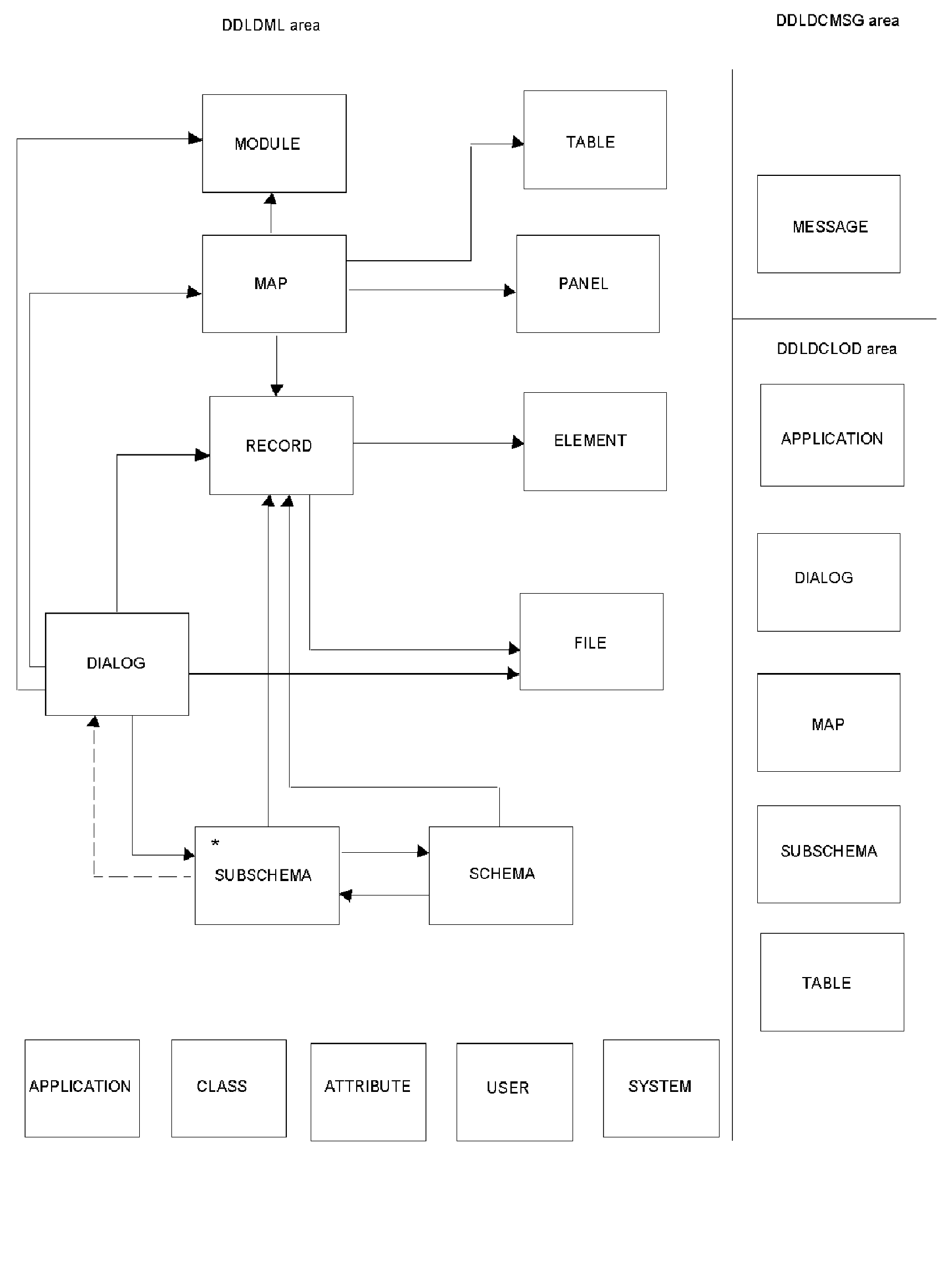
Extract Path for SUBSCHEMA when LEVEL = ENTITY
This section describes the EXTRACT path for SUBSCHEMA when LEVEL = ENTITY.
EXTRACT, SUBSCHEMA=subschema-name, LEVEL=ENTITY
For the subschema specified in the EXTRACT statement:
- Extract the subschema
Extract the corresponding subschema load module from the DDLDCLOD (load) area
For each record connected to the subschema
- Extract the subschema record
- For each element connected to the subschema record
- Extract the subschema record element and all of its subordinate elements
- Extract all files associated with record
All attributes, systems, and users associated with every entity are also extracted.
Extract Path for APPLICATION when LEVEL = DIALOG
- For each record defined as a global record of the application
Extract the record
For each element connected to the global record
- Extract the global record element and all of its subordinate elements
For each IDD defined file connected to the record
- For each dialog named in a function of the application
Extract the dialog
Extract the corresponding dialog load module from DDLDCLOD (load) area
- For each process module connected to the dialog and for each included process module within the process module
- Extract the process module source
- For each message code in the process module source
- Extract the message from DDLDCMSG (message) area
- For each referenced dialog within the process module source
- Extract the dialog and its components (start at step 2. above)
- For each record connected to the dialog
- Extract the record
- For each element connected to the dialog record
- Extract the dialog record element and all of its subordinate elements
- For each IDD defined file connected to the record
- For each file used by the dialog
- For the subschema connected to the dialog
- Extract the schema connected to the subschema
- For each record connected to the schema
- For each subschema connected to the schema
-Extract the subschema
- Extract the corresponding subschema load module from DDLDCLOD (load) area
- Extract each Logical Record Facility work record used by the subschema
- For each record connected to the subschema
- Extract the Record
- Extract the subschema record element and all of its subordinate elements
- Extract the map connected to the dialog
Extract the corresponding map from DDLDCLOD (load) area
For each message code in the map
- Extract message from DDLDCMSG (message) area
For each edit and/or code table used in the map
- Extract the table
- Extract the corresponding table load module from DDDLCLOD (load) area
For each work record used in the map
- Extract the map record
- For each element connected to the map record
- Extract the map record element and all of its subordinate elements
For the panel connected to the map
For each help module connected to the map
- Extract the module source
- Extract the map help load module
All attributes, systems, and users associated with every entity are also extracted.
Copyright © 2014 CA.
All rights reserved.
|
|