

Through clustering, users can store related entities close together in the database. Clustering allows a business application to access related entities quickly and efficiently. To ensure optimal processing, you need to base your database sizing calculations on the size of a cluster.
If you don't plan the use of storage resources effectively, the system may be unable to fit an entire cluster on a single page. Overflow conditions may occur, causing the system to perform two or more I/Os to access each application cluster. For a detailed discussion of overflow conditions, see "Overflow Conditions" earlier in this section.
Procedure
You can use the following procedures to calculate the size of a cluster:
Note: In an SQL implementation, linked clustered relationships always contain NEXT, PRIOR, and OWNER pointers. Linked indexed relationships always contain INDEX and OWNER pointers.
Note: If any entity in the cluster is the parent of an indexed relationship, you need to allow space for storage of the internal index entities.
Sample cluster size calculation
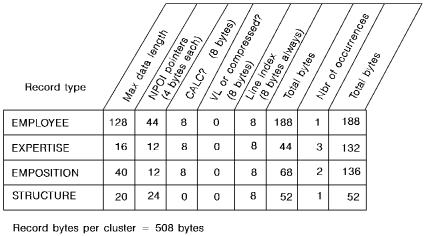
The following diagram shows how the size of a cluster is determined.
In the EMP-DEMO-REGION area, 508 bytes will be required to store a complete cluster of EMPLOYEE, EXPERTISE, EMPOSITION, and STRUCTURE entities.
Note: If one or more indexes are to be included in the cluster, refer to the index size calculations later in this chapter.
The above calculations are for a non-SQL implementation. If this is an SQL implementation, note that the data length and index pointer options can differ.
|
Copyright © 2014 CA.
All rights reserved.
|
|