Local Mode Considerations
The DDL compilers can be run under the central version or in local mode. If the central version has access to the DDLDML or DDLDCLOD area of the dictionary in update usage mode, an attempt to execute a compiler in local mode without specifying USAGE RETRIEVAL in a SIGNON statement will terminate with an error code of 0966.
To ensure the integrity of the dictionary, either journal local mode compilations or back up the dictionary before each local mode compilation. The central version uses automatic recovery procedures to ensure the integrity of the dictionary.
Naming the Dictionary and System
In an operating environment with multiple dictionaries, the name of the dictionary to be accessed (or the DC/UCF system on which it resides) can be specified through SYSIDMS parameters or on the compiler SIGNON statement or the command facility CONNECT statement. If specified in both places, the SIGNON or CONNECT specification takes precedence. If specified in the SYSIDMS file, the name of the dictionary is specified using DICTNAME and the DC/UCF system on which it resides is specified using DICTNODE.
Note: For more information about the SYSIDMS parameter file, see Chapter 25, “Dictionaries and Runtime Environments".
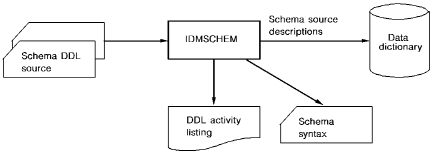
Compiling a Non-SQL Defined Schema
To compile a schema in batch mode, execute the program IDMSCHEM. Input and output are as follows:
|
Mode |
Description |
|---|---|
|
Input |
Schema source statements |
|
Output |
A card image file containing schema syntax,if the source input contains a PUNCH statement |
Note: To compile an SQL-defined schema, you submit SQL DDL statements through the CA IDMS Command Facility. For sample job streams, see the CA IDMS Common Facilities Guide.
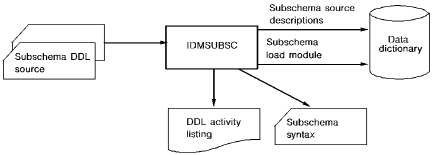
Compiling a Subschema
To compile a subschema in batch mode, execute the program IDMSUBSC. Input and output are as follows:
|
Mode |
Description |
|---|---|
|
Input |
Subschema source statements |
|
Output |
A card image file containing schema syntax, if the source input contains a PUNCH statement |
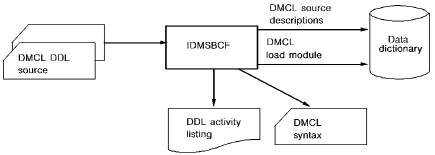
Defining Segments, DMCLs, and Database Name Tables
To define a DMCL in batch mode, execute the program IDMSBCF (the CA IDMS Command Facility). Input and output are as follows:
|
Mode |
Description |
|---|---|
|
Input |
Segments, DMCL, and database name table source statements as described in Physical Database DDL Statements. |
|
Output |
|
Note: For more information about sample IDMSBCF job streams, see the CA IDMS Common Facilities Guide.
|
Copyright © 2014 CA.
All rights reserved.
|
|