

Types of Variable-Length Records
Internally, CA IDMS/DB treats the following types of records as variable-length:
|
|
Description |
|---|---|
|
Fixed-length compressed records |
Records with a fixed length that are compressed through a specified compression routine. Although the length of these record types is fixed from the point of view of user programs, compression makes them internally variable. |
|
Variable-length records |
Records (either compressed or uncompressed) the length of which depends on a variable field (that is, records that contain an OCCURS DEPENDING ON clause). |
Since you cannot anticipate the total length of either of these types of records, specify, in the schema, the following information:
Steps to Store a Variable-Length Record
Using the values specified for minimum root and minimum fragment, CA IDMS/DB performs the following steps to store a variable-length record:
Variable-Length Indicator
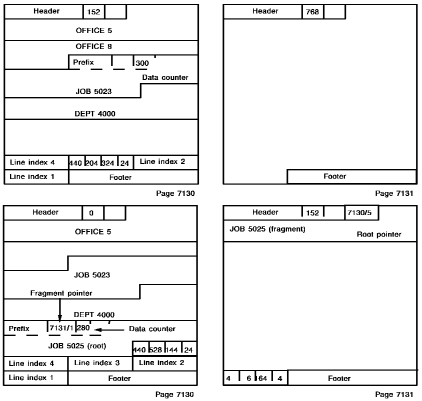
In the root, CA IDMS/DB places an extra pointer at the end of the prefix to point to the first fragment. At the beginning of the data portion of the root, CA IDMS/DB adds a 4-byte variable-length indicator (VLI) The VLI contains a 2-byte counter used to keep track of the size of the data portion of the entire record (including four-bytes for the VLI). The record-length field in the line index for a root segment contains the length of the portion of the record (prefix and data) that is stored on the home page.
SR4 System Record
Each fragment contains a one-pointer prefix that points to the next fragment; the last fragment points back to the root. Fragments are placed on a page in the same manner as any record. A fragment is considered an SR4 system record; the record-id field in the line index of a fragment is always set to a value of 4.
Storing a Variable-Length Record
In the following example, the JOB 5023 record fits entirely on page 7130; because the JOB record is a compressed record, it is a variable-length record and CA IDMS/DB includes a 4-byte variable-length indicator (VLI) in it, bringing the total data length of the record to 300 bytes. CA IDMS/DB cannot store the entire JOB 5025 record on page 7130; however, the page does have sufficient space for a root. CA IDMS/DB stores the root portion of JOB 5025 on page 7130 and includes a VLI, bringing the data portion of the entire record to 280 bytes. CA IDMS/DB stores the remainder of the record on page 7131 as a fragment. Note that the record-id field for the last line index on page 7131 is 4, indicating that the record is a fragment.
Returning Fragments to the Home Page
On future accesses (GET, OBTAIN, or SELECT) of a fragmented variable-length record, CA IDMS/DB may reduce the number of fragments. If the area is readied in update mode and the home page has sufficient space to hold the entire record, CA IDMS/DB returns the fragments to the page. The fragments (minus fragment pointers) are concatenated to the root and physically deleted from the pages on which the fragments were located; the fragment pointer in the root is set to point to itself. Adjustments are made to the space available count in the page header and to the record length in the record's line index.
Page Reserve
When the size of a variable-length record is increased by a DML MODIFY command, CA IDMS/DB may create additional fragments for the record. If you anticipate a general increase in the size of variable-length records in an area, specify a page reserve for the area to decrease the possibility that CA IDMS/DB will create fragments.
A page reserve sets aside a specified number of bytes on each database page in an area for modification of variable-length records. CA IDMS/DB cannot use this reserved space to store any kind of record.
Specify an area's page reserve in the physical database definition(s) for the area using either a CREATE AREA statement or in an area override statement within the DMCL(s) that include the area's segment. An adequate page reserve is typically 30 percent of the area's size. Use the following criteria to estimate the size of the page reserve:
When you specify a page reserve, you do not affect the physical structure of the database. In fact, you can vary the page reserve for an area by using (at different times) several DMCL modules with different page reserves.
|
Copyright © 2014 CA.
All rights reserved.
|
|