

What is a Space Management Page?
CA IDMS reserves selected pages, called space management pages (SMPs), to keep track of the available space on each page. These pages are filled with 2-byte items called space management entries. Each space management entry, depending on the entry's relative position on the page, corresponds to a page in the area. The first entry corresponds to the space management page itself, the second entry to the first page following the space management page, and so on.
Number of Pages Managed by SMP
The number of pages managed by one space management page is the page size minus 32 (header and footer) divided by 2 (two bytes per space management entry).
For example, a space management page for an area whose page size is 800 bytes holds 384 entries. The first entry is for the space management page itself. If the area contained 900 pages, the area would require three space management pages. The first space management page would be the first page in the area, the second would be the 385th page, and the third would be the 769th page.
FORMAT Utility Initializes SMP Entries
For pages that will contain record occurrences, the FORMAT utility initializes space management entries to a value equal to the page size of the area minus the number of bytes used by the header and footer (that is, the amount of usable space on each page). The first space management entry is for the space management page and is initialized to zero. In the previous example, the space management entries for data pages would be initialized to a value of 768.
Accessing Space Management Pages
After initialization, space management pages are accessed only in the following situations:
Actual Space Available
The actual space available for each page is not maintained constantly to avoid accessing the space management page each time a record is stored or erased. Instead, a page is considered empty (for space management purposes) until either of the following conditions occurs:
A page returns to the empty status when an erase operation puts the space used back below the 70 percent threshold.
Consequently, unless a large enough page size is specified, CA IDMS/DB might attempt to store records that will not physically fit on a page.
Suppose, for example, that a page is 60 percent full and marked as empty in the space management page, and that a record occurrence being stored is 45 percent of the page size. Using information maintained in the space management page, CA IDMS/DB would determine that the record occurrence could fit on the page, when it could not.
To ensure that CA IDMS/DB can successfully store all records, specify a page size that allows CA IDMS/DB to store the largest fixed-length record on 30 percent of the page.
Determining Minimum Page Size
Use the following algorithm to determine minimum page size:
min-page-size = ((record-length + 8) / 0.30) + head-foot-length
where:
Reporting on Area Space Utilization
The PRINT SPACE utility statement reports on:
Use of the Space Management Page
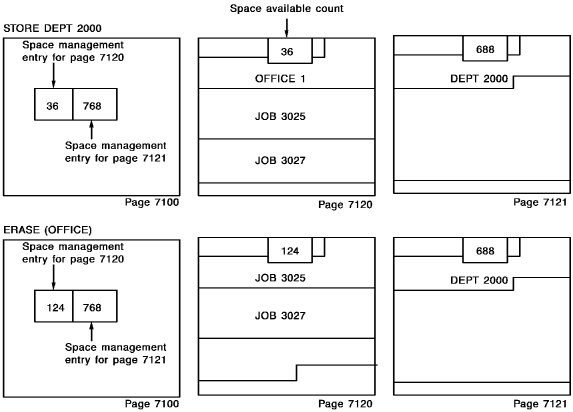
The following diagram shows the use of the space management page.
CA IDMS/DB changes the space management entry for page 7120 from 768 (the page size minus 32) to 36 (the actual number of bytes left on page 7120) after storing the JOB 3027 record. Thus, after consulting the space management page, CA IDMS/DB knows that it cannot store the DEPT 2000 record (72 bytes long) on page 7120 because of insufficient space, and stores it on the next page.
When the OFFICE 1 record is deleted from page 7120, the page is still more than 70 percent full, so CA IDMS/DB moves the value 124 (the actual amount of space available) to the space management entry.
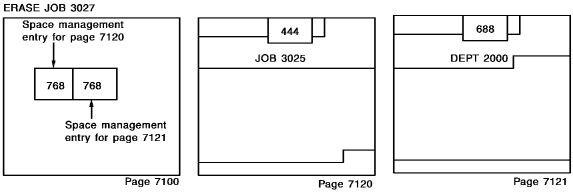
When the JOB 3027 record is deleted, however, page 7120 is less than 70 percent full and the space management entry is reinitialized to 768 bytes.
|
Copyright © 2014 CA.
All rights reserved.
|
|