

Due to System Failure
Warmstart occurs when CA IDMS starts up and, by examining the journal files, it detects that the previous execution of the DC/UCF terminated abnormally CA IDMS uses the journal files to rollback or restart all transactions that were active when the system failed.
How You Respond to a System Failure
In response to a DC/UCF system failure, you should immediately restart the system. In a data sharing environment, or if distributed transactions were active at the time of failure, it is particularly important to restart failing systems as soon as possible, since some data may be inaccessible within other systems until the failing system has completed its warmstart.
Note: Do not offload any journal files between the time of system failure and your first attempt to warmstart the system. If you must offload, use the READ option of the ARCHIVE JOURNAL utility statement.
Data Sharing Considerations
In general, you respond to a DC/UCF system failure in the same way regardless of whether the system is a member of a data sharing group. However, certain types of failures, such as a loss in connectivity to a coupling facility, require special action. Additionally, if a member is unable to warmstart and manual recovery becomes necessary, then data sharing introduces additional considerations.
More Information
Incomplete Distributed Transactions at Startup
When restarting a failed central version, warmstart identifies incomplete distributed transactions that were active at the time of failure. Depending on where in the commit process the failure occurred, these transactions are completed by warmstart or are restarted. If restarted, the transactions remain active until resynchronization takes place with the other resource or transaction managers involved in the transaction or until the transactions are manually completed.
If a restarted transaction is in an InDoubt state, then any locks held by that transaction at the time of failure are reacquired and held until the transaction is completed. Since these locks prevent access to resources that were updated by the transaction, it is important to restart all failed systems as soon as possible in order that resynchronization can complete the transaction and free the locks.
Note: For more information about recovering distributed transactions, see 21.3.3, “Resynchronization” and 21.4, “Distributed Transaction Recovery Considerations”.
The following sample messages might be displayed when a distributed transaction is restarted:
IDMS DC202038 V74 In-Doubt Transaction-ID 1416 will be added to the
unrecovered transaction list
IDMS DC202051 V74 Warmstart COMPLETE, but recovery of SOME transactions
have been DEFERRED until later in the startup
IDMS DB342017 V74 T1 Will lock Transaction-ID 1416
IDMS DB342019 V74 T1 DTRID SYSTEM74::01650C90A708A9B2-01650C8C4207D9FF
active at startup
IDMS DB342020 V74 T1 DTRID SYSTEM74::01650C90A708A9B2-01650C8C4207D9FF
has been restarted
IDMS DB342022 V74 T1 In-Doubt Transaction 1416 has been restarted
Incomplete Warmstart
Certain errors, such as I/O errors or open failures, may prevent warmstart from rolling out the changes in one or more database files. If this occurs, warmstart will continue, the system will start up and the transactions affected by the error will be restarted. Once restarted, automatic rollback will be invoked to again attempt to remove the effect of the unrecovered transactions. If automatic rollback is successful, no further action is necessary although the reason for the original failure should be investigated and corrective action taken if necessary. If automatic rollback is not successful, the unrecovered transactions will be suspended just as if they had encountered an I/O error. To correct the situation, You respond as if a database file I/O error occurred. First take whatever action is necessary to make the file available, such as restoring a damaged file or using DCMT commands to correct a data set name. Then restart the suspended transactions by issuing a DCMT VARY FILE ACTIVE command.
Note: For more information about responding to I/O errors, see 21.7, "Recovery Procedures from Database File I/O Errors".
How Warmstart Works
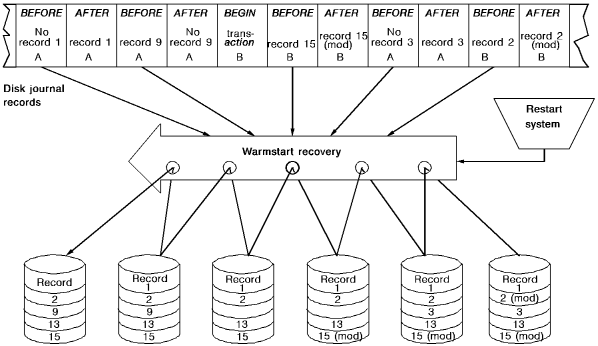
During warmstart, CA IDMS/DB does the following:
Example
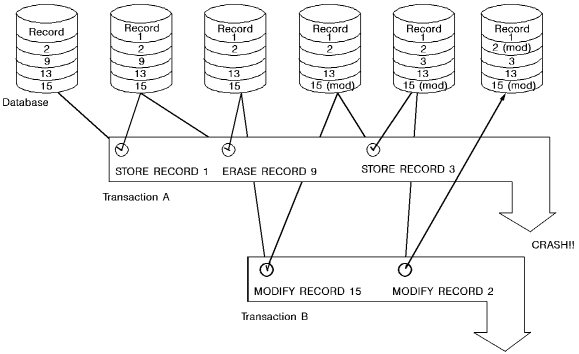
The following example shows how a warmstart operation is done. In this example, the two transactions are active at the time of the system crash. Both are recovered automatically when the system is restarted.
|
Copyright © 2014 CA.
All rights reserved.
|
|