

RECORD statements identify a non-SQL database record type. Depending on the verb, options, and substatements coded, the RECORD statements can also:
The schema compiler applies RECORD statements to the current schema.
The ADD RECORD statement creates a new schema record description in the dictionary and associates it with the current schema.
Unless the SHARE clause is used, ADD RECORD creates a record structure for the schema record. The record structure's name is the same as that of the schema record. The structure is automatically assigned a version number, which distinguishes the record from others that have the same name in the dictionary. The schema compiler uses NEXT HIGHEST when assigning record version numbers.
Note: It is better to use the SHARE clause rather than define the record structure in the schema. The SHARE clause allows you to maintain control of the record versions stored in the dictionary.
The SHARE STRUCTURE and SHARE DESCRIPTION clauses allow the schema to share the structure of either a dictionary record (IDD record) or a record that belongs to another schema.
The SHARE clause connects an existing record structure to the schema record. The schema record shares the dictionary description of an existing record, including its synonyms, elements, and element synonyms. The SHARE clause does not create a new record structure.
Note the following considerations about using SHARE:
Do not use ELEMENT substatements for any schema record that shares a structure. Once SHAREd, a schema record should always be maintained through SHARE clauses.
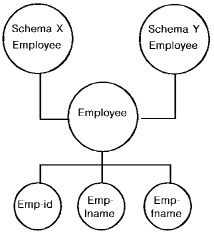
Both SHARE STRUCTURE and SHARE DESCRIPTION cause the schema record to share the structure of an existing record.
The following diagram shows two schemas sharing the structure of the EMPLOYEE record.
When using SHARE STRUCTURE, you must supply the appropriate:
The following example shows a RECORD statement for SKILL which shares the structure of the SKILL record in the schema OTHRSCHM.
add record name is skill
  share structure of record skill
     of schema othrschm
  location mode is calc using skill-code
     duplicates are not allowed
  within area org-demo-region
  minimum root length is control length
  minimum fragment length is record length
  call idmscomp before store
  call idmscomp before modify
  call idmsdcom after get.
SHARE DESCRIPTION allows the schema record to share the structure of a record that belongs to another schema. Unlike SHARE STRUCTURE, SHARE DESCRIPTION copies the entire record description (record ID, location mode, etc.) from the owning schema to the schema record named as the object of the ADD statement. You do not have to add anything.
In the following example, the SKILL record in the current schema shares the structure of the SKILL record in EMPSCHM (version 1). Each record has its own copy of nonstructural information.
add record name is skill
  share description of record skill
    of schema empschm version 1.
The COPY ELEMENTS substatement uses the structure of an existing record type to generate new element descriptions for the record type. (The SHARE clause of the RECORD statement does not generate new element descriptions; it uses existing ones.)
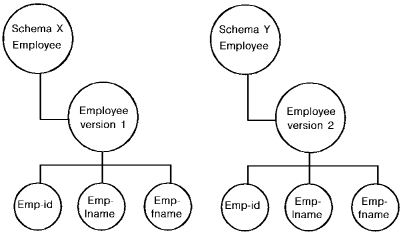
The COPY ELEMENTS substatement requests that all elements from a record description already stored in the dictionary be included in the new record structure. The record description may have been stored through another schema or through the IDD DDDL compiler. COPY ELEMENTS can be used in place of ELEMENT substatements (see below) to define all of the record's elements or only some of them. When COPY ELEMENTS supplies some of the record's elements, use ELEMENT substatements to supply the rest.
The differences between SHARE STRUCTURE, SHARE DESCRIPTION, and COPY ELEMENTS are as follows:
|
SHARE DESCRIPTION |
SHARE STRUCTURE |
COPY ELEMENTS |
|---|---|---|
|
Shares the structure of another schema record |
Shares the structure of either a dictionary record (IDD record) or another schema record |
Creates new element descriptions based on existing record structures |
|
Uses existing element descriptions |
Uses existing element descriptions |
Creates new element descriptions |
|
Copies the nonstructural part of the existing schema record:
|
Does not copy nonstructural information |
Does not copy any record information |
The ELEMENT substatements identify the element of a schema record. Because elements cannot exist in a database except as components of a record, schema elements are considered subordinate to schema records. Consequently, all ELEMENT substatements for a single record must immediately follow the RECORD statement in a single execution of the schema compiler.
The ELEMENT substatement uses COBOL-like syntax to describe elements. Additional clauses provide CA IDMS/DB-specific information and documentational entries.
The ELEMENT substatement associates an element with the record and, if the element does not already exist, adds the element description to the dictionary. The element descriptions cannot be modified individually or deleted using these substatements. To change element descriptions, modify the record description and respecify all of the record's elements.
The minimum ELEMENT substatement required for the element to be a valid schema component depends on whether the element is a group or elementary item:
|
Item |
Required |
|---|---|
|
Group item |
|
|
Elementary item |
|
Minimal ELEMENT substatements are shown below:
02 claim-date.
   03 claim-year   pic 99.
   03 claim-month  pic 99.
   03 claim-day    pic 99.
You can mix ELEMENT and COPY ELEMENTS substatements in any sequence necessary to describe the structure of the record. However, because the level number of copied elements are the same as those in the base record, you should take care in mixing elements of different levels. To mix ELEMENT and COPY ELEMENTS substatements and to change the level numbers within the record, follow these steps:
In the following example, the structure of NEW-COVERAGE is generated by copying elements from the COVERAGE record and the IDD-built CARRIER-DETAIL record, and by coding new element descriptions in line:
add record name is new-coverage
  location mode is via emp-coverage set
  within emp-demo-region area
  copy elements from record coverage
    of schema empschm version 1.
  02 cov-carried-id   pic 99.
  02 cov-carrier-name pic x(20).
  copy elements from record carrier-detail.
The result of the above activity is as follows:
01 new-coverage
   02 cov-select-date.
      03 cov-select-year    pic 99
      03 cov-select-month   pic 99
      03 cov-select-day     pic 99
   02 cov-termin-date.
      03 cov-termin-year    pic 99
      03 cov-termin-month   pic 99
      03 cov-termin-day     pic 99
   02 cov-type              pic x.
   02 cov-insplan-code      pic xxx.
   02 cov-carrier-id        pic 99.
   02 cov-carrier-name      pic x(20).
   02 cov-carr-no-of-claims pic 99 comp.
   02 cov-carr-claims-processed
                        occurs 0 to 100
                        depending on
                        cov-carr-no-of-claims
      03 cov-carr-payment   pic x.
         88 prompt          value '9'.
         88 over-30-days    value '4'.
         88 over-60-days    value '1'.
      03 cov-carr-courtesy  pic x.
      03 cov-carr-check     pic x.
         88 cleared         value 'C'.
         88 bounced         value 'B'.
Note: If you specified in the SCHEMA statement that record IDs were to be set up automatically, you can still override the ID in the RECORD statement.
The following example defines a schema record which has the same description as another record in schema DEMOSCHM. The employee record will be stored CALC based on the EMP-ID element with a portion of the EMP-DEMO-REGION area. The portion of the area is defined with the SUBAREA clause. The subarea name is actually defined in the DMCL and resolved at runtime.
add record name is employee
   share structure of record emp version is 10 of schema demoschm
   location mode is calc using (emp-id) duplicates are not allowed
   within area emp-demo-region
         subarea low-pages
   call idmscomp before store
   call idmscomp before modify
   call idmsdcom after get.
|
Copyright © 2014 CA.
All rights reserved.
|
|