

If you defined a non-SQL schema using symbolic names for subareas, VIA-record displacement, or index attributes, you must assign values to the symbolic parameters in the physical definition of the areas.
The following schema definition of EMPSCHM illustrates the use of a subarea symbolic. The EMPLOYEE record is stored in the EMP-SUBAREA portion of the EMP-DEMO-REGION area.
add schema empschm.                                          ─┐
   add area emp-demo-region.                                  │
   add record employee                                        │ Logical
     location mode is calc using id-0415                      │ definition
     within area emp-demo-region                              │
        subarea emp-subarea.                                 ─┘
Subarea EMP-SUBAREA can be assigned different page ranges in different physical databases. For example, in segment TEST1, EMP-SUBAREA maps to pages 2002 through 2051; in segment TEST2, EMP-SUBAREA maps to pages 5002 through 7000:
create area test1.emp-demo-region                            ─┐
   primary space 100                                          │
   from page 2001                                             │
   subarea emp-subarea offset 1 for 50 percent  ◄───────┐     │
      .                                                 │     │ Physical
      .                                                 │     │ definition
create area test2.emp-demo-region                       │     │
   primary space 2000                                   │     │
   from page 5001                                       │     │
   subarea emp-subarea offset 1 for 100 percent  ◄──────┘    ─┘
      .
      .
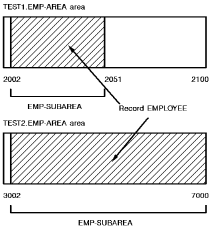
Percent Specification and Area Expansion
To allow subarea page ranges to expand in proportion to increases in the area's page range, use an OFFSET specification with a percentage value in the FOR parameter. For example, the default of OFFSET 0 FOR 100 PERCENT indicates that the subarea is the entire area regardless of future expansion.
|
Copyright © 2014 CA.
All rights reserved.
|
|