

Program Status Fields
The IDMS communications block contains the following fields that describe program status information:
The ERRSTAT field and its use are described under Testing for DML Error-Status Codes later in this chapter.
Note: A program that consists of two or more run units must reinitialize the ERRSTAT field to 1400 after finishing one run unit and before binding the next.
Page information is not changed if the call to the DBMS results in a nonzero status condition.
Page information is a 4-byte field consisting of the following sub-fields:
The PGINFO field overlays part of the IDBMSCOM area in the subschema control.
The dbkey radix portion of the page information can be used in interpreting a dbkey for display purposes and in formatting a dbkey from page and line numbers. The dbkey radix represents the number of bits within a dbkey value that are reserved for the line number of a record. By default, this value is 8, meaning that up to 255 records can be stored on a single page of the area. Given a dbkey, you can separate its associated page number by dividing the dbkey by 2 raised to the power of the dbkey radix. For example, if the dbkey radix is 4, you would divide the dbkey value by 2**4. The resulting value is the page number of the dbkey. To separate the line number, you would multiply the page number by 2 raised to the power of the dbkey radix and subtract this value from the dbkey value. The result would be the line number of the dbkey. The following two formulas can be used to calculate the page and line numbers from a dbkey value:
Page-number = dbkey value / (2 ** dbkey radix)
Line-number = dbkey value - (page-number * ( 2 ** dbkey radix))
Note: (native VSAM users) The DIRDBKEY field can be used only when storing a record in a native VSAM relative record data set (RRDS). This field must be initialized by the user to the relative record number of the record being stored.
Updating the Fields
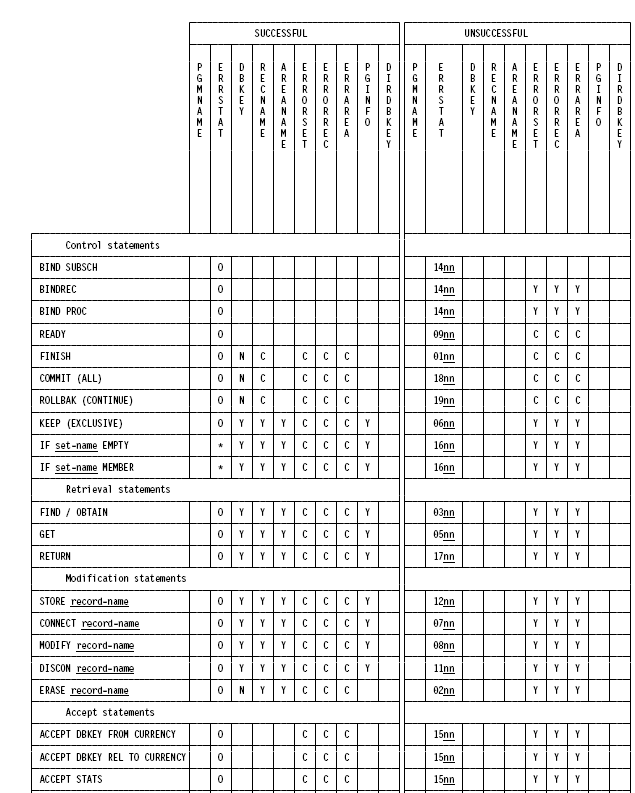
After a call to the DBMS, one or more of the fields described above may be updated, depending on the DML statement issued and whether or not the statement was executed successfully.
Example of Updating Fields
The following figure illustrates the updating process; only those fields accessed by the runtime system are shown. Fields used internally by the DBMS are not shown. Blank fields are not updated by DML statements.
Key for this figure:
|
* |
If true, field is set to zone decimal zeroes (0000); if false, field is set to 1601 |
|
0 |
Field is set to zone decimal zeroes |
|
Y |
Field is updated |
|
C |
Field is cleared to spaces |
|
N |
Field is set to null db-key value (-1) |
|
nn |
Specific minor error code |

|
Copyright © 2014 CA.
All rights reserved.
|
|