

The @FIND/@OBTAIN OWNER statement accesses the owner record of the current set occurrence. You can use this statement to retrieve the owner record of any set whether or not that set has been assigned owner pointers.
Note: Native VSAM users—The @FIND/@OBTAIN OWNER statement is not valid since the owner records are not defined in native VSAM data sets.
Currency
To execute an @FIND/@OBTAIN OWNER statement, currency must be established for the specified set.
Note: When a record declared as an optional or manual member of a set is retrieved, it is not established as current of set if it is not currently connected to the named set. A subsequent attempt to retrieve the owner record will instead locate the owner of the current record of set. In such cases, you should determine whether the retrieved record is actually a member of the named set before issuing the @FIND/@OBTAIN OWNER statement. The @IF statement (see @IF in this chapter) can be used for this purpose.
Following successful execution of an @FIND/@OBTAIN OWNER statement, the accessed record becomes the current record of run unit, its area, its record type, and all sets in which it currently participates as member or owner. If the current record of set is the owner record when the statement is executed, currency in the specified set remains unchanged.
Syntax
►►─┬─ @FIND ───┬────── OWNER ─────────────────────────────────────────────────►
   └─ @OBTAIN ─┘

 ►─── ,SET=set-name ──────────────────────────────────────────────────────────►

 ►─┬───────────────────────────┬──────────────────────────────────────────────►◄
   └─ ,KEEP= ─┬─ SHARED ──────┬┘
              └─ EXCLUSIVE ───┘
Parameters
Accesses the owner record of the specified set occurrence.
Names the set whose owner record is to be retrieved. Set-name must be a set included in the subschema; it can be a register, a user-defined variable, or a user-supplied variable enclosed in quotes.
Places a shared or exclusive lock on the accessed record:
Places a shared lock on the accessed record.
Places an exclusive lock on the accessed record.
Example
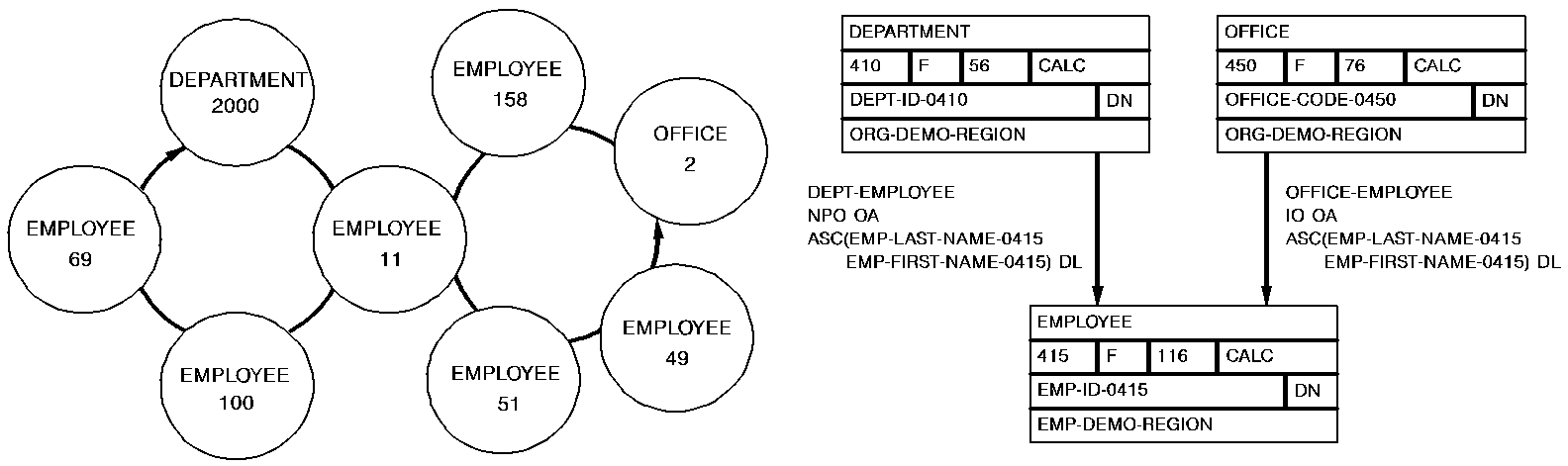
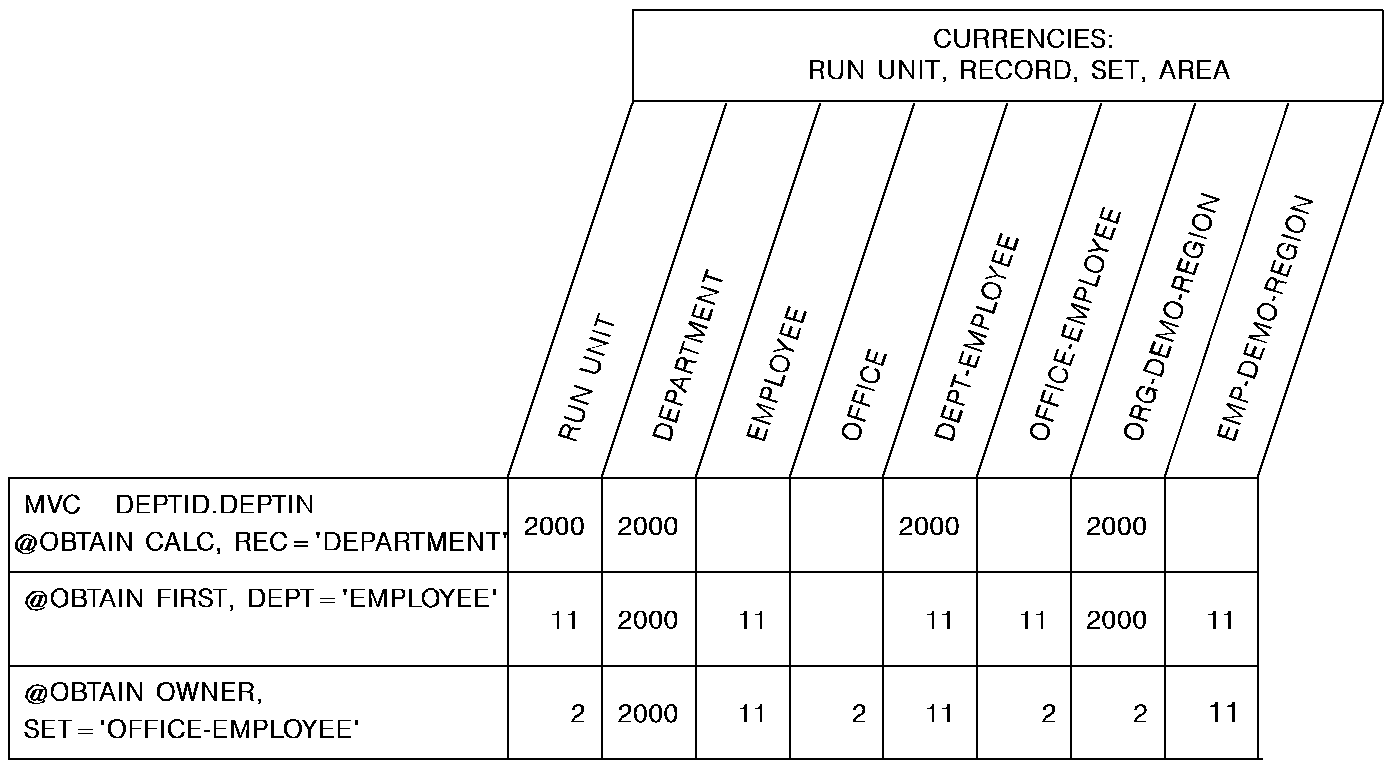
The following figure provides an example of how you would use the @OBTAIN OWNER statement, in conjunction with other @OBTAIN statements, to navigate the database and access the owner record of the OFFICE-EMPLOYEE set from the owner record occurrence of the DEPT-EMPLOYEE set.
Status codes
After completion of the @FIND/@OBTAIN OWNER function, the ERRSTAT field in the IDMS communications block indicates the outcome of the operation. The following is a list of the acceptable status codes for this function and their corresponding meaning:
The request has been serviced successfully.
The area in which the named record participates has not been readied.
Currency has not been established for the named record, set, or area.
The named record or the named set is not in the subschema, or the named record is not defined as a member of the named set. The program has probably invoked the wrong subschema. or the record name has been misspelled.
The subschema specifies an access restriction that prohibits retrieval of the named record.
A record occurrence has been encountered whose record type is not a member or owner of the set as it is defined in the subschema.
A database file will not open properly
When the KEEP parameter is specified as part of an @FIND/@OBTAIN statement, a major code of 06 will be returned if an error occurs during the KEEP processing (see @KEEP in this chapter). The major code of 03 states that an error has occurred in the @FIND/@OBTAIN processing.
|
Copyright © 2014 CA.
All rights reserved.
|
|