

You can also use the RESTART parameter in conjunction with the STOPAFTER parameter to perform a reorganization in increments. The planned pause between reorganization steps gives you time to back up files, manage disk space, or to perform any other necessary operations functions.
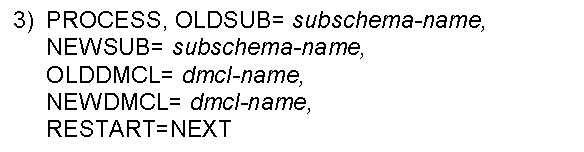
For example, you can stop processing after the UPDLINK step has completed by using the STOPAFTER parameter; then use RESTART to resume execution at the next step, STORE. The use of STOPAFTER and RESTART is optional. However, if STOPAFTER is used to halt processing, RESTART is required to resume processing.
Perform backup procedures--For users who need to conform with operations standards and want to reorganize a large area or a large database, the stop/restart feature allows you to stop the reorganization process to back up work files between reorganization steps.
Interrupt processing to perform operations functions-- The stop/restart feature was also designed to accommodate scheduled data processing operations functions that require the entire machine. CA IDMS/DB Reorg allows you to interrupt its processing to IPL, back up disks, or to perform other operations functions.
Manage disk space effectively--With CA IDMS/DB Reorg's convenient stop/restart feature, you can interrupt processing and run CA IDMS/DB Reorg in two or more parts. This allows you to allocate space for files as needed, rather than allocating all data sets at the beginning of the run. In this way, you can execute CA IDMS/DB Reorg in multiple steps to allow the new database to use disk space that was used by the old database.
Examples of STOPAFTER and RESTART:
|
Copyright © 2014 CA.
All rights reserved.
|
|