

Before using CA IDMS/DB Audit parameter statements, review the following exhibits:
|
Example |
Function |
|---|---|
PROCESS |
Keywords appear in UPPERCASE. The minimum required portion of each keyword is UNDERSCORED. If a portion of or an entire keyword is not underscored, you can omit that portion or that keyword. |
,AEA=area-name |
Variables appear in lowercase italics. You must substitute an appropriate value for each variable. |
[,BEGIN=page-number] |
Brackets indicate optional clauses. |
          / CRITICAL \
PROCESS= < ALL        >
         \ NONE     /
|
Braces enclose two or more options. You must select one of the options |
│ ,PAGES │ │ ,CALCSETS │ │ ,USERSETS │ │ ,LDEL │ |
A pair of double bars encloses two or more options. You must select one or more of the options. Do not specify an option more than once. |
Figure 3.1: Notation Conventions
|
Item |
Rule |
|---|---|
|
Order of Parameter Statements |
You must enter the PROCESS statement first. You can enter all other parameter statements in any order. Within a parameter statement you can enter options in any order. |
|
Continuing a Parameter Statement |
To continue a parameter statement onto the next record, key in a trailing comma. Do not split a keyword phrase between two records. |
|
Entering Blanks In Parameter Statements |
You can enter blanks (character spaces) between keywords to improve readability in a parameter statement without affecting processing. Do not, however, embed blanks within a keyword or value field. |
|
Entering Parameter Statements |
On an 80-character input record, you must enter all parameter syntax between positions 1 through 72. |
|
Comments |
Enter an asterisk (*) in column 1, to indicate a comment. |
Figure 3.2: Parameter Syntax Rules
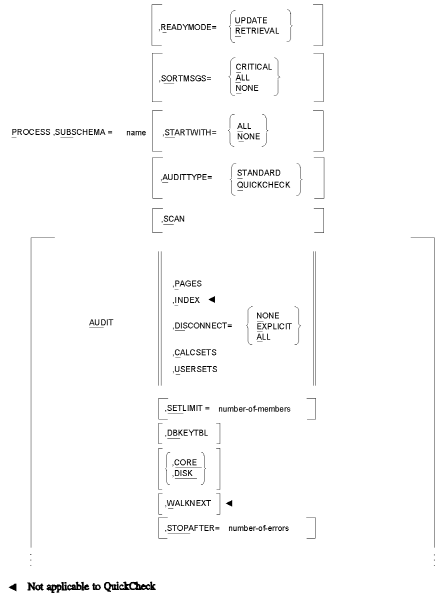
Figure 3.3a: CA IDMS/DB Audit Parameter Syntax Summary
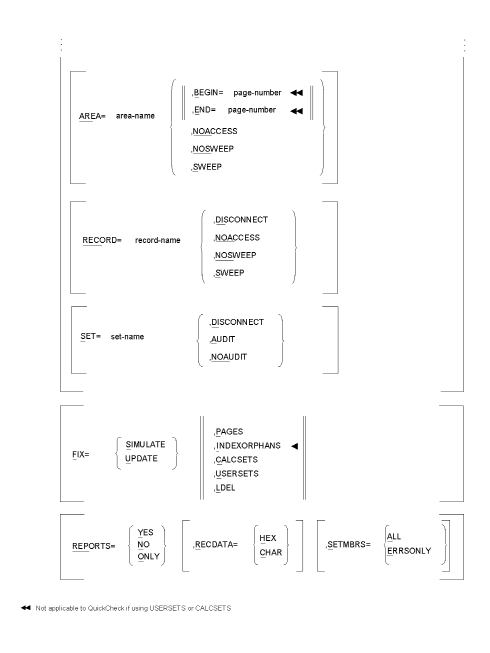
Figure 3.3b: CA IDMS/DB Audit Parameter Syntax Summary
|
Copyright © 2013 CA.
All rights reserved.
|
|