

When you specify either PROCESS=REPORTS or PROCESS=ALL, in the AUTOMATIC Mode all CA IDMS/DB Analyzer reports are produced. In this case, use the REPORT statement to suppress the production of a specific CA IDMS/DB Analyzer report. Use a separate REPORT statement for each report you want to suppress.
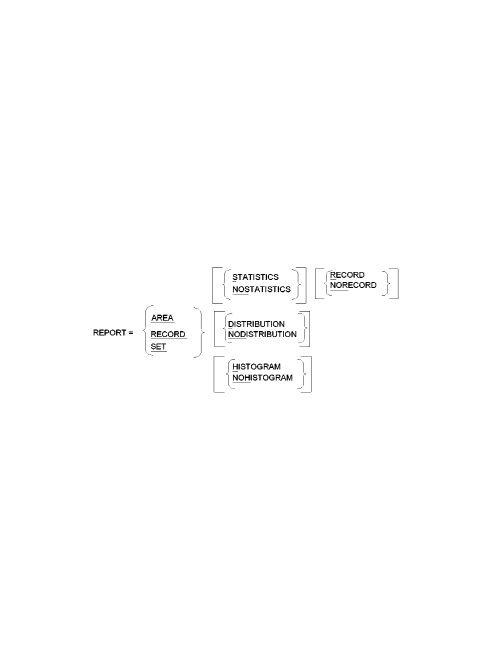
Exhibit 3.9: REPORT Statement Syntax
REPORT=
REPORT identifies the REPORT statement and is followed by the name of the CA IDMS/DB Analyzer report you want to suppress. Select only one report name for each REPORT statement that you use.
In AUTOMATIC Mode when none of the optional parameters are present:
AREA
AREA indicates that the Area Report is not to be produced.
RECORD
RECORD indicates that the Record Report is not to be produced.
SET
SET indicates that the Set Report is not to be produced. In addition, for an SR8 (integrated index) set the SR8 Index Report is not to be produced.
Use the NO version of the optional parameters to indicate that the report is to be produced, but the indicated selection of the report is to be bypassed.
  < STATISTICS   >
, \ NOSTATISTICS /
Indicates whether the Statistics section of the report is to be produced.
Default: The default is STATISTICS and does not need to be specified.
   < RECORD   >
 , \ NORECORD /
Indicates whether the Record section of the report is to be produced.
Note: The RECORD/NORECORD parameter is only valid with the AREA report to bypass the Analysis By Record section, or with the SET report to bypass the Multi-member Set section.
Default: The default is RECORD and does not need to be specified.
   < DISTRIBUTION   >
 , \ NODISTRIBUTION /
Indicates whether the Distribution section of the report is to be produced.
Default: The default is DISTRIBUTION and does not need to be specified.
< HISTOGRAM >
, \ NOHISTOGRAM /
Indicates whether the Histogram section of the report is to be produced.
Default: The default is HISTOGRAM and does not need to be specified.
|
Copyright © 2013 CA.
All rights reserved.
|
|