

Parameters › PROCESS Statement
PROCESS Statement
Use the PROCESS parameter statement to initiate CA IDMS/DB Analyzer processing. This statement consists of parameters that control all processing for the Analyzer option. The PROCESS statement must be the first statement entered. The PROCESS statement is described as follows:
- PROCESS = initiates execution of CA IDMS/DB Analyzer and indicates that processing options follow.
- ACCUMULATE indicates that you want CA IDMS/DB Analyzer to accumulate statistics from the database into an archive file, but that you do not want reports to be produced at this time.
- REPORTS indicates that you want one or more reports produced using statistics from a previously accumulated statistical file.
- ALL indicates that you want a current set of statistics to be accumulated and you want one or more reports to be produced showing this current set of statistics.
- SYNTAX indicates that you want CA IDMS/DB Analyzer to validate parameter syntax. Use this option prior to a full run to eliminate premature termination due to syntax errors.
Default: There is no default. You must choose one of these options.
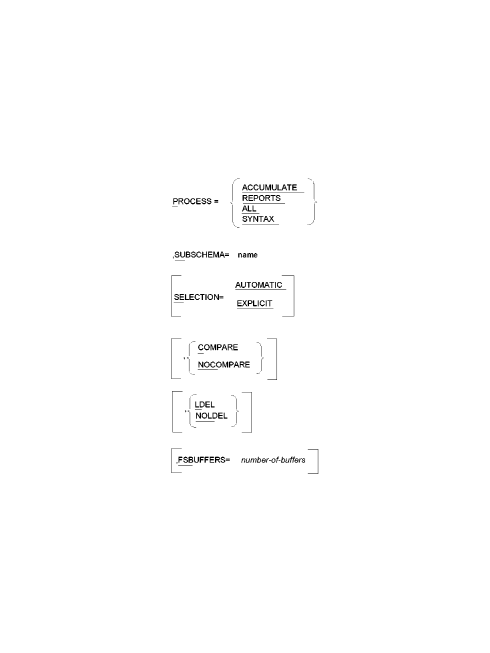
Exhibit 3.5: PROCESS Statement Syntax
Copyright © 2013 CA.
All rights reserved.
|
|