

Converting DBOMP to CA IDMS/DB › Converting DBOMP Load and Maintenance Programs
Converting DBOMP Load and Maintenance Programs
You must convert all DBOMP load and maintenance programs to CA IDMS/DB before you can run them against the CA IDMS/DB database. Converting these programs involves:
- Inserting the necessary CA IDMS/DB DML control statements to prepare the database for processing
- Replacing all DBOMP calls, process indicators, and associated logic with CA IDMS/DB DML statements and associated logic
Steps for Converting Load and Maintenance Programs
Follow the eight steps presented below to convert DBOMP Assembler, PL/I, and COBOL load and maintenance programs. To obtain the proper record names and descriptions, set names, area names, and subschema names, consult the dictionary reports produced by the IDMSRPTS utility (see the CA IDMS Utilities Guide).
- Remove all program references to work areas and work area prefixes.
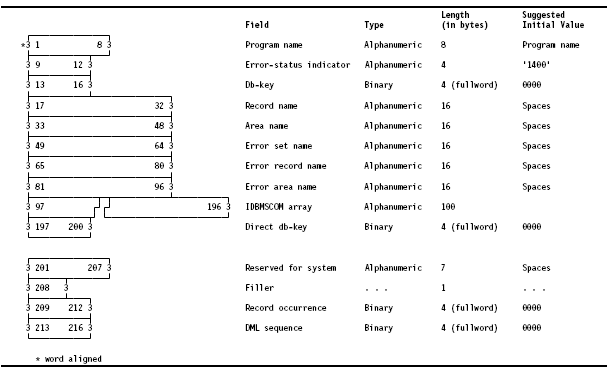
- Provide a CA IDMS/DB Communications Block for the program, as shown in the figure following this procedure.
- Allocate space in program variable storage for each CA IDMS/DB record type to be referenced in the converted program. The structure of each record type is described in the data dictionary Subschema Record Description Listing, the SUBREC report generated by the IDMSRPTS utility (see the CA IDMS Utilities Guide).
- Issue an @MODE macro (Assembler only).
- BIND the subschema and all record types to be referenced in the program.
- READY those database areas that will be accessed by the program; one READY statement can be issued for all areas, or each area can be READYed explicitly.
- Replace each DBOMP CA$LL or BMPCALL with an CA IDMS DML statement equivalent to the function requested by the process indicator in the DBOMP work area prefix. Alter the associated logic as necessary to conform with CA IDMS/DB programming requirements. The section following this list of guidelines shows the DBOMP process indicators (and commands) and their equivalent CA IDMS DML statements and associated logic.
- Check the CA IDMS/DB error status after every call to CA IDMS/DB (see DBOMP Error Codes With CA IDMS/DB Equivalents).
Note: Maintain low-level codes in converted structural maintenance programs. You can incorporate this logic into user programs as a subroutine that is invoked following routines that add records to the CA IDMS/DB database. For an example of this low-level code logic, Sample Application and Procedures; you can apply this example to user maintenance programs.
Communications Block from Step 2 of Conversion
Copyright © 2013 CA.
All rights reserved.
|
|