

Purpose
Defines a path through the database.
Syntax
     Col
     2
     ▼              ┌─────────────────────────────┐
►►── PATH path-id ┬─▼─ database-record-expression ┴┬──────────────────────┬─┬─►◄
                  │                                ├ RETURN key only ─────┤ │
                  │                                ├ ALL-MEMBERS set-name ┤ │
                  │                                └ lr-expression ───────┘ │
                  └─ lr-expression ─────────────────────────────────────────┘
Expansion of Database-record-expression
   ┌─────────────────────────────────────────────────────────────────┐
►►─▼─ database-record-name ─┬──────────────────────────────────────┬─┴────────►◄
                            └─ ( ─┬───────────┬─┬────────────┬─ ) ─┘
                                  └─ path-id ─┘ └─ set-name ─┘
Expansion of lr-expression
►►── logical-record-name ┬─────────────┬─┬─────────────────────────────────┬──►◄
                         └ ( path-id ) ┘ └┬ WHERE ┬ lr-boolean-expression ─┘
                                          └ WHEN ─┘
Expansion of lr-boolean-expression
               ┌─────────────┬─ AND ─┬────────────────────┐
               │             └─ OR ──┘                    │
               │                                          │
►►─┬─────────┬─▼─┬───────┬─┬─ dba-keyword ──────────────┬─┴─┬─────┬───────────►◄
   └─ NOT ( ─┘   └─ NOT ─┘ └─ lr-comparison-expression ─┘   └─ ) ─┘
Expansion of lr-comparison-expression
►►─┬ literal ──────────────┬─┬─ MATCHES ────────┬─┬ literal ──────────────┬───►◄
   ├ value ────────────────┤ ├─ CONTAINS ───────┤ ├ value ────────────────┤
   ├ KEY-VALUE ────────────┤ └─ test-operation ─┘ ├ KEY-VALUE ────────────┤
   └ field-name-expression ┘                      └ field-name-expression ┘
Expansion of Field-name-expression
►►── data-item-name ─┬─────────────────────────────────────────────────────┬─►
                     └ ( ┬ file-record-name ──────────────────┬┬───────┬ ) ┘
                         ├ database-record-name ──────────────┤└ level ┘
                         └┬─────────────────────────┬ lr-name ┘
                          └ database-record-name OF ┘

 ►─┬────────────────────┬─────────────────────────────────────────────────────►◄
   └─ .subscript-value ─┘
Syntax Rules
Identifies the parameter type. It must be coded starting in column 2. More than one PATH parameter can be specified in a CA Culprit run.
A unique 2-character alphanumeric string that identifies the primary path. Path-id must be coded starting in column 6; the default is **. If the CA Culprit run accesses a table, CA Culprit automatically generates a PATH parameter that specifies 01 as the path id.
For considerations that apply to path-id, see Specifying Path Identifiers.
Specifies a database record and optionally specifies an alternate path ID and set relationship. Database-record-expression can be repeated as often as required to construct a path, provided that no more than 100 record types appear on a single path and no more than 255 record types are specified for all the PATH parameters defined for the run.
See expanded syntax for database-record-expression below.
A keyword expression that can be specified only if the entry record is accessed using an index. If specified, RETURN KEY ONLY must be the last entry on the path.
When a PATH parameter specifies RETURN KEY ONLY, CA Culprit does the following:
The RETURN KEY ONLY option can be used to create a key file that contains index-key values or to compare key file values with database values.
Applies to multiple-member set relationships only. Optionally, set-name may be enclosed in parentheses.
The following figure illustrates a multiple-member set relationship.
Example of a Multiple-Member Set
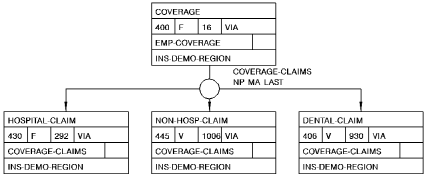
Note: The COVERAGE record is the owner of three types of member records: HOSPITAL-CLAIM, NON-HOSP-CLAIM, and DENTAL-CLAIM. COVERAGE-CLAIMS is the name of the set relationship.
ALL-MEMBERS instructs CA Culprit to access each occurrence of each record in a multiple-member set. Set-name specifies the name of the multiple-member set; the name must be enclosed in parentheses.
The following coding considerations apply to the ALL-MEMBERS option:
To access data from more than one but not all member record types, the PATH parameter must specify the ALL-MEMBERS option. The user's procedure logic or selection criteria must control processing based on the value of REC-NAME. REC-NAME indicates which member record type has been returned to the input buffer for a given string. For more information about REC-NAME, see Database Field Name References.
Note: When the ALL-MEMBERS option is specified, you must allocate enough storage space in the input buffer for each member record in the multiple-member set. For more information about specifying the size of the input buffer, see INPUT Parameter.
Indicates the name of a logical record following a string of database records on the PATH parameter. A logical record can follow database records on the PATH parameter under the following circumstances:
 PATHAA EMPLOYEE EMP-JOB-LR
*       WHERE EMP-ID-0415 EQ EMP-ID-0415 (EMPLOYEE)
See expanded syntax for lr-expression later in this chapter.
Expansion of Database-record-expression
Identifies a name of a database record. At run time, CA Culprit accesses the entry record occurrences in one of the following ways:
For rules that apply to the order of database records in a path definition, see Defining a Path.
Identifies either a null path or an alternate path. Path-id is an optional 2-character alphanumeric value that must be unique for the run and be enclosed in parentheses. If the PATH parameter also specifies set-name (see below), both path-id and set-name must be enclosed in the parentheses.
CA Culprit moves path-id to the PATH-ID field in the input buffer when one of the following conditions is true:
PATHAA DEPARTMENT EMPLOYEE EXPERTISE SKILL (BB)
In the special case of an entry record, either the path contains no occurrences of the entry record or the database contains no occurrences of the entry record for a particular key.
PATHAA DEPARTMENT EMPLOYEE (BB) EXPERTISE SKILL
SELECT EMPLOYEE WHEN EMP-ID-0415 EQ (0301 0054)
An optional value that specifies the name of a set relationship between the previous record type and the current record type; the set must be defined to the subschema. If specified, set-name must be enclosed in parentheses. If the PATH parameter also specifies path-id (see above), both path-id and set-name must be enclosed in the parentheses.
The following considerations apply to set-name:
Expansion of lr-expression
The name of a logical record defined in the subschema named on the INPUT parameter. Logical-record-name must be the only record on the path.
The following considerations apply to logical record retrieval:
An optional 2-character alphanumeric value unique to the run; if specified, it must be enclosed in parentheses. CA Culprit moves the value of path-id to the PATH-ID field in the input buffer when one of the following conditions is true:
Note: If the DBA-specified logical record status is other than LR-NOT-FOUND or LR-ERROR, CA Culprit continues as if a status of LR-FOUND were returned. The user can test the reserved word LR-STATUS to determine the logical record status that was returned.
A keyword that introduces selection criteria for logical record retrieval.
Specifies criteria to be applied toward the selection of logical record occurrences. WHEN may be used as a synonym for WHERE.
See expanded syntax for lr-boolean-expression later in this chapter.
Expansion of lr-boolean-expression
A keyword that reverses the logic of the boolean expression; for example, WHERE NOT DEPT-ID EQ '3200' returns all logical record occurrences that do not specify 3200 for DEPT-ID.
A keyword that is used in the logical record definition and defined to the data dictionary.
Logical connectors that allow the user to state complex logical record selection criteria. With AND, both conditions must be true; with OR, one condition must be true.
A boolean expression, which is expanded below.
Expansion of lr-comparison-expression
A value to be compared. It is an alphanumeric, numeric, or hexadecimal literal enclosed in single quotation marks, as follows:
|
Type of literal |
How to code it |
Example |
|---|---|---|
|
alphanumeric |
A 1- to 64-character alphanumeric value that consists of letters, numbers, and special characters in any combination. To express an apostrophe (a single quotation mark), code two consecutive single quotation marks. |
'ERNIE''S DINER'
|
|
numeric literal |
A 1- to 15-character numeric value, optionally preceded by a sign and optionally containing an embedded or trailing decimal point. |
'12.34'
|
|
hexadecimal |
A 1- to 50-character (25-byte) hexadecimal value, preceded by X. |
X'010203' |
Specifies an arithmetic operation that contains operands and operators.
An operand must be a numeric literal or the name of a numeric field. The left operand is separated from the right operand by an arithmetic operator (see below). A space must exist between each operand and operator.
An operator indicates the type of arithmetic calculation, as follows:
|
Operator |
What it means |
|---|---|
|
+ |
The value of the left operand is added to the value of the right operand. |
|
- |
The value of the right operand is subtracted from the value of the left operand. |
|
* |
The value of the left operand is multiplied by the value of the right operand. |
|
/ |
The value of the left operand is divided by the value of the right operand. |
Parentheses can be used within the arithmetic expression; if parentheses are not used, CA Culprit follows algebraic rules of precedence.
Specifies that a value in a KEY or KEYFILE parameter is to be compared to a field in the logical record.
Specifies a field in either the logical record or in the input buffer. Unless the field is qualified by a record name or a level number that establishes another meaning, the expression applies to a field in the logical record.
The expression applies to a field in the input buffer if CA Culprit retrieves a logical record on another path, a database record on this or another path, or a key file record.
In all cases, the field name must be defined to the data dictionary; the name cannot be defined on either a user-supplied REC parameter or a work field parameter.
See expanded syntax for field-name-expression below:
This is a comparison operator that performs either generic searches or pattern matching. The values of the left and right operands can be either literals or fields containing character strings or zoned decimal values. Literals, including numeric values, must be enclosed in single quotation marks.
When CA Culprit encounters MATCHES, it compares the left operand with the right operand, one character at a time, starting with the leftmost character. If a character in the left operand does not match its respective character in the right operand, the result of the comparison expression is false. If a match occurs for each character in the shorter operand, the result is true.
A generic search occurs when the right operand is shorter than the left. For example, WHERE CUST-NAME MATCHES 'B' retrieves each logical record occurrence for which the customer's name begins with the letter B.
Pattern matching occurs when the right operand includes special characters, as follows:
|
Special Character |
Matches... |
|---|---|
|
@ |
Any alphabetic character. |
|
# |
Any numeric character. |
|
* |
Any character. |
For example, WHERE TELEPHONE-NUM MATCHES '617###4567' retrieves each logical record that contains a telephone number that begins with 617, ends with 4567, and contains any three digits in between.
This comparison operator searches for an occurrence of the right operand in the left operand. The length of the left operand must be equal to or greater than the length of the right operand.
The values of the left and right operands can be either literals or fields containing character strings or zoned decimal values. Literals, including numeric values, must be enclosed in single quotation marks.
If the left operand does contain the substring, the result of the comparison expression is true; otherwise, the result is false. For example, WHERE CODE-NUM CONTAINS 'X23D' retrieves all logical record occurrences that have a code number containing X23D.
Specifies operators to compare the value of the left operand to the value of the right operand, as follows:
|
Test Operation |
Meaning |
Synonyms |
|---|---|---|
|
EQ |
equal |
E or = |
|
NE |
not equal |
N or # |
|
GT |
greater than |
H or > |
|
LT |
less than |
L or < |
|
GE |
greater than or equal to |
>= or => |
|
LE |
less than or equal to |
<= or =< |
Expansion of Field-name-expression
The name of a field defined to the data dictionary.
Specifies the name of a key file record.
File-record-name can be specified only if the CA Culprit code includes a KEYFILE parameter that specifies the FN= keyword expression. This keyword expression indicates that the key file is defined to the data dictionary.
Specifies the name of a database record that precedes the logical record on the PATH parameter. The name of the database record is required only if the field name occurs in more than one type of record on the PATH parameter(s).
Specifies the name of the logical record. The name is required only if the field name occurs in more than one type of record on the PATH parameter(s).
If the field name occurs in more than one type of record within the logical record, lr-name must be qualified as database-record-name OF lr-name, where database-record-name refers to a database record within the logical record.
Identifies a specific occurrence of a record in the input buffer, as described in REC Parameter. If specified, level must be separated from the name of the record by a comma or a space and must precede a closing parenthesis.
Level has a special meaning when it qualifies a field in a WHERE clause associated with a logical record on a dummy path, as follows:
PATH-- EMP-JOB-LR WHERE EMP-ID-0415 EQ '0073'
PATH-- EMP-JOB-LR WHERE EMP-ID-0415 EQ EMP-ID-0415 (1)
Identifies a specific occurrence of a multiply-occurring field; it is a value in the range 1 through 32,767. If specified, it must be separated from the name of the multiply-occurring field by a period (.).
Examples
Sample PATH parameters are shown and described in following figure.
Employee Database Subschema contains a figure of the database structure and lists the database field definitions. Examples 1 through 4 refer to the following set occurrence diagram.
The logical record examples (examples 9 through 11) access a logical record that contains certain fields from the DEPARTMENT, OFFICE, EMPLOYEE, and JOB records.
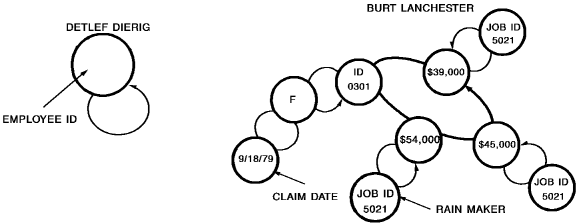
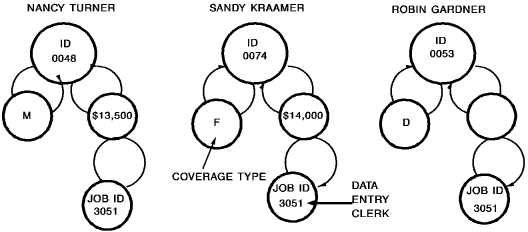
Note: The set occurrence diagram contains the following types of information: the employee's name (EMP-NAME-0415) and ID (EMP-ID-0415) from the EMPLOYEE record, the employee's salary (SALARY-AMOUNT-0420) from the EMPOSITION record, the employee's job title (TITLE-0440) and ID (JOB-ID-0440) from the JOB record, the employee's insurance coverage plan (TYPE-0400) from the COVERAGE record, and any hospital claims (CLAIM-DATE-0430) from the HOSPITAL-CLAIM record.
Example 1: Primary Path ID
PATHAA EMPLOYEE EMPOSITION JOB
CA Culprit accesses the first EMPLOYEE record occurrence and then searches for an associated EMPOSITION record occurrence followed by a JOB record occurrence. Once it completes a string and returns it to the input buffer, CA Culprit looks for the next JOB record occurrence associated with the EMPOSITION record. If it finds no more JOB records, CA Culprit looks for the next EMPOSITION record occurrence associated with the EMPLOYEE record, and so on. Since the PATH parameter specifies a primary path ID only, each string CA Culprit returns to the input buffer must contain an occurrence of the EMPLOYEE, EMPOSITION, and JOB records.
CA Culprit returns the following strings to the input buffer, based on the set occurrences
   PATH-ID      EMPLOYEE            EMPOSITION      JOB

     AA     0301 BURT LANCHESTER     $54,500      5021 RAINMAKER
     AA     0301 BURT LANCHESTER     $45,000      5021 RAINMAKER
     AA     0301 BURT LANCHESTER     $39,000      5021 RAINMAKER
     AA     0048 NANCY TERNER        $13,500      3051 DATA ENTRY CLERK
     AA     0074 SANDY KRAAMER       $14,000      3051 DATA ENTRY CLERK
     AA     0053 ROBIN GARDNER       $14,000      3051 DATA ENTRY CLERK
Example 2: Null Path Id
KEY EMP-ID (0312 0301 0048 0074 0053 0444)
PATHAA EMPLOYEE (BB) EMPOSITION JOB
The KEY parameter specifies employee ID values with which CA Culprit can access each EMPLOYEE record in path AA directly. Following the EMPLOYEE record on the PATH parameter is a null path ID (BB). If CA Culprit does not find an occurrence of an EMPLOYEE record by using the ID values specified in the KEY parameter, it returns BB to the PATH-ID field in the input buffer.
The following sequence of strings returned to the input buffer indicates that there is no employee with an ID of 0312. Also note that CA Culprit did not return a string to the input buffer for employee 0444, which indicates that CA Culprit was not able to complete path AA for this individual.
   PATH-ID      EMPLOYEE            EMPOSITION      JOB

     BB     0312
     AA     0301 BURT LANCHESTER     $54,500      5021 RAINMAKER
     AA     0301 BURT LANCHESTER     $45,000      5021 RAINMAKER
     AA     0301 BURT LANCHESTER     $39,000      5021 RAINMAKER
     AA     0048 NANCY TERNER        $13,500      3051 DATA ENTRY CLERK
     AA     0074 SANDY KRAAMER       $14,000      3051 DATA ENTRY CLERK
     AA     0053 ROBIN GARDNER       $14,000      3051 DATA ENTRY CLERK
Example 3: Alternate Path Id
KEY EMP-ID (0312 0301 0048 0074 0053 0444)
PATHAA EMPLOYEE (BB) EMPOSITION (CC) JOB
This PATH parameter specifies three path identifiers. Path AA is the primary path id; path BB is the null path id; and path CC is an alternate path ID for paths that contain an EMPLOYEE record occurrence but no occurrence of the EMPOSITION record.
As shown in the following sequence of strings returned by CA Culprit to the input buffer, CA Culprit returns CC to the PATH-ID field for the DETLEF DIERIG record occurrence. The remainder of the input buffer contains residual salary and job information associated with the ROBIN GARDNER record occurrence. The user's procedure logic must test the value of PATH-ID to determine which path CA Culprit navigated.
   PATH-ID      EMPLOYEE            EMPOSITION      JOB

     BB     0312
     AA     0301 BURT LANCHESTER     $54,500      5021 RAINMAKER
     AA     0301 BURT LANCHESTER     $45,000      5021 RAINMAKER
     AA     0301 BURT LANCHESTER     $39,000      5021 RAINMAKER
     AA     0048 NANCY TERNER        $13,500      3051 DATA ENTRY CLERK
     AA     0074 SANDY KRAAMER       $14,000      3051 DATA ENTRY CLERK
     AA     0053 ROBIN GARDNER       $14,000      3051 DATA ENTRY CLERK
     CC     0444 DETLEF DIERIG      ($14,000)    (3051 DATA ENTRY CLERK)
Example 4: Multiple vs. Single Paths
PATHAA EMPLOYEE EMPOSITION
PATHDD EMPLOYEE COVERAGE HOSPITAL-CLAIM
 or
PATHAA EMPLOYEE EMPOSITION EMPLOYEE COVERAGE HOSPITAL-CLAIM
These PATH parameters are alternative ways to access two record types that are related to the same owner by different set relationships, as follows:
PATH-ID      EMPLOYEE          EMPOSITION  COVERAGE  HOSPITAL-CLAIM

  AA     0301 BURT LANCHESTER   $54,500       -          -
  AA     0301 BURT LANCHESTER   $45,000       -          -
  AA     0301 BURT LANCHESTER   $39,000       -          -
  DD     0301 BURT LANCHESTER  ($39,000)      F      09/18/79
  AA     0048 NANCY TERNER      $13,500      (F)    (09/18/79)
  AA     0074 SANDY KRAAMER     $14,000      (F)    (09/18/79)
  AA     0053 ROBIN GARDNER     $14,000      (F)    (09/18/79)
CA Culprit returns the following strings to the input buffer for the one-path method:
PATH-ID      EMPLOYEE          EMPOSITION  COVERAGE  HOSPITAL-CLAIM

 AA     0301 BURT LANCHESTER   $54,500       F      09/18/79
 AA     0301 BURT LANCHESTER   $45,000       F      09/18/79
 AA     0301 BURT LANCHESTER   $39,000       F      09/18/79
Example 5: RETURN KEY ONLY Path
PATH01 JOB (JOB-TITLE-NDX) RETURN KEY ONLY
0151*010 TITLE-0440
0151*020 DBKEY-PAGE   F0
0151*030 DBKEY-LINE   F0
CA Culprit accesses each JOB record occurrence by using the index defined for that record; the record is indexed by job titles. RETURN KEY ONLY instructs CA Culprit to return the index key and the db-key of each JOB record occurrence to the input buffer. Following is a portion of the output for Report 01:
    TITLE                  DBKEY-PAGE      DBKEY-LINE

  ACCOUNTANT                75113              2
  AP-CLERK                  75114              5
  AR-CLERK                  75149              5
  COMPUTER OPERATOR         75147              3
     -                        -                -
     -                        -                -
Example 6: ALL-MEMBERS Path
PATH03 COVERAGE ALL-MEMBERS (COVERAGE-CLAIMS)
The code specified in path 03 instructs CA Culprit to navigate the COVERAGE-CLAIMS multiple-member set relationship that appears in the figure under Example of a Multiple-Member Set. For each COVERAGE record occurrence, CA Culprit accesses either a HOSPITAL-CLAIM, a NON-HOSP-CLAIM, or a DENTAL-CLAIM record occurrence. CA Culprit fills the REC-NAME field in the input buffer with the name of the member record type retrieved. The strings returned by CA Culprit appear below:
    REC-NAME      COVERAGE   DENTAL      HOSPITAL    NON-HOSPITAL

 NON-HOSP-CLAIM      F         -            -         10/07/82
 NON-HOSP-CLAIM      F         -            -         08/18/81
 HOSPITAL-CLAIM      M         -         11/07/82    (08/18/81)
 DENTAL-CLAIM        F      05/23/77    (11/07/82)   (08/18/81)
 DENTAL-CLAIM        F      04/10/80    (11/07/82)   (08/18/81)
 HOSPITAL-CLAIM      F     (04/10/80)    09/18/79    (08/18/81)
Example 7: ALL-MEMBERS Path and REC-NAME
PATH03 COVERAGE ALL-MEMBERS (COVERAGE-CLAIMS)
SELECT BUFFER WHEN REC-NAME EQ ('NON-HOSP-CLAIM' 'DENTAL-CLAIM')
At run time, CA Culprit accesses all three COVERAGE-CLAIMS record types, but the SELECT parameter limits record retrieval to only the NON-HOSP-CLAIM and DENTAL-CLAIM record occurrences. The strings that CA Culprit returns to the input buffer appear below:
   REC-NAME      COVERAGE   DENTAL      HOSPITAL   NON-HOSPITAL

NON-HOSP-CLAIM      F         -            -         10/07/82
NON-HOSP-CLAIM      F         -            -         08/18/81
DENTAL-CLAIM        F      05/23/77    (11/07/82)   (08/18/81)
DENTAL-CLAIM        F      04/10/80    (11/07/82)   (08/18/81)
Example 8: Bill-of-Materials Path
PATH32 DEPARTMENT EMPLOYEE STRUCTURE (REPORTS-TO) EMPLOYEE (MANAGES)
0151*010 DEPT-ID      HH 'DEPT ID'
0151*020 EMP-NAME     HH 'EMPLOYEE'
0151*030 EMP-NAME (2) HH 'MANAGER'
Once CA Culprit accesses a DEPARTMENT record occurrence, it navigates a bill-of-materials data structure. In this example, CA Culprit retrieves each employee in the department and the people that manage the employee. Since the EMPLOYEE record appears twice on the PATH parameter, all field names that pertain to the second occurrence of the record in the input buffer must be qualified by a level indicator. A portion of the report output appears below:
    DEPT ID     EMPLOYEE              MANAGER

     0100       JOHN  ROTGUT          HENRIETTA HENDON
     0100       PAM   VAN DONG        ROBBY WILDER
     0100       PAM   VAN DONG        HENRIETTA HENDON
     0100       ROBBY WILDER          HENRIETTA HENDON
      -              -                     -
If REPORTS-TO and MANAGES were reversed in this example, CA Culprit would retrieve each employee in the department and the people that report to the employee, as shown in the following example:
    DEPT ID     EMPLOYEE              STAFF

     0100       JOHN  ROTGUT          ELEANOR PEOPLES
     0100       JOHN  ROTGUT          HERBIE BABIE
     0100       PAM   VAN DONG        ROGER WILCO
     0100       PAM   VAN DONG        DANIEL MOON
     0100       PAM   VAN DONG        RENE MAKER
     0100       ROBBY WILDER          PAM VAN DONG
       -             -                     -
Example 9: Logical Record Path Using KEY-VALUE
 PATHA1 EMP-JOB-LR WHERE JOB-ID-0440 EQ '3051'
*                    AND EMP-ID-0415 EQ KEY-VALUE
 KEY EMP-ID-0415 (0312 0301 0048 0074 0053 0444)
This PATH parameter specifies retrieval of EMP-JOB-LR logical record occurrences. The WHERE clause instructs CA Culprit to retrieve those logical records that have a job ID of 3051 and employee ids that equal the values specified on the KEY parameter. CA Culprit returns the following logical record strings to the input buffer:
  EMP-ID     EMP-NAME       JOB-ID      TITLE

  0048     NANCY TERNER     3051     DATA ENTRY CLERK
  0053     ROBIN GARDNER    3051     DATA ENTRY CLERK
  0074     SANDY KRAAMER    3051     DATA ENTRY CLERK
Example 10: Logical Record Path Using CONTAINS
 PATHA2 EMP-JOB-LR (JOB-TITLE-NDX)
*                  WHERE TITLE-0440 CONTAINS 'ENTRY'
*                  AND (EMP-ID-0415 EQ '0048' OR
*                       EMP-ID-0415 EQ '0053' OR
*                       EMP-ID-0415 EQ '0074')
CA Culprit accesses EMP-JOB-LR logical record occurrences by using the index defined for the JOB record type. The WHERE clause selects those logical record occurrences where the job title contains the word ENTRY and the employee ID equals the listed values. CA Culprit returns the same strings to the input buffer as in the previous example.
Example 11: Logical Record Using MATCHES
PATHAA EMP-JOB-LR WHERE EMP-ID-0415 MATCHES '03##'
CA Culprit returns only those logical record occurrences where the employee ID value begins with 03 and ends with any other combination of numbers, as shown below:
0349   ROGER     WILCO
0371   BETH  M.  CLOUD
0334   CAROLYN   CROW
0321   DANIEL    MOON
0301   BURT      LANCHESTER
0366   ALAN      DONOVAN
0355   MARK      TIME
|
Copyright © 2014 CA.
All rights reserved.
|
|