

Purpose
Allows database access.
If specified, DATABASE must be the first parameter in the CA Culprit parameter stream and must be coded starting in column 2; it cannot be part of code copied using USE, =MACRO, or =COPY parameters.
Syntax
                 ┌───────────────────────────────────┐
►►─── DATABASE ──▼─┬─ DICTNAME = dictionary-name ──┬─┴────────────────────────►
                   ├─ DICTNODE = dictionary-node  ─┤
                   ├─ DBNAME = database-name ──────┤
                   └─ DBNODE = database-node ──────┘

 ►─┬────────────────────────────┬─────────────────────────────────────────────►◄
   ├─ SYSCTL = sysctl-name ─────┤
   ├─ CVMACH = cv-machine-name ─┤
   └─ LOCAL ────────────────────┘
Syntax Rules
Specifies the name of the dictionary to be accessed for a CA Culprit run. The dictionary provides the record and set definitions that describe the subschema to be accessed for the CA Culprit run. The primary dictionary also stores CA Culprit modules that report on the data dictionary.
The default for dictionary-name is the start-up (or primary) dictionary. To utilize the default in a CA-ICMS environment, the start-up dictionary must include ASF and IDB.
(DDS only) Specifies the name of the DC/UCF node that controls the dictionary to be accessed for the CA Culprit run.
Specifies the name of the database from which CA Culprit retrieves data. DBNAME can identify a user database or a secondary data dictionary. This keyword expression is required if the subschema specified on the INPUT parameter maps to more than one database; for example, a test database and a production database.
(DDS only) Specifies the name of the DC/UCF node that controls the named database.
(z/OS and z/VSE only) Specifies a ddname of a SYSCTL file in the JCL stream. The value specified is the default for the CA Culprit run and overrides the default central version in IDMSOPTI. A CA Culprit run that creates or retrieves tables can override the SYSCTL= keyword expression specified on the DATABASE parameter.
Specifies the name of the virtual machine in which the DC/UCF system is executing; the default is the name specified in an IDMSOPTI module. Cv-machine-name is a 2- through 8-character value.
To use this DATABASE parameter option successfully, the CULP0, CULL, and CULE modules must be link edited with an IDMSOPTI module that was assembled with CENTRAL=YES and CVMACH=cv-machine-name options.
Note: For more information about IDMSOPTI modules, see the CA IDMS System Operations Guide.
Specifies that the CA Culprit job is to execute locally.
Examples
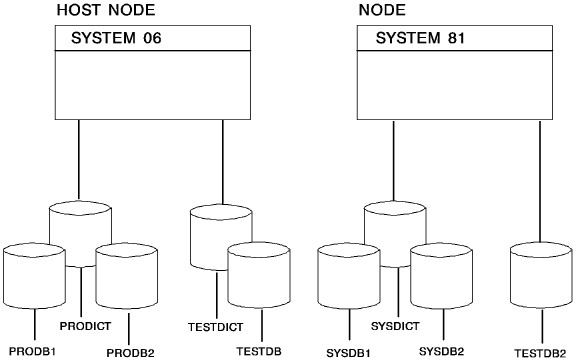
The following figure illustrates a multiple dictionary/database DDS environment. The examples of DATABASE parameters that follow reference this figure.
Example 1
DATABASE DBNAME=PRODB2
The startup dictionary for SYSTEM06 is PRODICT, which contains the schema and subschema source statements that define a view of the database. PRODB2 is a database that supplies the data for the CA Culprit run.
Example 2
DATABASE DICTNAME=TESTDICT DBNAME=TESTDB
TESTDICT is the name of an alternate dictionary for SYSTEM06; CA Culprit accesses this dictionary for a source description of the subschema specified on the INPUT parameter. TESTDB is the name of an alternate database that supplies the input data for the run.
Example 3
DATABASE DICTNAME=PRODICT DBNAME=TESTDICT SYSCTL=SYSTEM06
To report on the contents of an alternate dictionary, CA Culprit must access report modules that are stored in the startup dictionary and use the alternate dictionary as input for the CA Culprit job. In this example, PRODICT contains the report modules and TESTDICT is the alternate dictionary. The SYSCTL file with ddname SYSTEM06 is the default for the CA Culprit run.
Example 4
DATABASE DBNODE=SYSTEM81
The CA Culprit run uses input parameters obtained from the startup dictionary in the host node, SYSTEM06; the startup dictionary is PRODICT. CA Culprit retrieves input data for the run from a database that is controlled by SYSTEM81.
Example 5
 DATABASE DICTNODE=SYSTEM81 DBNODE=SYSTEM81
*         DBNAME=TESTDB2
DICTNODE= specifies the central version node that controls the dictionary to be accessed for record and set definitions. In this example, the only dictionary defined for node SYSTEM81 is SYSDICT. DBNODE= specifies the central version node that controls the database to be accessed for input data. DBNAME= specifies the name of the database.
|
Copyright © 2014 CA.
All rights reserved.
|
|