

CA Culprit processes information in six phases. The following figure illustrates these six processing phases. A description of each processing phase follows:
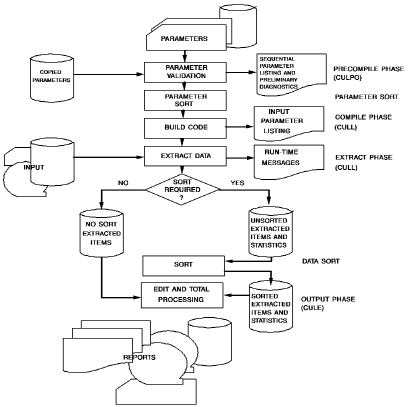
Note: CA Culprit's six processing phases are Precompile, Parameter Sort, Compile, Extract, Data Sort, and Output.
Precompile
The precompile (CULP0) phase performs preprocessing functions on CA Culprit input parameters:
This phase generates the Sequential Parameter Listing as output. An example of a Sequential Parameter Listing appears in the following report. This listing shows the parameters that generated the output shown earlier; parameters appear in the order they were entered.
Sequential Parameter Listing for Employee Salary Report:
 mm/dd/yy      SEQUENTIAL PARAMETER LISTING               Vnn.n  PAGE
 00 ** SYSIN **                            IN  80 DD=EMPFILE
   INSTALLATION SECURITY OPTION IS NO
                                            REC EMP-NAME    1 25         'EMPLOYEE' 'NAME'
                                            REC EMP-LNAME  11 15
                                            REC SALARY     70 10 3 DP=2
                                            REC TITLE      50 20         'TITLE'
                                            REC DEPARTMENT 30 20         'DEPARTMENT'
                                            010 COUNT 1
                                            013EMPLOYEE SALARY REPORT
                                            01SORT DEPARTMENT,1,TITLE,0,EMP-LNAME
                                            014100010'DEPARTMENT'
                                            01410012 DEPARTMENT
                                            01510000 COUNT
                                            0151*010 TITLE HR   SZ=20
                                            0151*020 EMP-NAME HR
                                            0151*030 SALARY F$ SZ=10 HF
                                            0161*030 SALARY F$ SZ=10
                                            018010   IF LEVL EQ 1 DROP
Note: Parameters appear in the order in which they were entered by the user.
Parameter Sort
The parameter sort phase sequences all run parameters according to the CA Culprit standard sort; for example, parameters that share the same report number are ordered together. Run parameters include user-supplied parameters and parameters that are generated internally by CA Culprit during the precompile phase.
Compile
The compile (CULL) phase reads the sorted parameter file and generates a series of machine language subroutines for each report. If errors are detected during this phase, CA Culprit prints appropriate diagnostic messages; if the errors are severe enough, CA Culprit will not generate the associated reports.
This phase generates the Input Parameter Listing as output. An example of an Input Parameter Listing appears in the following report. This listing shows the parameters that generated the report shown earlier in Data Input under What It Does. The parameters are now sorted by type. The listing includes any default values supplied by CA Culprit to user-supplied parameters.
Input Parameter Listing for Employee Salary Report:
 mm/dd/yy                   INPUT PARAMETER LISTING                  Vnn.n  PAGE    1

 ********
 INPUT    RECORD TYPE BLOCK  FILE DESCRIPTION...
 ********
  INPUT   00080   F
 ********
 REC      START SIZE TYPE DP FIELD-NAME                     RECORD-NAME,LEVEL
 ********
  REC     00030  020         DEPARTMENT
  REC     00011  010         EMP-LNAME
  REC     00001  025         EMP-NAME                         'EMPLOYEE'     'NAME'
  REC     00070  010   3   2 SALARY
  REC     00050  020         TITLE
 ********
 WORK     LENGTH   WORK-FIELD-NAME    OCCURRENCES  DECIMAL POINT AND VALUE
 ********
  01  0   008       COUNT     1
 ********
 SORT     BREAK A/D  SORT FIELD-NAME
 ********
  01 SORT   1        DEPARTMENT
            0        TITLE
                     EMP-LNAME
 ********
 TITLE    REPORT TITLE
 ********
  01  3   EMPLOYEE SALARY REPORT
 ********
 EDIT     LINE CC COLUMN  VALUE OR FIELD-NAME AND EDIT OPTIONS...
 ********
  01  4     1   0  0001   'DEPARTMENT'
  01  4     1      0012   DEPARTMENT
 ********
 EDIT     LINE CC COLUMN  VALUE OR FIELD-NAME AND EDIT OPTIONS...
 ********
  01  5     1      *010   TITLE     SZ=020    HF
  01  5     1      *020   EMP-NAME  HR
  01  5     1      *030   SALARY    SZ=010    F$        HF
  01  5     1      0000   COUNT
 ********
 EDIT     LINE CC COLUMN  VALUE OR FIELD-NAME AND EDIT OPTIONS...
 ********
  01  6     1      *030   SALARY    SZ=010    F$
 ********
 PROCESS USER   INTERNAL
         LABEL  SEQUENCE     PROCESS STATEMENT
 ********
  01  8  010        1    $ IF LEVL EQ 1 DROP
  01  8             2    LEVL      EQ        1         DROP
  EXTRACT WILL BE PERFORMED               ─┐
  PROFILE OPTION IN EFFECT: RELEASE =  6   ├─────────────── Compile phase is successful;
                                          ─┘                input files will be read.
Note: This listing shows the CA Culprit parameters after the precompile, parameter sort, and compile phases. Default values are supplied where applicable (for example, record type F on the INPUT parameter).
Extract
The extract (CULL) phase performs the following functions:
The following CA Culprit parameters participate in this processing phase:
If data from the input buffer is selected for a particular report, appropriate data is written to an extracted items file; if data from the input buffer is not selected for a particular report, control of the input buffer passes directly to the next report.
The extract phase generates the Run-Time Messages listing as output, as shown in the following report. This listing shows input processing statistics such as the number of records read and the number that passed through SELECT/BYPASS logic.
Run-Time Message Listing for Employee Salary Report:
mm/dd/yy                   RUN TIME MESSAGES                      Vnn.n  PAGE

                                                                                 ─┐
 ***********  END OF FILE  ****************************************************** │
                                                                                  ├── Input file successfully read
          56 INPUT RECORDS READ                                                   │
                                                                                 ─┘
Note: The END OF FILE message indicates that the input was successfully read.
Data Sort
The data sort phase performs the following functions:
Input buffers and work fields that are extracted for a report but not sorted are written to an unsorted extracted items file. The unsorted extracted items file contains detail information for reports that either do not specify a SORT parameter or specify a SORT parameter that contains the keyword NOSORT. This file is not processed in the data sort phase.
Output
The output (CULE) phase performs the following functions:
The following CA Culprit parameters participate in the output phase:
This phase generates an Output Phase Statistics report at the end of each report, as shown earlier in Data Input under What It Does. The Output Phase Statistics report indicates the number of records written for the report.
|
Copyright © 2014 CA.
All rights reserved.
|
|