

While you are under TCF, you can transfer directly between any of the development tools that operate under TCF without losing your place within the various tools. TCF also allows you to transfer to and from the Selection Screen at any time.
Invoking TCF from DC/UCF, transferring between development tools, invoking and exiting from a development tool, and exiting from TCF are discussed in this section.
Invoke TCF from a DC/UCF system by specifying any task code that is defined for use under TCF. For example, invoke TCF from CA IDMS/DC by specifying a task code (such as 'tcf') after the ENTER NEXT TASK CODE prompt, as follows:
ENTER NEXT TASK CODE:
 tcf
Note: A task code is the unique name (such as ADSAT) or the function key (such as PF3) that requests access to a development tool or online compiler. Task codes for use under TCF are defined at system generation time and can differ from site to site.
If you are using a teleprocessing monitor other than CA IDMS/DC, specify a task code after the prompt presented by that monitor.
Decide which task code to use based on what you need to access under TCF. For example, you can use a task code to access either:
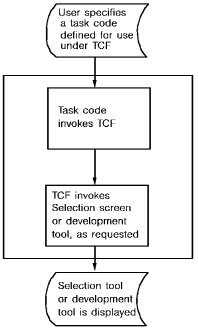
TCF is invoked when you specify a task code defined for use under TCF. Then, TCF invokes the Selection Screen or the development tool identified by the supplied task code.
The following diagram shows what happens when you supply a task code to a DC/UCF system.
|
Copyright © 2014 CA.
All rights reserved.
|
|