

Exiting from TCF returns control to the DC/UCF system. You can exit from either of the following locations:
You can either suspend or terminate TCF when you exit. Decide whether to suspend or terminate TCF as follows:
You can resume any of your suspended sessions by selecting the session from your list of suspended sessions (while under TCF). You can also resume any suspended session by invoking the appropriate development tool (while under TCF or directly from DC/UCF) and specifying the name of the definition being created in the suspended session.
You can resume any of your suspended sessions by invoking the appropriate development tool (while under TCF or directly from DC/UCF) and specifying the name of the definition being created.
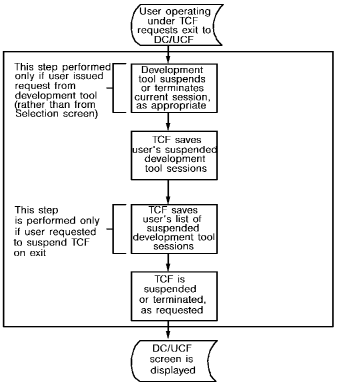
You can exit to the DC/UCF system from the Selection Screen or directly from a development tool. If the user suspends TCF on exit, TCF saves the user's list of suspended development tool sessions. If the user terminates TCF on exit, TCF clears the user's list of suspended development tool sessions. In both cases, the actual suspended development tool sessions are saved.
The following diagram shows what happens when you exit from TCF.
|
Copyright © 2014 CA.
All rights reserved.
|
|