

Define one, and only one, SYSDIRL dictionary for each release of CA IDMS.
Business Value:
Defining only one SYSDIRL dictionary saves disk space because only one copy of the dictionary schema definition exists. A single copy also eliminates the need for updating multiple dictionaries each time the definition changes.
Additional Considerations:
A SYSDIRL dictionary contains the schema and subschema definitions that describe the dictionary itself. These definitions are used when running dictionary reports and using query tools to report on dictionary contents. The SYSDIRL dictionary also contains all of the CA-provided CA Culprit report source modules. Each copy of the SYSDIRL data is about 20 megabytes in size, so you can save considerable disk space by storing it only once. The dictionary in which you place it is referred to as a SYSDIRL dictionary and it can be shared by all central versions and local mode jobs.
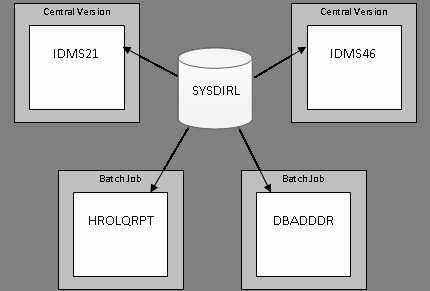
The following diagram illustrates the use of a single SYSDIRL dictionary shared by central versions IDMS21 and IDMS46 and batch jobs HROLQRPT and DBADDDR.
If you decide to maintain multiple SYSDIRL dictionaries, you must update the definitions in each dictionary when upgrading to a new release of CA IDMS. If you are doing manual configuration, the steps to update the definitions in one dictionary instance are executed as part of Job 9.
To update additional dictionaries, you must rerun steps DIRLDEFS, DIRLPROT, DIRLARSQ, and DIRLDICT for each additional dictionary and change the job stream on each execution to name the target dictionary and the DMCL that describes it.
More Information:
For more information about the types of dictionaries and their uses, see the CA IDMS Database Administration Guide – Volume 2.
|
Copyright © 2013 CA.
All rights reserved.
|
|