

Passkey Screens › Passkey Security › Predefined Passkey Combinations
Predefined Passkey Combinations
ASF supplies predefined passkey combinations that allow you to specify useful combinations of data and catalog access with a single passkey. The predefined passkey combinations can be given for a user or for a table, as follows:
- DBA—Dba passkey When given for a user, DBA allows you to list a user's directory, create tables for the user, and assign passkeys for the user. When given for a table, DBA allows you to assign passkeys for that table and to access the table if any data access passkeys are assigned.
- Read—Read passkey When given for a user, Read allows you to list a user's directory and derive views from tables owned by the user. When given for a table, READ allows you to derive a view from the table.
- Alter—Alter passkey When given for a user, Alter allows you to add and modify data in tables owned by the user and to modify definitions of tables owned by the user. When given for a table, Alter allows you to add and modify data in the table and modify the table definition. Note that Alter does not include a Browse passkey, which must be assigned separately.
- Write—Write passkey When given for a user, Write allows you to list the user's directory and create tables for the user, and gives you complete data access to tables owned by the user. When given for a table, Write gives you complete data access to the table.
- Update—Update passkey When given for a user, Update allows you to create tables for the user and gives you complete data access to tables owned by the user. When given for a table, Update gives you complete data access to the table. Note that the Update passkey does not include a Browse passkey, which must be assigned separately.
- All—All passkey When given for a user, All allows you to list a user's directory, create tables for the user, and assign passkeys for the user, and gives you complete data access to tables owned by the user. When given for a table, All allows you to assign passkeys for the table and gives you complete data access to the table.
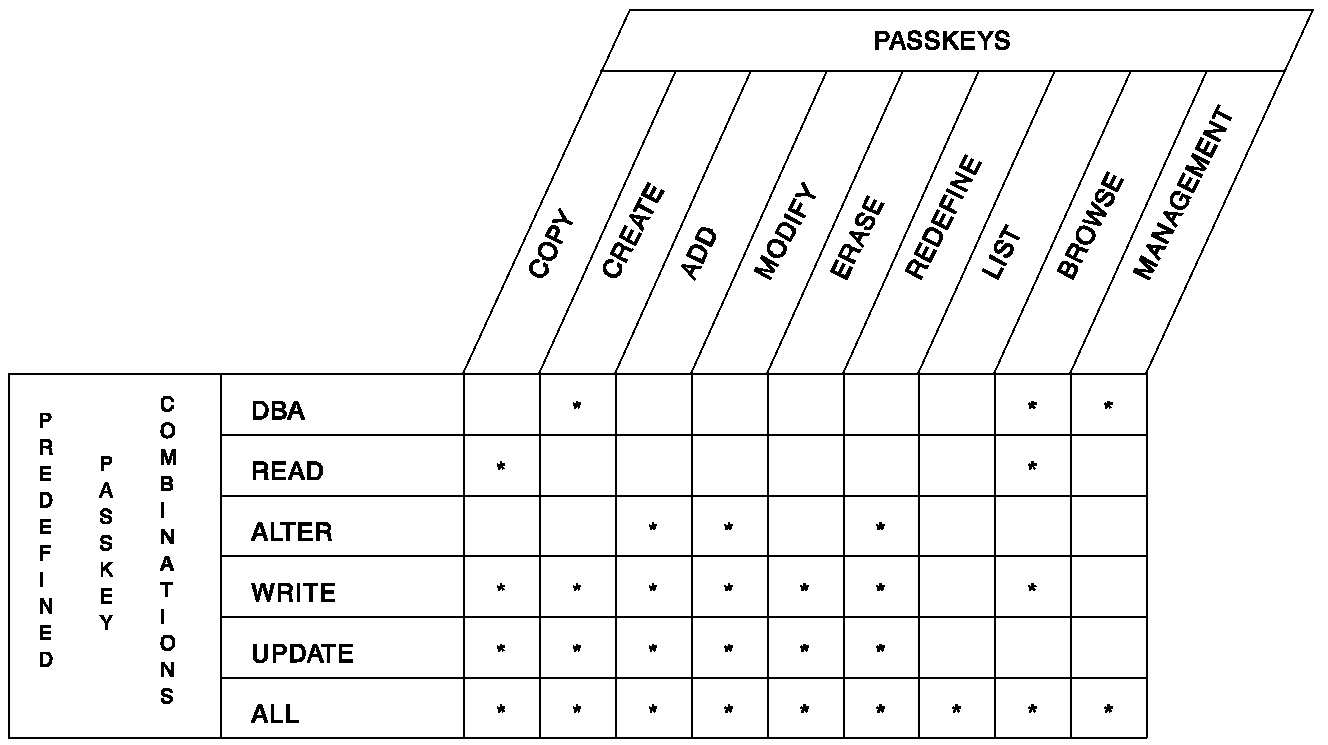
The screens used to assign passkeys, delete passkeys, and review passkey assignments are discussed separately below.
Copyright © 2014 CA.
All rights reserved.
|
|